
 Login
Login 

Guides
Workforce mobilisation software: getting crews site-ready without the scramble
By Richard Lomen · 20 July 2026 · Updated 6 October 2026

Workforce mobilisation software gets a crew site-ready in one process: the tickets, inductions, medicals, travel and kit each worker needs for a specific site, checked off before departure day and tied to the roster so nobody who isn’t ready gets scheduled.
Every field business knows the mobilisation scramble. The contract lands on Wednesday, the client wants crews on site Monday, and four people are working the phones: chasing tickets, booking flights, allocating utes, and submitting induction paperwork. When something does slip (an expired licence discovered at the gate, a missing site induction) the cost isn’t admin time. It’s a crew standing down while the day rate burns. The Australian Bureau of Statistics’ May 2026 average weekly earnings put mining full-time adult ordinary time earnings at $3,224.20 a week, more than 50% above the all-industries figure of $2,083.70.
The software replaces that scramble with a repeatable process. Every requirement for every worker sits in one place, gets checked off before departure day, and connects to the roster so nobody who isn’t site-ready gets scheduled.
What mobilisation actually involves
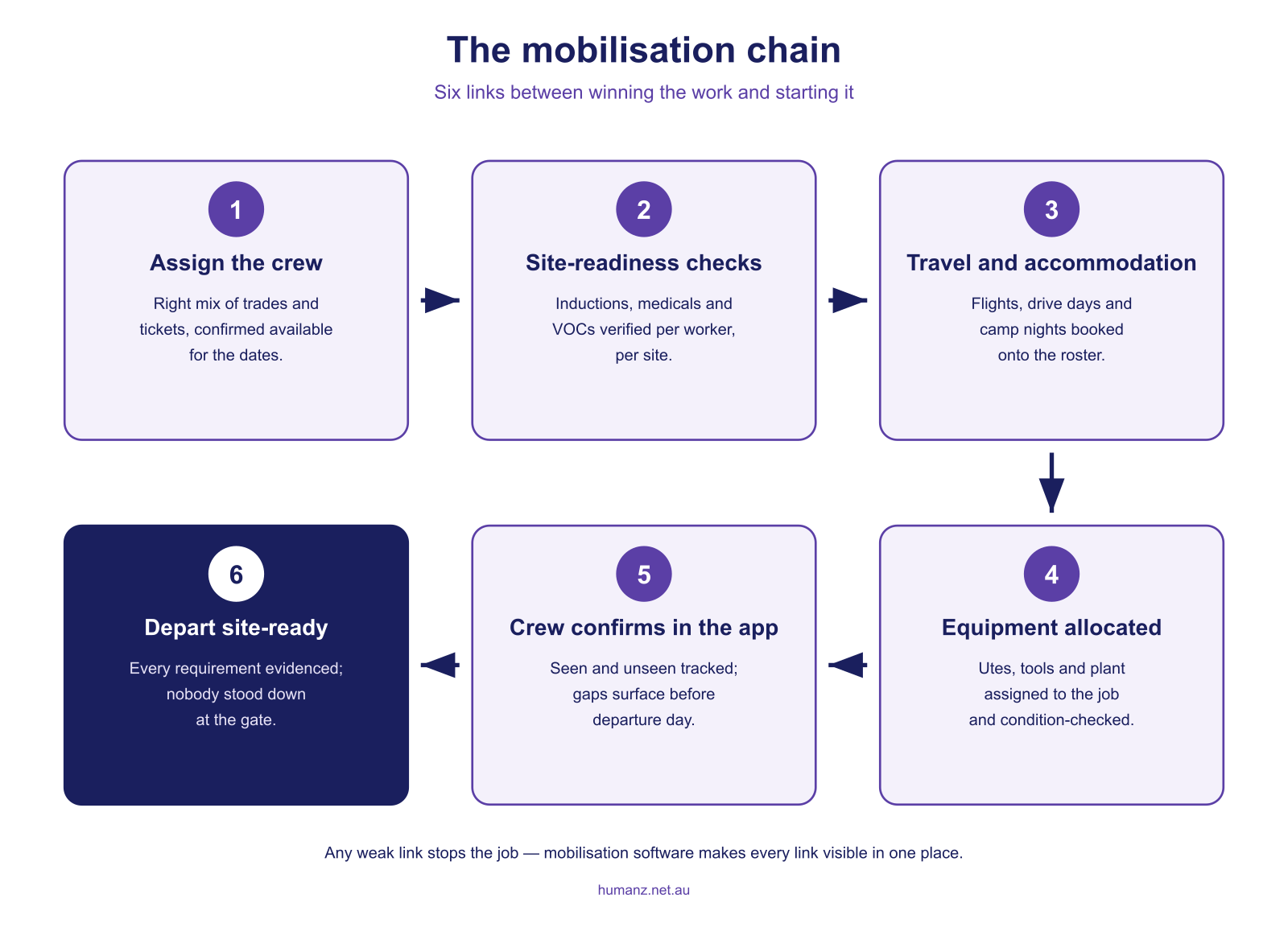
Mobilising a crew to a new site or project is a chain of dependencies, whether the crew flies, drives or buses in, and any weak link stops the whole job:
- The right people: a mix of trades and tickets that matches the scope, confirmed available for the dates
- Compliance current for the full deployment window, from site and client inductions to medicals, D&A clearances and licences
- Travel and accommodation (flights, vehicles, camp or hotel) booked to match the roster
- Equipment allocated, serviceable and tracked to the job
- Paperwork acknowledged before day one: onboarding forms, project documents, safety briefings
The traditional tooling for this chain is a spreadsheet per job plus a wall of phone calls. It works until crew size, site count or compliance load crosses a threshold. Then it fails, expensively and in public. The extreme case is a shutdown, where headcount doubles overnight against a date that will not move; the shutdown and turnaround version of this problem gets its own guide. Safe Work Australia’s WHS framework puts the duty squarely on the employer to ensure workers are trained, competent and inducted for the work they’re sent to do, and site access controls in mining and major construction enforce it at the gate.
What mobilisation software needs to do
1. Site-readiness checks per worker, per site
“Qualified” is site-specific. A worker cleared for one client’s site may be missing an induction, medical or verification of competency (VOC) for the next. Mobilisation software holds the requirements per site or client and checks every assigned worker against them, showing the gaps as a checklist weeks out rather than at the gate. Subcontracted crews get measured against the same requirements, which is why subcontractor management belongs in the same system rather than in a separate folder of insurance certificates. Nationally recognised training records can be verified against training.gov.au, and expiry alerts keep each profile current between jobs. That machinery is covered in our guide to qualification, induction and credential tracking.
2. Onboarding that feeds straight into mobilisation
New starters are usually hired for the job being mobilised, so onboarding and mobilisation are the same pipeline. Digital field worker onboarding, with documents, tickets and inductions captured on mobile, means a Wednesday hire starting Monday arrives with a complete profile instead of a paper trail. For resources businesses, onboarding software for mining and construction covers the site-access side in detail.
3. Travel and accommodation on the roster
Flights, drive days and camp nights are part of the deployment, and they belong on the same schedule as the shifts, so the scheduler sees conflicts and workers see their full itinerary in the app. Humanz handles these as roster items with reusable templates and bulk upload, which we’ve covered in managing FIFO flights and accommodation in your roster. For swing-based operations, the broader pattern is in our FIFO rostering software guide. If the deployment runs on a swing cycle, the free FIFO swing calendar maps the pattern onto real dates so travel bookings line up with changeover days.
4. Equipment allocated with the crew
A mobilised crew without its utes, tools and calibrated instruments is decorative. Equipment allocation belongs in the same mobilisation view as the people. Assign it to the job, condition-check it, and track it through to demobilisation so the gear comes back. That’s the case we make in asset tracking for field teams.
5. Confirmation before departure day
Publishing a mobilisation plan isn’t the same as having forty people confirmed on it. Seen/unseen tracking and one-tap confirmation through the worker app surfaces the person who never saw the plan while there’s still time to act. It’s the same no-show prevention logic that protects day-to-day rosters, applied to the highest-stakes week of the job.
6. One live picture for the whole mobilisation
The mobilisation coordinator’s real job is answering “are we ready?” at any moment. That needs a single view: workers assigned vs required, compliance gaps outstanding, travel booked, equipment allocated, confirmations received. When that picture lives in the same platform as the roster, readiness flows straight into scheduling. No re-keying, no versioned spreadsheets.
The payoff
Systemised mobilisation pays off three ways. Speed, because a crew mobilised in days rather than weeks is often the difference in winning the work. Cost, because there are no stand-downs at the gate and no last-minute flight premiums. And proof, a timestamped record that every worker was inducted, licensed and briefed, which is exactly what a WHS audit or client review asks for.
How Humanz handles mobilisation
Humanz was built by operators who lived the mobilisation scramble in mining services and contracting. The wider picture for that sector sits in our guide to workforce management for mining operations. The platform connects the whole chain:
- Per-site requirements checked against every assigned worker
- Onboarding on mobile, with documents, tickets and inductions captured before day one
- Flights and accommodation as roster items, with templates and bulk upload
- Vehicles and tools assigned to the job alongside the crew
- Seen/unseen status on every worker’s mobilisation plan
- Compliance gates, so non-ready workers can’t be rostered until gaps are closed
See how Humanz mobilises a crew →
Frequently asked questions
What is workforce mobilisation software? Software that manages everything between winning work and crews starting it. Assigning people, verifying site-specific compliance, booking travel, allocating equipment and confirming attendance, all in one live view connected to the roster.
How is mobilisation different from onboarding? Onboarding brings a worker into the business. Mobilisation gets a workforce ready for a specific site or project. They overlap heavily for new hires, which is why they work best in the same platform.
What should a mobilisation checklist cover? Five things per worker: confirmed availability for the dates, compliance current for the whole deployment window, travel and accommodation booked to match the roster, equipment allocated and serviceable, and paperwork acknowledged before day one. Every item needs an owner and a due date well ahead of departure. The checklist fails at whichever item nobody was watching, which is the argument for holding all five in one system.
How fast can a crew realistically be mobilised? With profiles current and templates set up, businesses routinely turn a client order into a confirmed, compliant, travel-booked crew inside a couple of days. The bottleneck becomes flights, not paperwork.
Can it handle mobilising subcontractors as well as employees? Yes. Subcontractors carry their own compliance profiles (insurances, licences, inductions) and are assigned, checked and confirmed through the same process as direct employees.
What happens when a worker isn’t site-ready? The gap shows on the mobilisation checklist and the worker is flagged at rostering, so the issue is fixed, or the worker swapped, before departure day rather than at the site gate.
Does travel booked in the system appear to workers? Yes. Flights, drive days and accommodation appear in each worker’s app schedule alongside shifts, with notifications when anything changes.
Does mobilisation software handle demobilisation too? It should, because getting off site cleanly matters nearly as much as getting on. Demobilisation means equipment returned and condition-checked, travel home booked, and worker profiles updated so the next mobilisation starts from accurate records. Gear that was allocated and tracked at mobilisation is the gear that comes back at the end.
Related articles
Ready to see Humanz on your own roster?
Free 30-minute walkthrough, we'll use your real crews, sites and shift patterns.