
 Login
Login 

Subcontractors
Shutdown and Turnaround Workforce Management: Mobilising Hundreds Into a Window That Will Not Move
By Christian Tietzel · 2 September 2026 · Updated 28 September 2026

For eleven months of the year, a mining services or maintenance business knows its workforce. Same crews, same sites, a roster that mostly repeats. Then the shutdown lands. For a few weeks the site carries double or triple its usual headcount, most of the extra people have never walked through that gate before, and the whole event runs against a finish date the asset owner has been planning around for a year or more.
The top end of this game shows how much rides on it. Woodside’s integrated turnaround of the Goodwyn A platform and the Karratha Gas Plant followed two years of planning and delivered some 100,000 hours of work in 34 days. Your shutdown is probably smaller. The shape of the problem is identical. A huge amount of labour, compressed into a window, executed mostly by people who don’t work for the asset owner.
This guide covers the workforce side of shutdown and turnaround management: why mobilisation breaks the admin that works fine the rest of the year, where the compliance gate bites, how the roster changes, what everyone forgets at demobilisation, and what workforce management software has to do to be worth having in the middle of it.
Why shutdown mobilisation breaks normal workforce admin
Normal workforce admin is built for a steady state. People join occasionally, credentials expire occasionally, the roster changes at the edges. A coordinator with a spreadsheet and a good memory can hold it together, more or less. A shutdown hits that setup with three multipliers at once.
Volume. Say the window needs 150 extra people across mechanical, electrical, scaffolding and rigging crews. Each one carries a stack of things that must be verified before they’re any use: a site induction, a medical or drug-and-alcohol clearance, high risk work licences, verifications of competency for the plant they’ll touch, and for subcontractors, entity-level insurances and licences behind the person. Call it five or six checks a head. That’s the best part of a thousand individual verifications, any one of which can stop a worker at the gate.
Deadline. Shutdown windows aren’t a surprise. Asset owners plan them far ahead, and the biggest publish them: Woodside lists its planned maintenance campaigns with approximate start and end dates months in advance. Those dates can drift before the event. Once the plant comes down, the pressure reverses, because every day it stays down is production not sold, and everyone from the general manager to the greenest TA knows it. There is no “we’ll sort his induction next week” on a shutdown. Next week the shutdown is a third over.
The blended crew. Your permanent people are the minority. Around them sit labour hire filling the gaps and specialist subbies doing the work nobody keeps in-house. Three engagement types, three different places their paperwork lives, and three versions of “mate, he’s got all his tickets” to run down. If your system only holds employees, it holds the smallest slice of the crew you’re about to field.
Any one of these is manageable. All three at once is why shutdown mobilisation is its own discipline, and why the fortnight before the window opens is when workforce admin either proves itself or gets found out.
The compliance gate: where mobilisation actually fails
Talk to anyone who has run a few shutdowns and the war stories are rarely about the work. They’re about day one. A crew flown in and stood in the induction queue. A rigger turned around at the gate because his ticket covers basic and the lift plan needs advanced. A machine idle because the only inducted operator is on the other job.
Day one of a shutdown is a convergence. Hundreds of people arrive at one gate, and everything has to be current at the same moment.
Licence class is a sharper filter than people expect. In WA, a worker must hold the right class of high risk work licence and be over 18 to do high risk work, and the classes are granular: dogging is its own ticket, rigging comes in basic, intermediate and advanced, scaffolding the same, forklifts split into two classes, and the crane classes alone run to a dozen. “He’s a rigger” is not a crewing answer. Which class, and does it cover this lift? The one mercy is portability: a high risk work licence is recognised in every Australian state and territory, so the Queensland boilermaker’s ticket works in the Pilbara. The choke points are class match, currency and whether anyone verified it before he got on the plane, not the licence itself.
The VOC layer sits on top. A licence says a worker may operate that class of plant. A verification of competency shows they can operate this one, and site owners routinely require a VOC before a worker touches their gear at all. We’ve covered how VOCs work and who requires them in detail. For shutdown planning the point is simple: a VOC is site and plant specific, so a crew that was fully verified on the last job may be missing half its VOCs for this one.
Subcontractors bring a second tier of paperwork. Behind every subbie on the tools sits an entity that needs its own checking: public liability and workers’ compensation certificates of currency, entity licences, all current for the dates of the window. Our subcontractor onboarding checklist walks through the full list. On a shutdown you’re running that checklist twenty times in a fortnight, against companies you may never have engaged before.
And then expiry keeps moving during the window. This is the trap in relying on a day-one check. A ticket that’s current at the gate and expires in week two stands a worker down in the middle of the busiest weeks your business has all year. The check that matters isn’t “current today”. It’s “current for every rostered day of the window”, run before the person is booked, with enough lead time to renew or replace them if the answer is no.
Building the shutdown roster
A shutdown roster looks nothing like the one your business runs the rest of the year, and the differences are exactly where generic rostering tools give up.
The window runs around the clock, so the roster is days and nights from the start, usually 12-hour shifts. Crews have to balance by trade on every shift, not headcount alone. Ten scaffolders on days and none on nights isn’t a roster, it’s a bottleneck with a colour-coded spreadsheet. Supervision has to spread across both shifts too, and the critical shared assets (the crane, the elevated work platforms, the one machine everyone’s scope depends on) need operators cleared and rostered wherever the sequence puts them.
Then there’s fatigue, which in a compressed window is not a footnote. Safe Work Australia’s guidance defines fatigue as more than feeling tired: a state of mental or physical exhaustion that reduces a person’s ability to perform work safely and effectively. The same guidance names the schedule features a shutdown is made of (early starts, short breaks between shifts, shifts stretched by overtime) as major contributors, and puts shift workers, night workers and FIFO crews among those most at risk. And it isn’t optional reading, because PCBUs must eliminate or minimise the risk of fatigue so far as is reasonably practicable. Safe Work Australia’s Key Work Health and Safety Statistics for 2025 show what’s riding on it. Of the 188 workers killed at work in 2024, a rate of 1.3 per 100,000, machinery operators and drivers accounted for 32%, at 6.7 deaths per 100,000, more than five times the rate for workers overall. That is exactly the group a shutdown roster leans on hardest.
On a shutdown, that duty lives or dies in the roster. Twelve-hour shifts, consecutive days, night work and a hard finish date is precisely the combination that produces heroic hour counts, and the moment someone gets injured, the roster is the first document the investigator asks for. Hour limits and break rules have to be checked when the shift is allocated, not reconstructed afterwards. If you’re still working out the coverage maths (how many people a 24-hour window really takes once rotation and absence are priced in), the free crew planner on our tools page will give you a defensible starting number.
The demobilisation tail nobody plans
Everyone plans the ramp-up. The ramp-down mostly just happens, and it’s where a well-run shutdown quietly leaks money for weeks afterwards.
Crews don’t leave at once. Scopes close out on different days, so people are released in dribs and drabs, and somebody has to know who is still on site, still on hire, still accruing hours. Final timesheets come in from workers who’ve already flown home and have no reason to answer the phone. Any time in lieu agreement made during the window matters here too: under the construction, mining and road transport awards, overtime banked and not yet taken as time off has to be paid when employment ends. Subbie invoices arrive over the next month and have to be reconciled against hours someone approved, or didn’t, in the chaos of week three. The argument about the disputed Saturday nobody recorded properly happens in October, about a shift worked in August, between people who’ve both moved on to other jobs.
And there’s the asset almost every business throws away: the pool itself. You just verified tickets, watched performance and collected contact details for a few hundred workers. Next window, that’s gold, but only if it survives as structured records rather than a folder of PDFs named “scan0041”. The businesses that mobilise fastest are the ones whose last demobilisation filed everything properly.
What good looks like with a system
None of the above is news to anyone who has run a turnaround. The question is what changes when the workforce side runs through one system instead of spreadsheets, inboxes and a coordinator’s memory.
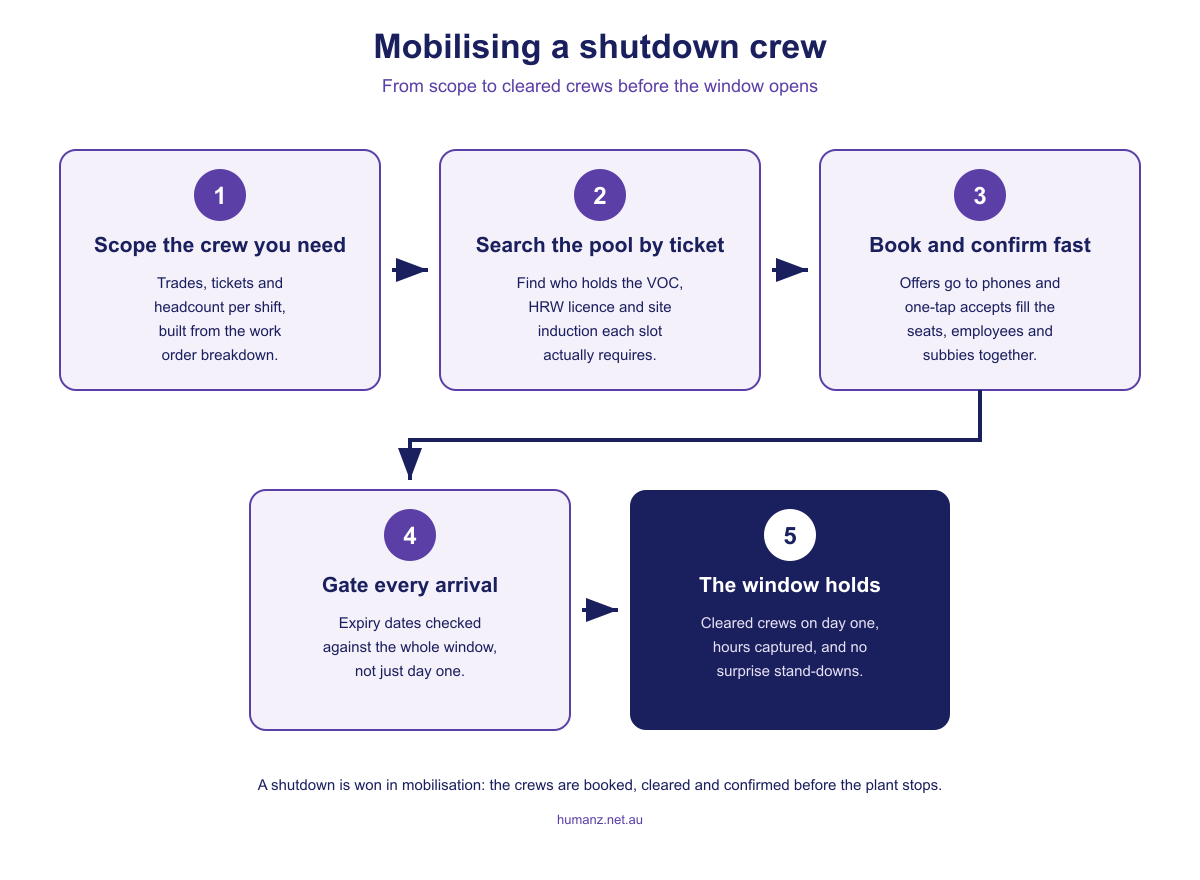
You scope the crew in tickets, not just trades. The work order breakdown becomes a demand line per shift: so many advanced riggers, so many EWP operators, a crane crew per night shift. The credential requirements ride along with each slot from the start.
You search the pool by credential. “Who holds advanced rigging, a current induction for this site, and is free from the 14th” should be a filter, not a fortnight of phone calls. A workforce pool with credentials and availability held as data turns crewing from a ring-around into a query, and it’s the single biggest speed difference between businesses that mobilise in days and businesses that mobilise in weeks. Our guide to workforce mobilisation software goes deeper on this pattern.
Employees, labour hire and subbies sit on one roster. In Humanz, a subcontractor carries their own compliance profile, with entity insurances and licences held alongside the person’s tickets, and gets rostered on the same board as your employees. One crew view, every worker type, each checked against the requirements of the slot they’re in. That’s the core of subcontractor management software done properly, and for shutdown-heavy businesses it’s the difference between one plan and three lists taped together.
The roster gates on compliance, for the whole window. A worker without the required ticket, induction or VOC record can’t be booked into the slot, and expiry dates are checked against every rostered day rather than the first. The gate check moves from the gate to the planning screen, weeks earlier, while there’s still time to fix what it finds.
Offers land on phones and come back fast. Shutdown crewing is a race against every other contractor mobilising for the same window, run in a market that is short of people and getting shorter. The Australian Resources and Energy Employer Association’s workforce forecast has WA’s resources and energy industry needing at least 11,000 new workers by the end of 2029, across 48 WA projects in a national pipeline of 107 major projects. Shift offers pushed to the mobile app with one-tap accepts fill seats in hours. The confirmed roster, site details and start times live on the same phone, which matters when half the crew has never been to this site.
Timesheets survive the chaos. Hours prefill from the roster, workers confirm from their phones, supervisors approve daily instead of facing a mountain at demob, and approved hours flow to payroll through the two-way Xero integration. On a shutdown running hundreds of 12-hour shifts a week, the gap between recorded hours and remembered hours is real money, and it compounds in the subbie invoice reconciliation months later.
Mining services businesses were among the first to run on Humanz, and shutdown mobilisation is the sharpest version of what the platform is for. The broader mining picture, swings, camps and all, lives on the mining workforce management page.
The test worth running this week
You don’t need a shutdown on the calendar to find out whether you’re ready for one. Ask your coordinator one question: who in our pool holds an advanced rigging ticket and a current induction for our biggest client’s site, and what dates are they free next month?
If the answer takes a minute, you’re ready to mobilise. If it takes a day of phone calls and a spreadsheet archaeology dig, that’s the gap, and it’s far cheaper to close it now than in the last two weeks before the next window opens.
Frequently asked questions
What is shutdown and turnaround workforce management software?
It’s software that runs the workforce side of a planned shutdown or turnaround end to end: building a credentialed worker pool, crewing shifts from it, checking tickets and inductions before booking, and capturing hours through the event. The distinguishing feature is that employees, labour hire and subcontractors are managed on one roster with per-worker compliance checks, because shutdown crews are always blended.
How far ahead should shutdown workforce mobilisation start?
Crewing should start as soon as the scope is firm enough to estimate trades and headcount per shift, which is typically months before the window. Credential gaps are the reason: renewing licences, booking medicals and completing site inductions all have lead times that can’t be compressed in the final week. The day-one queue at the gate is where late mobilisation becomes visible, but the failure happened weeks earlier.
Can one system manage employees, labour hire and subcontractors on the same shutdown roster?
Yes, and for shutdown work it’s close to mandatory, because the crew is blended from the start. In Humanz, subcontractors carry their own compliance profiles, including entity-level insurances and licences, and sit on the same roster as employees, so every worker type passes the same checks before being booked. Planners see one crew rather than three separate lists.
How is fatigue managed on a shutdown roster?
By checking hour limits and break rules when each shift is allocated, not after the event. A shutdown combines 12-hour shifts, consecutive days and night work, which Safe Work Australia names among the main contributors to fatigue, and PCBUs must minimise that risk so far as is reasonably practicable. If an incident occurs, the roster is the first document an investigator asks for, so the controls have to live in it from the start.
Can interstate workers use their high risk work licences on a shutdown?
Yes. A high risk work licence is recognised in every Australian state and territory, so a ticket issued in Queensland works on a Pilbara shutdown. The checks that still matter are whether the licence class matches the task, whether it stays current for every rostered day of the window, and whether anyone verified it before the worker got on the plane.
What happens if a worker’s ticket expires in the middle of the shutdown?
If it’s only discovered mid-window, the worker is stood down until the credential is renewed, which can idle a whole crew that depends on them. The fix is to check expiry dates against every rostered day of the window at booking time, rather than day one alone. That surfaces the problem weeks early, with time to renew the ticket or roster someone else.
Why do timesheets go wrong on shutdowns?
Volume and turnover. Hundreds of long shifts are worked by people who may only be engaged for a couple of weeks, and by the time hours are queried, many have left site. Prefilling timesheets from the roster, capturing confirmation on workers’ phones and approving daily keeps the record intact while the people who can verify it are still standing in front of you.
Related articles
Ready to see Humanz on your own roster?
Free 30-minute walkthrough, we'll use your real crews, sites and shift patterns.