
 Login
Login 

Guides
Asset tracking for field teams: why your workforce app should include it
By Richard Lomen · 8 June 2026 · Updated 3 September 2026

Ask any site manager for their biggest frustrations and lost or unaccounted-for tools and plant will be near the top of the list. A missing generator or a drill left on a previous job is a direct cost to the business and a delay to the job you’re on now. Sometimes it’s a safety issue too.
For Australian trades and construction businesses running equipment across multiple sites, manual asset tracking (spreadsheets, handwritten logs, workers self-reporting) isn’t cutting it.
This article covers what asset tracking should look like in practice and why it belongs inside your workforce app rather than bolted on as an afterthought.
The real cost of untracked equipment
Lost, stolen or misplaced tools and plant are a serious cost centre for construction and trades businesses. Some common scenarios:
- Tools left on a completed job site and not recovered until a week later, if at all
- Plant allocated verbally to a worker who then leaves the business, and the equipment leaves with them
- No record of which site has which equipment, leading to double-purchasing
- Servicing schedules missed because nothing is tracking service dates
- Equipment on-hired to another business with no formal record and no return date
The financial impact adds up quickly. Crime Statistics Agency Victoria data reported by the RACV shows more than $33 million worth of hand and power tools was stolen from Victorian tradies in 2023, a 37% jump in value on the previous year, across 18,626 power tools and 14,911 hand tools. That’s one state, and it only counts theft, not the gear quietly left behind on finished jobs.
Beyond the direct cost, there are WHS implications. Plant that isn’t properly tracked and serviced can become a safety risk, and Safe Work Australia places a clear duty on businesses to maintain plant in a safe condition. For a broader look at what site compliance covers, see our construction site compliance checklist.
What asset tracking actually looks like in a field workforce context
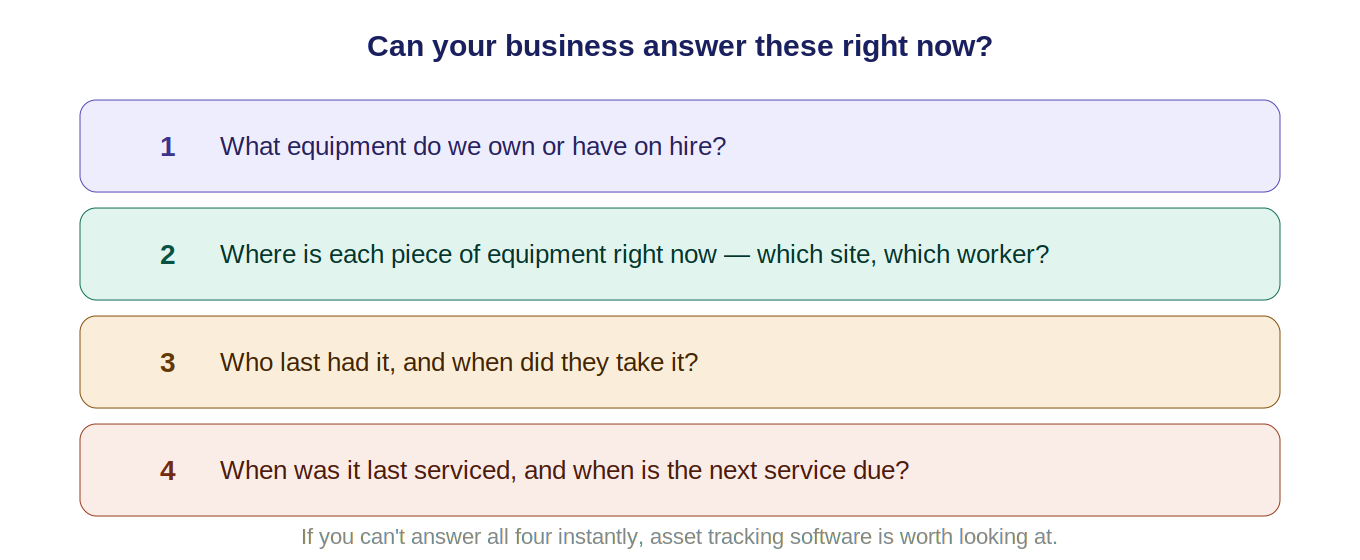
Asset tracking for field teams isn’t about installing GPS trackers on every tool. For most construction and trades businesses, it’s about knowing:
- What equipment is owned or on-hire. One accurate register of all assets
- Where each asset is right now, meaning which site, which worker, which project
- Service and maintenance history. When it was last serviced and when it’s next due
- Who has it and when they took it, as an auditable allocation record
- When it’s due back, and whether it came back
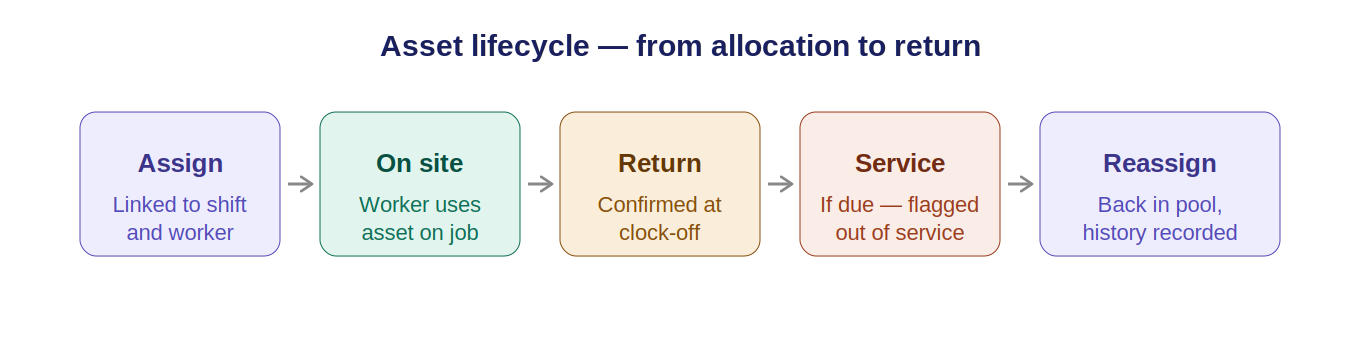
None of this needs exotic hardware. It needs an allocation system tied to your roster and workforce management, so that when a worker is assigned to a shift, the assets allocated to that shift go with them and there’s a record of it.
Why asset tracking belongs in your workforce app
Many businesses treat asset tracking as a standalone problem and reach for a separate tool. A dedicated asset management system, a spreadsheet, or even a whiteboard.
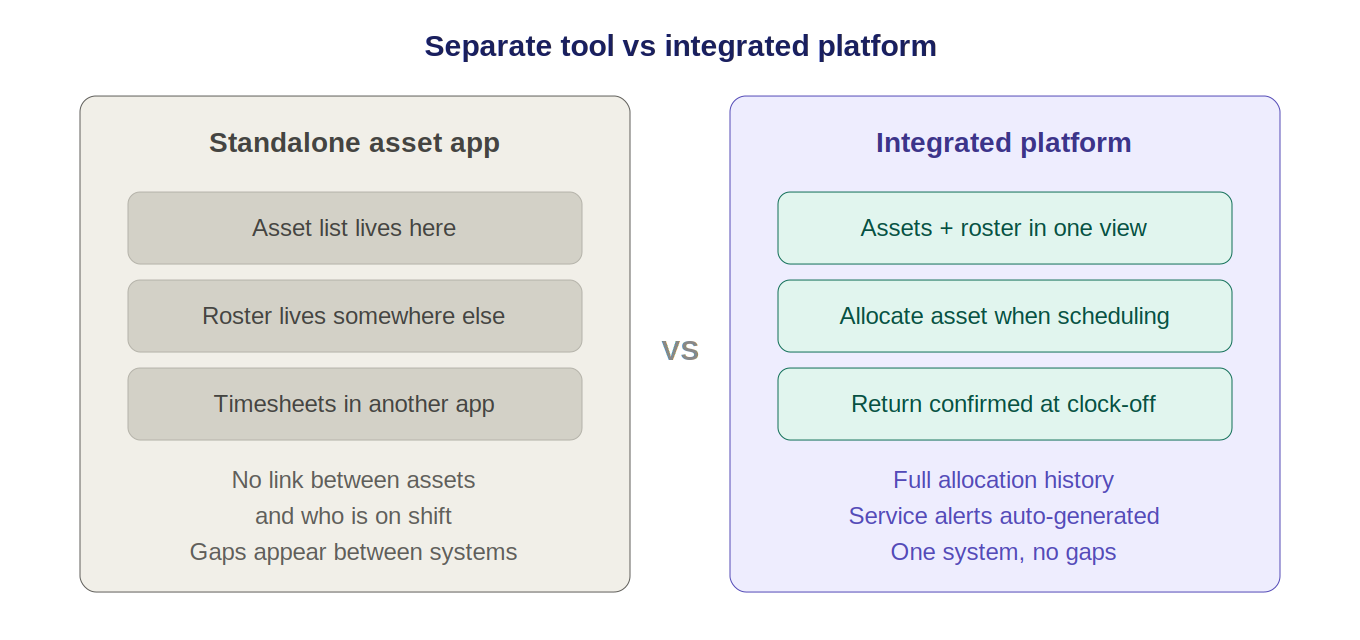
The problem is that assets don’t exist in isolation. They’re used by workers, on specific jobs, on specific shifts. When your asset tracking lives separately from your rostering, you lose the connection between the two. That’s where the gaps appear.
When asset tracking is built into your workforce app:
- Assets are allocated per shift. Scheduling a worker for a job and allocating the plant they need happens at the same time, in the same system. For a truck, that puts the hours the driver spent loading on the same record as the hours they drove, which is what the chain of responsibility record keeper has to hold.
- Supervisors see asset allocation alongside their roster. One view, not two separate apps
- Returning assets is part of shift completion, with workers confirming returns as they clock off
- Service dates and compliance sit next to WHS records, so everything stays connected
This integration is what separates purpose-built field workforce platforms from generic asset management tools. It also ties into in-app messaging for field teams. When a worker needs to flag a damaged or missing asset, a job-linked message beats a phone call every time.
Key features to look for in asset tracking software for trades
- Asset register. A searchable, maintainable list of all equipment (owned, leased or on-hire) with make, model, serial number, and purchase or hire date
- Allocation per shift or job, assigning specific assets to specific workers with a timestamped record
- Service and inspection scheduling. Set service intervals per asset, get alerts when service is due, and flag assets out-of-service while maintenance is underway
- An audit trail showing where each asset has been, who had it, and when it was returned
- Mobile access, because field supervisors and workers need to view and update asset status from a phone, not just a desktop
- Integration with rostering, so asset allocation sits alongside shift scheduling instead of in a separate system
The HIA (Housing Industry Association) and Master Builders Australia both highlight plant and equipment management as a key operational area for construction businesses. It’s a frontline concern, not a back-office one, which is why it belongs alongside rostering and compliance in workforce management software built for construction.
How Humanz handles asset tracking for field teams
Humanz is a mobile workforce app for contractors and construction teams that includes asset tracking as part of the core workforce management platform, not as a bolt-on. Assets are visible alongside your roster, so allocation is part of the scheduling workflow rather than a separate task. For shared vehicles, rooms and equipment, internal resource booking extends the same visibility to anything a crew can reserve.
Key asset features in Humanz:
- Asset register for all plant and equipment in one place
- Allocation per shift. Assign assets to specific workers and shifts while building the roster
- Service date reminders, with maintenance intervals set per asset and alerts when service falls due
- Allocation history showing who had what, on which job, and when
- Out-of-service flagging to pull assets from allocation during service or inspection
- Mobile visibility, so supervisors can manage allocation from the field
For businesses that have been tracking equipment through text messages and memory, the shift to a system like Humanz typically recovers equipment that was assumed lost, and stops the same situation repeating.
Asset tracking in Humanz sits alongside compliance tracking, so service records and WHS obligations for plant live in the same platform as your inductions and certifications. See the full picture in our construction site compliance checklist.
Frequently asked questions
Do I need special hardware for asset tracking?
Not for most construction and trades use cases. Software-based asset tracking, where allocation and returns are logged in an app, covers most of what field businesses need. Hardware GPS trackers are useful for high-value mobile plant like excavators and trucks, but they aren’t required for general tool tracking.
What’s the difference between asset tracking and fleet tracking?
Fleet tracking usually means GPS-based tracking of vehicles. Asset tracking in a workforce context is broader. It covers all the tools and plant used by field workers, and focuses on allocation, availability and service schedules rather than live GPS positioning.
Can asset tracking cover hired and leased equipment as well as owned plant?
Yes. A proper asset register holds owned, leased and on-hire equipment in one list, with hire dates and return dates recorded against each item. Hired plant is where informal tracking costs the most, because gear with no recorded return date tends to stay on hire, and on the invoice, long after the job needed it.
How does asset tracking help with WHS compliance?
Safe Work Australia requires that plant and equipment is maintained in a safe condition. Asset tracking software with service scheduling makes sure maintenance isn’t missed and creates a documented record that the business met its duty. This matters most for powered plant and lifting equipment.
Can workers see what assets are allocated to their shift?
Yes, in platforms like Humanz. Workers see their allocated equipment as part of their shift details, which cuts the chance of arriving on site without the right tools or leaving equipment behind at the end of a job.
What happens when an asset is flagged out of service?
It comes out of the allocation pool, so it can’t be assigned to a worker or shift until maintenance is done and the flag is cleared. That stops the familiar failure of a machine booked onto a job while it’s sitting in the workshop. Once it’s back in service, the asset returns to allocation with the work recorded in its service history.
What if an asset doesn’t come back at the end of a shift?
A system with allocation records makes it immediately clear who had the asset, when they had it, and on which site. That information speeds up recovery and creates an accountable record if the asset is ultimately written off. Recovery matters more than it used to. Crime Statistics Agency Victoria figures reported by the RACV show 82,947 theft-from-vehicle offences in Victoria in the year to December 2025, up 9.5%, with power tools taken in 15,391 burglary incidents valued at $18,496,823.
Related articles
Ready to see Humanz on your own roster?
Free 30-minute walkthrough, we'll use your real crews, sites and shift patterns.