
 Login
Login 

Rostering & Scheduling
FIFO Rostering Software: Managing Swings, Crews and Compliance in One Roster
By Duane Butler · 20 July 2026 · Updated 6 October 2026

A FIFO roster is a swing pattern, days on site followed by days at home, such as 2/1, 8/6 or 4/1, with the flights or drives on the changeover days. FIFO rostering software plans the swing rather than the week: it builds the pattern for each crew, moves flights and camp beds with it, and checks fatigue, tickets and inductions before a swing is confirmed.
Most rostering software is built on one assumption. Your people work a weekly pattern and go home at night. FIFO operations break that assumption completely. Crews work two weeks on and one week off, rotate between days and nights mid-swing, arrive on charter flights, sleep in camp accommodation, and are governed by some of the strictest fatigue rules in Australian industry. None of this is niche, either. On the WA Government’s own figures, mining employment in WA reached a record 135,693 on-site full-time equivalent positions in 2024, its eighth consecutive year of growth.
Run that on a weekly-pattern scheduler and you end up managing the real roster in a spreadsheet next to it. Purpose-built rostering software treats the swing, not the week, as the basic unit of planning, and our mining workforce management page covers how the swings connect to mobilisation, credentials and timesheets. If the crew drives or buses in rather than flying, the roster problem is the same shape, and FIFO, DIDO and BIBO compared explains what each asks of it.
Why FIFO breaks generic rostering tools
A FIFO roster has four properties that hospitality- and retail-style schedulers don’t model:
- Swing patterns, not weekly patterns. Rosters like 2/1, 8/6 and even-time repeat over multi-week cycles, often with crews offset against each other so the site is always covered. A tool that thinks in Monday-to-Sunday blocks forces you to rebuild the pattern by hand every cycle. (Weighing up which swing to run in the first place? See our shift roster patterns guide.)
- Travel is part of the shift. A worker’s swing starts at the airport, not the crib room. If flights and camp nights aren’t roster items, the scheduler can’t see whether someone can physically be on site for day one, and workers can’t see their travel in the same place as their shifts.
- Fatigue rules with teeth. Remote sites operate under fatigue frameworks where consecutive shifts, night rotations and total swing hours are all constrained. A roster that only counts weekly hours will happily build a non-compliant swing. In WA mining specifically, the fatigue duty is risk-based and the numbers live in guidance, which makes the roster itself the evidence.
- Crew-level operations. FIFO sites roster whole crews. A shift swap between two workers means checking camp beds, flight manifests and competency coverage, not just the shift grid.
If you’re comparing platforms more broadly, our guide to workforce rostering software in Australia covers the general evaluation criteria. This article is about the FIFO-specific layer on top.
What FIFO rostering software needs to do
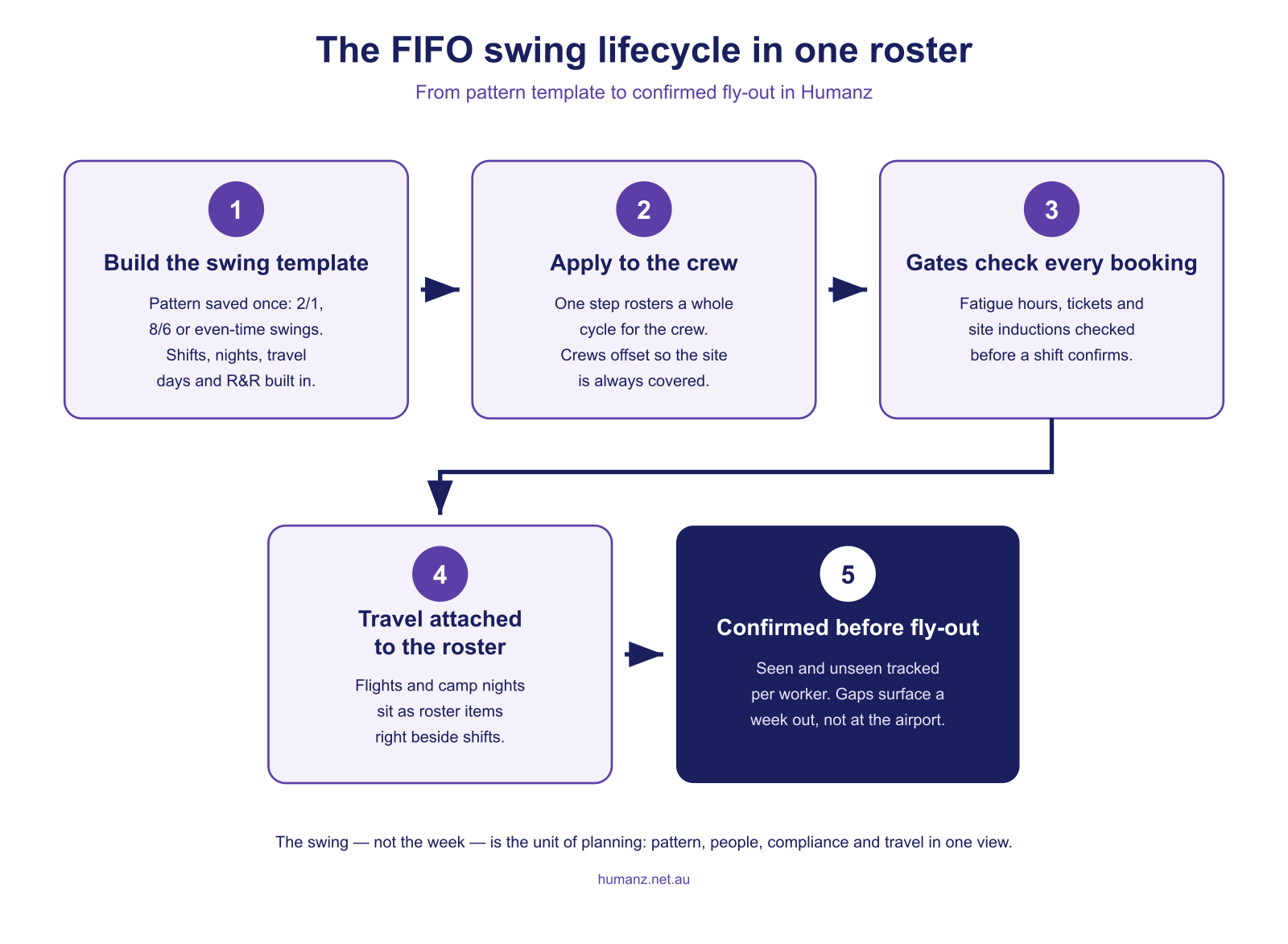
1. Build swing rosters from templates
The whole point of a swing is that it repeats, the same logic behind roster templates generally. Good FIFO rostering software lets you define the pattern once (shifts, nights, travel days, R&R) and apply it to a crew for the next cycle in one step. When a shutdown or weather event breaks the pattern, you adjust the exception, not the whole roster. If you’re still choosing between patterns, the free swing comparison tool puts two rosters side by side, and the FIFO roster calculator maps the chosen cycle onto real dates for the year ahead.
2. Roster flights and accommodation as first-class items
Charter flights, commercial legs and camp check-ins belong on the same schedule as work shifts. That’s how the scheduler sees travel conflicts before they happen, and how workers see their full swing (flight, camp, shifts) in one mobile view. We’ve covered this in depth in managing FIFO flights and accommodation in your roster, including swing templates and bulk uploads for mobilising large crews.
3. Enforce fatigue rules at the point of rostering
Under the model WHS laws, fatigue is a foreseeable risk you’re required to manage. Safe Work Australia’s fatigue guidance is explicit that shift structure, night work and travel time all form part of that risk. In Western Australia, WorkSafe WA’s fatigue management guidance for mining goes further again. The duty has weight behind it. In the WA Mental Health Commission’s study of more than 3,000 FIFO workers, one third (33%) reported high or very high psychological distress, against 17% in a benchmark group of non-FIFO workers.
The practical difference between platforms is when the fatigue check happens. A reporting tool tells you a swing breached the rules after it was worked. A rostering gate stops the non-compliant shift being booked at all. Fatigue management built into the roster, with thresholds checked as the scheduler builds the swing, turns the compliance obligation into a default rather than an audit finding.
4. Track competencies and site access per swing
A worker who’s fully qualified for one site may be missing an induction for the next. FIFO rostering software should check tickets, licences and site-specific inductions before a booking is confirmed, the same gate logic as fatigue, and it has to cover subcontractors and labour hire as well as your own crew, because a principal’s site rules don’t distinguish. Our guide to qualification, induction and credential tracking covers how expiry alerts keep this current between swings.
5. Confirm the crew before the plane leaves
Publishing a swing roster isn’t the same as filling it. Seen/unseen and confirmation tracking per worker tells you a week out, not at the airport, that someone hasn’t acknowledged their swing. For remote operations the cost of a no-show is multiplied by flight and camp logistics, which is why real-time confirmation tracking matters more in FIFO than anywhere else.
The mobilisation connection
Rostering a FIFO worker is the last step of a longer chain: onboarding, medicals, inductions, travel booking, camp allocation. If those live in different systems, the roster is only ever as accurate as the last email. Purpose-built platforms connect mobilisation to the roster so a worker isn’t schedulable until they’re site-ready, and new starters flow from onboarding onto their first swing without re-keying.
How Humanz handles FIFO rostering
Humanz was built in Australia for exactly this operating pattern. It’s used by mining services contractors, drilling companies and remote maintenance crews running swing rosters across multiple sites. For the wider picture beyond swings (fatigue, credentials, shutdown crews and assets), see our full guide to mining workforce management software.

- Swing and non-standard patterns built from reusable templates, applied per crew
- Flights and accommodation rostered as non-work shifts, visible to workers in the app
- Fatigue gates that check swing hours, consecutive shifts and rest windows at booking time
- Licence, ticket and induction checks before a worker can be rostered to a site
- Seen/unseen and confirmation tracking on every published swing
- Bulk operations for mobilising an entire crew’s travel and shifts in one upload
See a FIFO swing built live in Humanz →
Frequently asked questions
What makes FIFO rostering different from normal rostering? FIFO runs on the swing, not the week, and most rostering tools are built around a Monday-to-Sunday grid. Swing patterns repeat over multi-week cycles with crews offset against each other, travel is part of the shift, and fatigue rules constrain consecutive shifts and total swing hours. A weekly-pattern scheduler forces you to rebuild all of that by hand every cycle, which is how the real roster ends up in a spreadsheet next to it.
What roster patterns can FIFO rostering software handle? Any repeating cycle (2/1, 8/6, even-time, rotating days and nights) plus one-off patterns for shutdowns and campaigns. In Humanz, patterns are saved as templates and applied to crews per cycle.
How does fatigue compliance work for FIFO swings? Fatigue rules such as maximum consecutive shifts, swing hours and rest windows are configured as policies and enforced when shifts are booked. A swing that would breach the policy is flagged or blocked before it’s confirmed, not discovered in a report afterwards.
Can workers see flights and camp details in the app? Yes. Flights and accommodation are roster items, so they appear in each worker’s mobile schedule alongside shifts, with notes for terminals, check-in cut-offs and camp details.
Does it handle both employees and contractors on the same swing? Yes. Direct employees, labour hire and subcontractors are rostered in the same view, each with their own compliance profile, so crew coverage is checked across the whole workforce.
How do you know workers have seen their swing roster? Through seen/unseen and confirmation tracking on every published swing. Each worker’s status shows whether they have viewed and acknowledged the roster, so an unconfirmed swing surfaces a week out rather than at the airport. That early warning matters more in FIFO than anywhere else, because a no-show carries flight and camp logistics on top of the missed shift.
What happens when someone can’t fly? Live availability shows who else is qualified, compliant and not already rostered, so a replacement can be booked and notified through the app in minutes, with their travel updated in the same action.
Is Humanz only for mining? No. The same swing logic serves remote construction, energy, drilling and any operation that moves crews to site for multi-day stints.
Related articles
Ready to see Humanz on your own roster?
Free 30-minute walkthrough, we'll use your real crews, sites and shift patterns.