
 Login
Login 

Guides
How to onboard field workers faster: a step-by-step guide
By Richard Lomen · 15 June 2026 · Updated 3 September 2026

Getting a new field worker onto a job site should be straightforward. In practice it rarely is. Documents arrive late or in the wrong format. Inductions get scheduled, then rescheduled. Certifications are assumed current without anyone checking. The worker turns up on day one and the site supervisor didn’t know they were coming.
For Australian construction and trades businesses, slow or disorganised onboarding costs real money. Every day between hired and productive is wages spent on nothing. Every rushed induction is a WHS liability. And when new starters are hired for a specific job, onboarding becomes the first step of workforce mobilisation.
This guide walks through the process step by step, and shows where field worker onboarding software should be doing the work for you.
Why field worker onboarding is different from office onboarding
Office onboarding is mostly about access. Email, software logins, a desk, meeting the team. It matters, but the safety stakes are low. It’s also one of the clearest examples of why workforce management differs from HR software. Generic HR onboarding tools were built for the office, not the job site.
Field worker onboarding carries a heavier load:
- Under Australian WHS law, an induction covering site-specific hazards, emergency procedures and safe work practices must happen before work commences. Not optional.
- Trade licences, White Cards, working at heights tickets and other certifications have to be verified before the worker is deployed, against the issuing register where one exists (how to check each one). Assuming they’re current isn’t enough.
- Workers need to know what PPE is required, where to get it, and what plant and equipment they’re responsible for.
- The scheduling system needs their correct availability, contact details and role before the first shift.
- Payroll setup still applies: TFN declaration, superannuation choice, and any Award-specific information.
Miss one of these and the worker either can’t be deployed on their first scheduled day, or gets deployed as a liability.
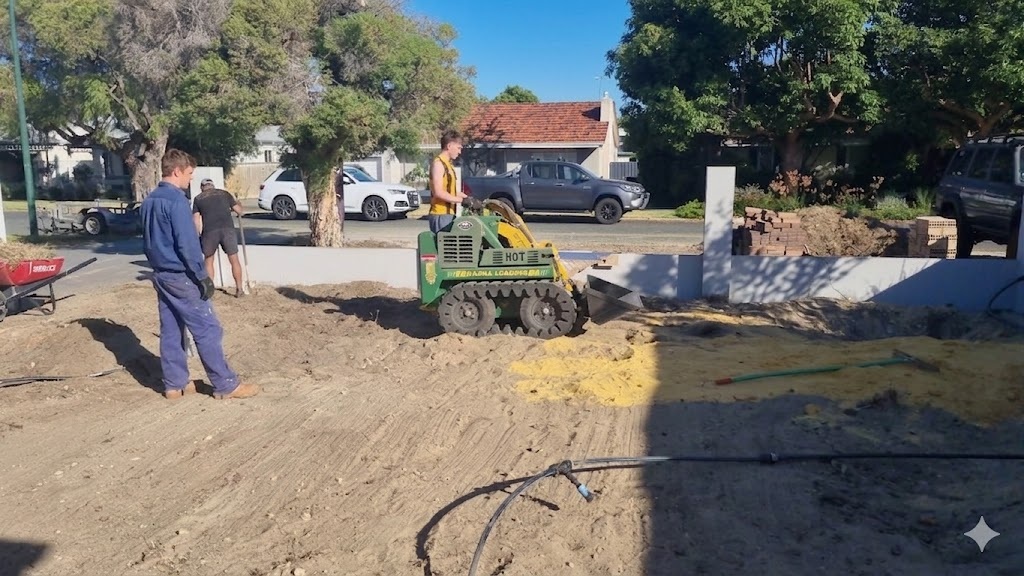
The true cost of slow onboarding for trades businesses
Some of the cost is direct. A worker who can’t start because their induction hasn’t been completed or their licence hasn’t been verified is a wage with no output. Missing TFN declarations and incorrect Award classifications turn into payroll errors that are expensive to unwind.
The rest is exposure. A rushed verbal induction puts someone on site who doesn’t fully understand its hazards, and leaves you with nothing to show Safe Work Australia or a principal contractor if they audit your site records. When an induction or licence can’t be verified, the consequences can be significant.
There’s a quieter cost too. Disorganised onboarding tells a new worker the business is poorly run, and the labour market gives them options. Jobs and Skills Australia’s 2025 Occupation Shortage List has 29% of assessed occupations (293 of 1,022) in shortage nationally, down from 33% in 2024 but with skilled trades still heavily represented. A qualified starter left waiting on paperwork is a qualified starter a competitor can ring. If you want a dollar figure on it, the free turnover cost calculator works out what replacing a field worker actually costs.
Step-by-step: how to onboard a field worker efficiently
Step 1: collect documents and certifications digitally
Before a worker’s first day, you need:
- Signed employment contract or contractor agreement
- TFN declaration (for employees) or ABN details (for contractors)
- Superannuation choice form
- White Card (Construction Induction Card)
- Trade licence (if applicable)
- Working at heights, confined space, or other role-specific certifications
- Proof of right to work in Australia
- Emergency contact details
The fastest way to collect all of this is a digital onboarding portal where the worker uploads documents from their phone before day one. No paper shuffle on the first morning, and you can verify credentials in advance. For contractors the list runs longer again, with ABNs, insurances and agreements to check, which our buyer’s guide to contractor management software covers in detail.
The ATO publishes a new employee checklist covering the payroll compliance requirements for every new starter.
In a system built for this, the requirements themselves are configured once against the business, so every new starter gets the same checklist automatically and nothing depends on whoever is doing the hiring that week. That matters more than it sounds. Master Builders Australia’s industry figures count 462,939 construction businesses in Australia as at June 2025, and 98.6% of them employ fewer than 20 people, so the person doing the hiring this week is usually also running jobs.
Mining raises the bar again
If you onboard for mining or resources work, the document stack grows and the sequencing gets stricter. On top of the standard set, a mining new starter typically needs a coal board or site-specific medical, a drug and alcohol clearance, national police check for some sites, the client’s own induction modules, and a verification of competency for each plant type they’ll operate. Several of those have lead times measured in weeks, not days, and most sites won’t confirm mobilisation until every one is sighted.
That’s why onboarding software for mining lives or dies on sequencing. The system has to know which requirements gate which sites, chase the outstanding ones automatically, and show a mobilisation coordinator exactly who is genuinely ready to fly rather than probably ready. We’ve written up what onboarding software for mining and construction should do in its own guide, and the mining workforce management guide covers how the whole gate-to-gate picture fits together.
Step 2: complete inductions and safety training
Site inductions must happen before work commences. That’s a requirement under the model WHS Act and it can’t be deferred. An effective site induction covers:
- Site layout and hazard areas
- Emergency procedures (muster points, first aid, evacuation)
- Site rules (PPE requirements, vehicle movement, no-go zones)
- Reporting procedures for incidents and near-misses
- Role-specific risks and controls
A digital induction, delivered as a form or video the worker completes on their phone, is tracked, timestamped and retrievable. A paper sign-in sheet is none of those things. The same goes for the daily prestart and the weekly toolbox talk that follow the induction: on a phone they leave a record, on a clipboard they leave a memory.
Safe Work Australia’s guidance on inductions is clear that workers must be given sufficient information to perform their work safely before they start.
Step 3: add to rosters and confirm availability
Once documents are verified and the induction is done, the worker goes into your scheduling system with:
- Correct role and trade classification
- Availability preferences
- Site access permissions
- Any restrictions (e.g. cannot work nights, licenced for specific plant only)
Getting this right upfront prevents the conflicts and gaps that come from bad worker profiles. For businesses using Humanz as their staff onboarding app and workforce platform, the profile feeds into rostering, so coordinators can schedule the worker the moment onboarding is complete.
Step 4: assign equipment and site access
Before they start:
- Confirm what PPE is required and whether it’s supplied or self-provided
- Allocate any tools, vehicles or plant the worker will be responsible for
- Set up site access credentials if needed (swipe cards, pin codes, site-specific apps)
- Record asset allocations so there’s a clear record of who holds what
Equipment allocated during onboarding and recorded in the system tends to still be there at the end of the job. See our article on asset tracking for field teams for how this works in practice. A mobile workforce app for contractors that handles onboarding and asset allocation in one place removes the risk of gear being assigned verbally and never recorded.
Step 5: brief on comms channels and reporting
The final step is comms. Before their first shift, a new worker should have:
- The workforce app installed and logged in
- Their roster and shift details in front of them
- A clear picture of how to submit timesheets
- The reporting process for near-misses and incidents
- A name to call when something goes wrong on site
If your business runs shift communications through in-app messaging, set the worker up and brief them before their first day, not while they’re standing on site wondering where the crew is.
How Humanz automates field worker onboarding
Humanz is field worker onboarding software inside a full workforce management platform, built for Australian trades and construction teams. Onboarding connects to rostering, compliance, timesheets and communications, so a worker isn’t considered onboarded until every step is complete.
In practice it works like this. Workers upload contracts, licences and certifications from their phone ahead of their start date, and coordinators are notified as each document arrives. Credentials sit on the worker’s profile with expiry dates tracked automatically. Humanz warns you before a licence lapses, and blocks rostering while anything is missing or expired.
Inductions are digital too. You build custom induction forms for each site or project, workers complete them on mobile, and every submission is timestamped against their record.
Once onboarding is complete, the worker appears in rostering with the correct role, availability and compliance status. No manual re-entry. Equipment assigned during onboarding is tracked in the same platform, and the worker joins the relevant job communication channels, so shift notifications reach them from the first day.
For businesses running a mix of direct employees and subcontractors, subcontractor onboarding runs the same way as it does for employees, with subcontractor-specific fields (ABN, insurance, contractor agreement) handled automatically. Our article on subcontractor management software Australia covers that side of the platform.
Onboarding feeds straight into construction site compliance. A worker who hasn’t completed their induction, or whose licence hasn’t been verified, shouldn’t show as available in your roster. Humanz enforces that automatically.
Frequently asked questions
How long does digital onboarding typically take compared to paper-based onboarding?
Paper-based onboarding for a field worker typically takes 1–3 days from offer acceptance to job-ready, assuming no delays in document collection. Digital onboarding through a platform like Humanz can bring that down to same-day or next-day in straightforward cases, because workers complete forms and upload documents from their phone before they arrive on site.
When should field worker onboarding start?
The day the offer is accepted, not the worker’s first morning. Documents, licence uploads and induction modules can all be completed from the worker’s phone before day one, so the start date is spent working rather than filling in forms. Waiting until they arrive on site is how a paid day becomes an admin day.
Is a site induction legally required before work starts in Australia?
Yes. Under the model Work Health and Safety Act, adopted in most Australian states and territories, persons conducting a business or undertaking (PCBUs) must give workers the information, training and instruction they need to work safely. That includes a site-specific induction before work commences. Deploying a worker who hasn’t been inducted creates direct WHS liability.
Can onboarding documents be collected digitally in Australia?
Yes. There’s no legal requirement for onboarding documents to be paper-based. Digital documents, electronic signatures and online form submissions are all legally valid, and often more defensible than paper because they carry timestamps and user identification.
Can a worker start on site if some onboarding steps are still outstanding?
Only if the outstanding steps don’t gate site entry. The site induction and licence verification must be complete before any work starts, because both are safety requirements rather than paperwork preferences. Payroll items can be chased afterwards at a pinch, though missing declarations turn into payroll errors that are expensive to unwind.
What happens if a worker’s licence can’t be verified before their first shift?
They shouldn’t be deployed to site in any role that requires the licence. Under Australian WHS law, putting an unlicenced worker on licenced work creates serious liability for the business. A good onboarding and compliance system prevents it by flagging the gap before the worker can be scheduled.
Do subcontractors need to go through the same onboarding process as employees?
The compliance elements are the same for both: White Card, trade licence, site induction and any site-specific requirements. The employment side differs, with an ABN and contractor agreement in place of a TFN declaration. A platform like Humanz runs both through the same workflow, with different fields for each worker type.
What records do I need to keep from the onboarding process?
At minimum: the signed employment or contractor agreement, TFN declaration or ABN, White Card, any role-specific licences, site induction records (with a timestamp and the version of the induction form used), and superannuation choice. The ATO and Fair Work Ombudsman both publish new starter checklists worth bookmarking.
How do I handle onboarding for a worker who is starting across multiple sites?
Each site typically has its own induction requirements. A good system stores the worker’s base credentials (licences, White Card) centrally and lets site-specific inductions be completed separately for each site. The worker’s profile then shows which sites they’ve been inducted at, so coordinators know where they can be deployed.
Related articles
Ready to see Humanz on your own roster?
Free 30-minute walkthrough, we'll use your real crews, sites and shift patterns.