
 Login
Login 

Fatigue management software built for Australian operations
Humanz embeds fatigue management directly into rostering, layered policies, live hour tracking and alerts that stop a non-compliant shift before it's ever confirmed. Built in Australia for mining, transport, construction and trades.
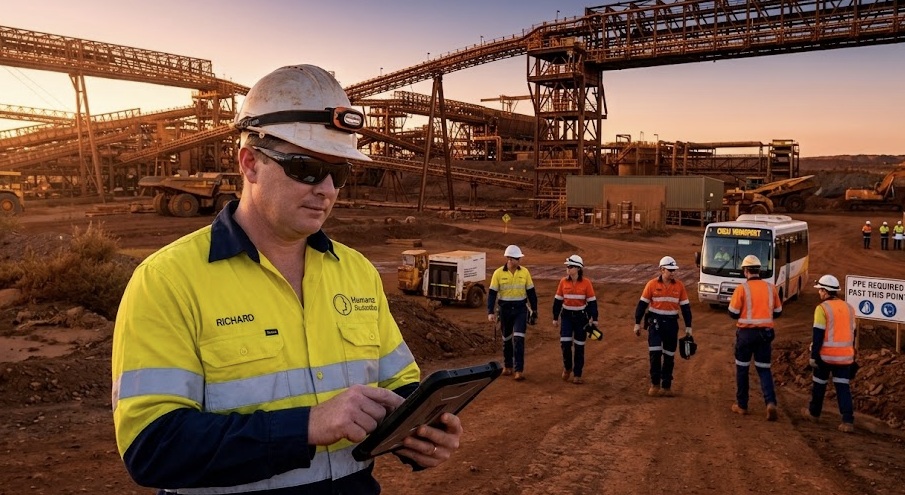
Fatigue risk, controlled where it starts: in the roster
Under model WHS laws, Australian employers must identify, assess and control fatigue risk. Humanz does it across swings, nights and multiple sites, automatically, while the roster is being built.
See breaches before they're booked
A worker picking up an extra shift on another site used to sail past safe-hour thresholds unseen. Humanz counts every shift across every site and flags the breach before the booking is confirmed.
A policy that reads the roster
Your fatigue policy stops living in a PDF. Its limits sit inside scheduling and check every booking automatically.
Checking that scales itself
No more cross-checking hours by hand. Rolling limits track continuously across crews, clients and swing patterns, with every decision on the audit trail.
Set fatigue rules for every level of your operation
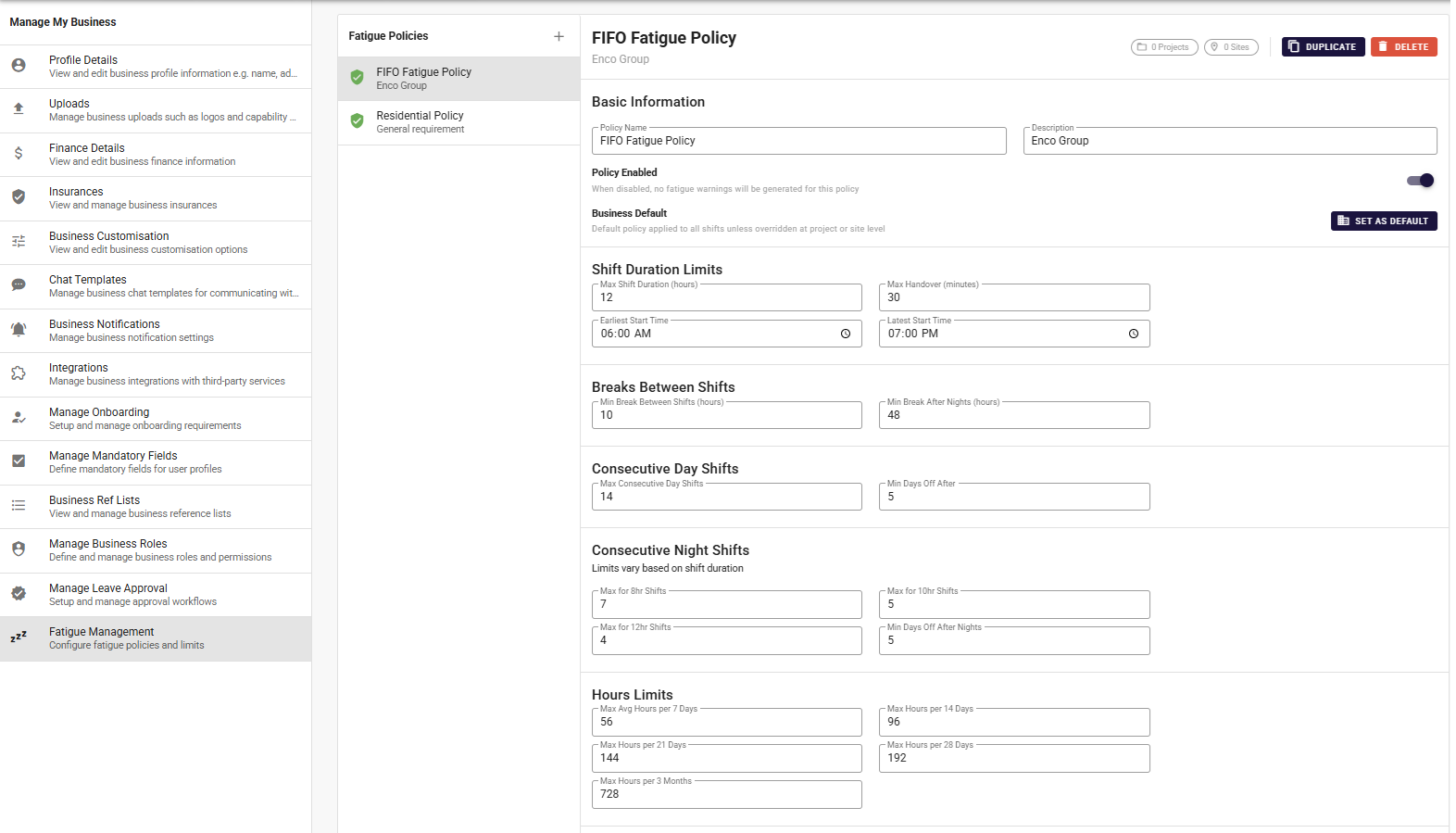
Build a fatigue policy once and apply it as your business default, then override it per client or per site, the strictest applicable policy always wins. Every lever that matters to fatigue risk is configurable.
- Business default, with client and site-level overrides
- Shift-duration, handover and start-time limits
- Minimum breaks between shifts and after nights
- Consecutive day/night caps and rolling hour limits (7/14/28 days)
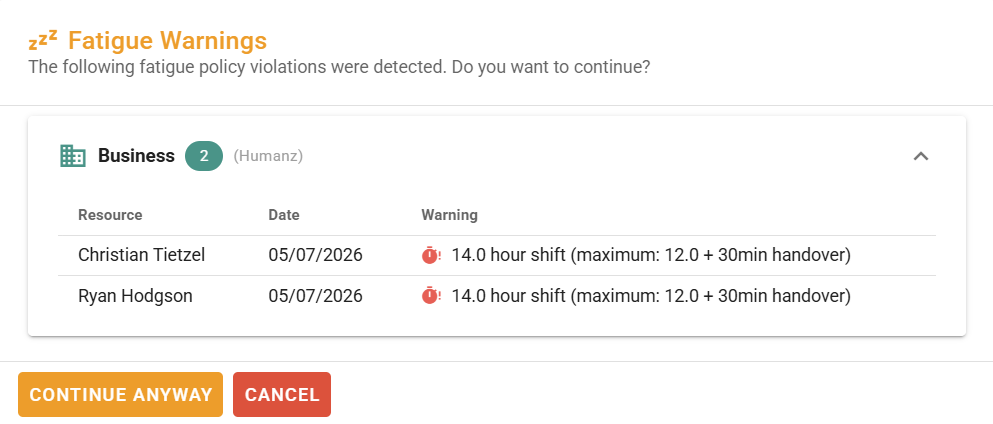
Get stopped before a non-compliant shift goes ahead
When a booking would breach a policy, Humanz surfaces the exact violation before the shift is confirmed, who, when and by how much. Coordinators can cancel and fix it, or continue anyway where they have the authority, with the decision on record.
- Violations detected at the point of scheduling
- The worker, date and specific breach shown
- Cancel, adjust, or override with permission
- Overrides captured for your audit trail
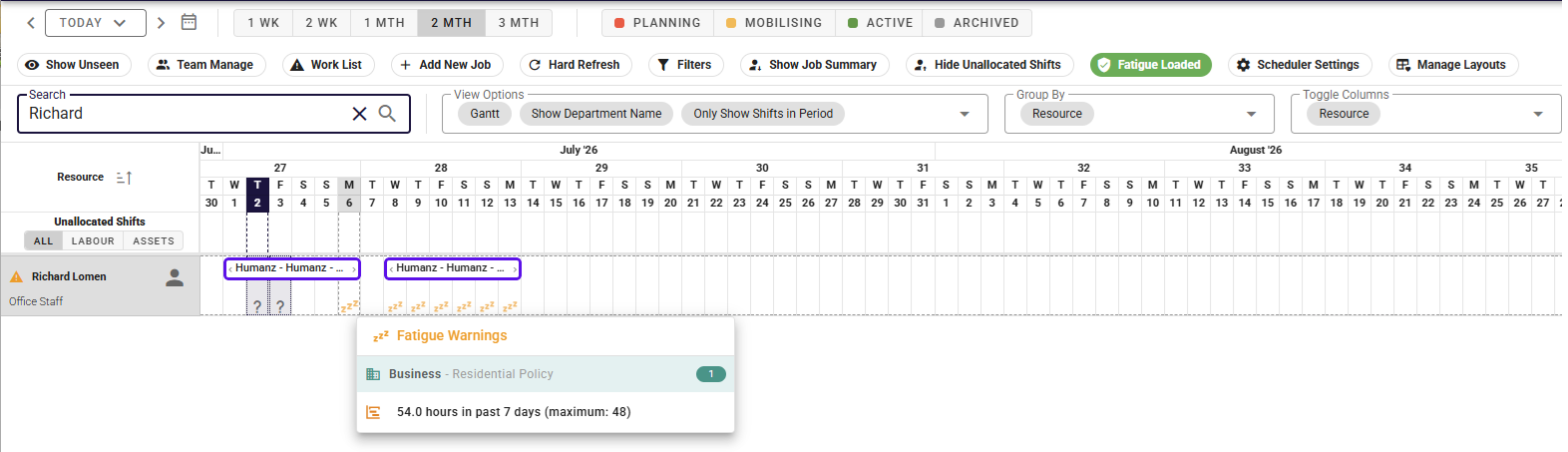
Breaches flagged right on the roster
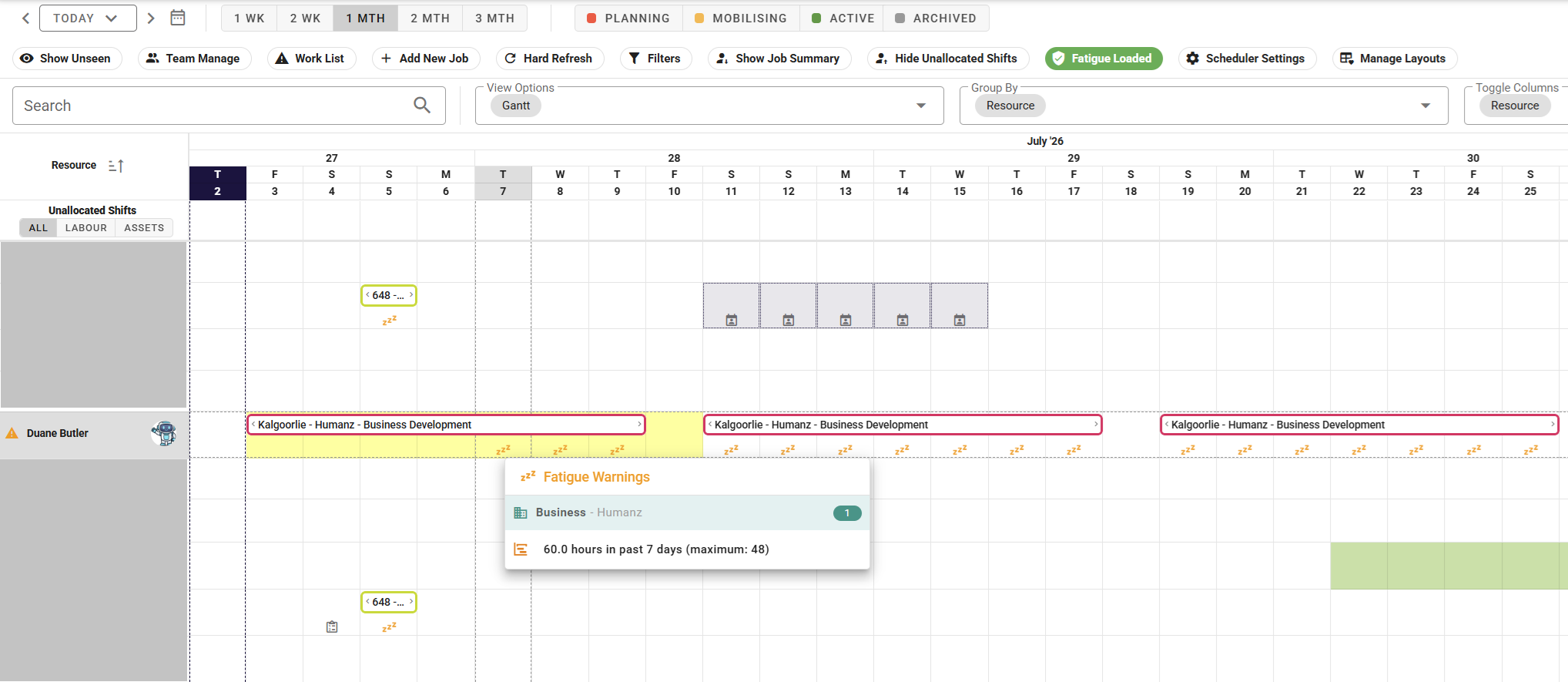
A fatigue icon appears on any shift that trips a policy. Hover it and you see which policy was breached and by how much, here, 54 hours in the past seven days against a 48-hour limit, all without leaving the schedule.
- A fatigue icon on every affected shift
- Hover for the policy and the exact breach
- Works across the one-week to three-month views
- Spot problems while there's still time to act
Rolling hours tracked across your whole workforce
Humanz keeps a running tally of every worker's hours across all their shifts, sites and clients, so the cumulative fatigue no single roster would reveal is caught. An overloaded worker stands out at a glance.
- Cumulative hours across all sites and clients
- Breached shifts highlighted on the roster
- Rolling 7-day and longer windows
- FIFO swings and rotating nights handled natively
A safeguard for schedulers, not your workers
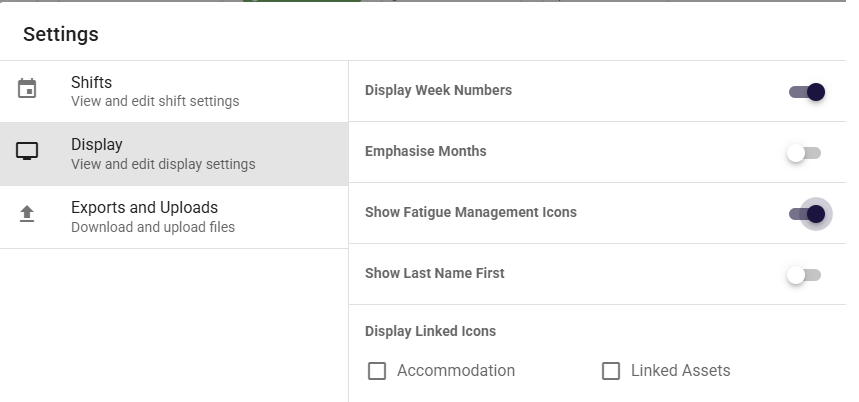
Fatigue monitoring is built for the people creating rosters. The fatigue icons toggle on or off in display settings, and the policies and breaches are only ever visible to coordinators on the Schedule, never to end users.
- Fatigue icons toggle in display settings
- Visible to coordinators on the Schedule
- Sits alongside accommodation and asset icons
- No noise for the people on the tools
Set up in minutes, with in-app guidance
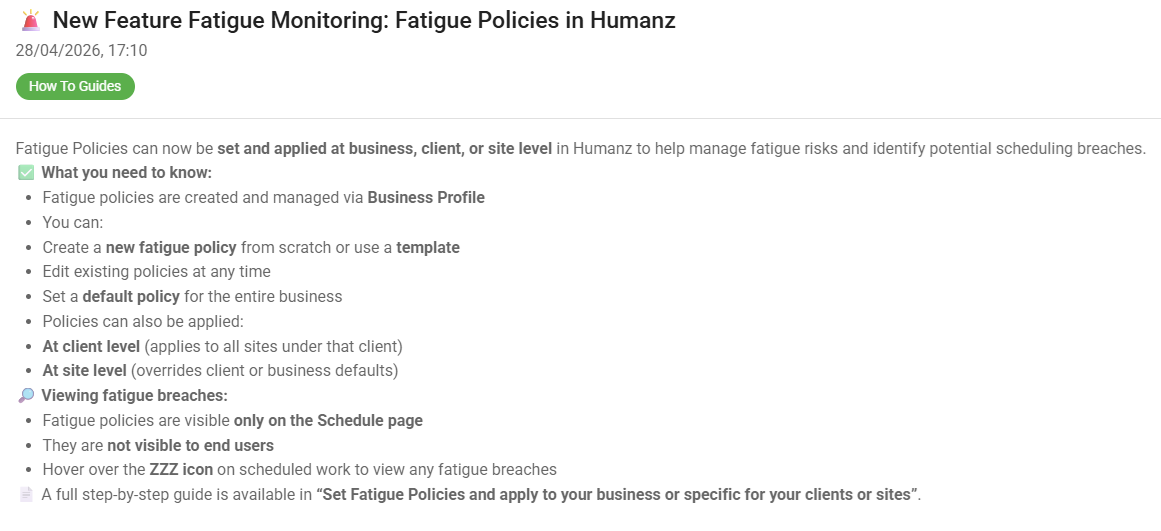
Fatigue Policies are created and managed from your Business Profile, start from a template or build from scratch, set a default, and refine them any time. In-app how-to guides walk your team through every step.
- Create from a template or from scratch
- Managed from your Business Profile
- Edit and refine policies at any time
- Step-by-step in-app guides included
Mapped to Australian fatigue obligations
Humanz was built around the compliance frameworks Australian operators actually work under.
Model WHS laws
Systematically identify, assess and control fatigue risk, with records to prove it.
Industry codes and client rules
Mining, transport and construction clients each impose their own fatigue standards. Layered policies let you meet all of them at once.
Qualification & licence currency
Fatigue gates work alongside licence and ticket expiry checks, one compliance layer over the whole roster.
Trusted by hundreds of Australian field & trades businesses





















.png)








































Getting started is simple
We support each step and move at your pace, see our approach for the full rollout picture.
Bring your fatigue policy
We configure your existing business, client and site rules into Humanz, usually in a single working session.
Connect it to the roster
Policies run automatically against every booking. Coordinators keep scheduling exactly as before, now with guardrails.
Monitor and improve
Dashboards show near-misses and trends, so you can tune rosters and policies with real data.
Works with what you already run
Fatigue rules are only as good as the systems they sit beside. Humanz connects outward so the data keeps moving.
Xero
Approved hours flow through to Xero on a two-way API, so the fatigue picture and the pay run are built from the same record of who actually worked.
How the Xero connection works →Microsoft single sign-on
Coordinators and crews sign in with the Microsoft accounts they already hold, on the web app and the mobile app. One account to disable when someone leaves.
What your IT manager will ask →Your payroll system
Not on Xero? Humanz still hands over accurate, approved time data with the fatigue checks already done, rather than pretending to be payroll.
The payroll handover in detail →Frequently asked questions
What is fatigue management software?
Fatigue management software tracks workers' hours against defined fatigue rules, maximum shift lengths, rest breaks, consecutive days, and alerts or blocks scheduling decisions that would breach them. In Humanz, these checks run inside the roster itself, so non-compliant shifts are caught before they're confirmed.
Is fatigue management a legal requirement in Australia?
Yes. Work health and safety law requires businesses to eliminate or minimise the risk of fatigue so far as is reasonably practicable. Safe Work Australia's model Code of Practice on managing the risk of fatigue at work, published in September 2025, sets out how, and it has been approved as a code in Tasmania, New South Wales and the Northern Territory. Software makes that obligation systematic and auditable rather than manual.
Is this the same as wearable fatigue detection technology?
No. Humanz manages fatigue risk on the roster side, tracking hours, breaks and consecutive shifts against your policies, with no wearables, cameras or in-cab hardware involved. Detection technology watches the worker in the moment, while Humanz stops the non-compliant shift being scheduled in the first place, so the two can sit together without overlapping.
What limits can a fatigue policy include?
A policy can set maximum shift lengths, minimum breaks between shifts and after nights, consecutive day and night caps, start-time limits and rolling hour ceilings across 7, 14 and 28 days. Build it once as your business default, then override it per client or site, with the strictest applicable policy always winning.
Can we set different fatigue rules for different clients or sites?
Yes. Humanz supports layered fatigue policies at business, client and site level. When a worker is rostered to a job, the strictest applicable policy applies automatically, which is exactly how mining and transport client requirements work in practice.
Does it work for FIFO and swing rosters?
Yes. Humanz handles extended swings, rotating nights and back-to-back patterns natively, tracking cumulative hours across the full cycle, including when workers move between sites or clients.
Can a coordinator override a fatigue warning?
Yes, where they have permission. Rather than hard-blocking the roster, Humanz shows the exact breach and lets an authorised coordinator continue anyway when there's a genuine reason. Every override is recorded, so you keep a clear audit trail of who accepted which risk and when.
How long does it take to set up?
Most teams have fatigue policies configured and running against live rosters within the first week or two of onboarding. Bring your current policy to a demo and we'll show you how it maps into the platform.
Something else on your mind? Browse every question we've answered →
Who it's for, and who it isn't
A fatigue platform earns its keep in some operations and is overkill in others. Here is the honest split.
Built for
- Mining, drilling and resources contractors running swings, nights and client-imposed fatigue policies
- Transport and logistics operations tracking driver and crew hours against hard limits
- Civil and construction businesses where hours accumulate across sites faster than anyone can watch
- Any operation whose fatigue policy currently lives in a PDF the roster has never read
Honestly, not for
- Nine-to-five, single-site teams whose hours never approach a limit. A calendar is genuinely enough.
- Operations wanting wearable or in-cab fatigue detection hardware. Humanz manages roster-side fatigue risk, not eye tracking.
- Anyone after a fatigue policy document alone. We enforce policies; writing one starts with your WHS advisor.
Guides & further reading
See your fatigue policy running live
Book a free demo and bring your current fatigue rules, we'll configure them in Humanz while you watch.