
 Login
Login 

Compliance, Fatigue & Safety
Fatigue Risk Management Software for Transport and Heavy Vehicle Operations
By Christian Tietzel · 20 July 2026 · Updated 3 September 2026

Most industries manage fatigue as a general WHS duty. Transport is the industry where the regulator writes prescriptive hours. Maximum work, minimum rest, counted in ways that don’t forgive sloppy rostering. For heavy vehicle operations, fatigue management isn’t a policy document. It’s a set of hard numbers your schedule either respects or breaches.
Fatigue risk management software (FRMS software) exists to make those numbers operational. It encodes them as rules the roster checks before a shift is booked, monitors hours as they accumulate, and keeps the evidence for when a regulator, client or incident investigation asks how fatigue was being managed.
The rules transport operators are working under
- Heavy vehicle drivers (NHVR jurisdictions). The Heavy Vehicle National Law sets standard, BFM and AFM hours. The NHVR’s fatigue management requirements prescribe maximum work and minimum rest across multiple counting periods, from 5½ hours to 14 days. Operators accredited under BFM or AFM take on explicit obligations to schedule within those limits and keep records proving it. And breaches are priced. Under the NHVR’s 2026-27 penalty schedule, a critical-risk breach of work and rest hours carries a maximum court penalty of $21,170 plus 4 demerit points, with a severe breach at $14,120 plus 3.
- Chain of responsibility. Under the HVNL’s chain of responsibility provisions, schedulers, consignors and managers hold duties alongside drivers to ensure work demands don’t induce fatigue breaches. A roster that pressures drivers into non-compliant hours implicates the business that built it. The exposure at the top of the chain is serious money. The same penalty schedule sets the maximum for a Category 1 safety-duty offence at $4,230,550 for a corporation, and $436,850 or 5 years’ imprisonment, or both, for an individual. Subcontracted owner-drivers sit inside that chain too, which is why subcontractor hours belong on the same roster as your employees’.
- Everyone else in the operation. Depot crews, loaders, mechanics and non-HVNL drivers still sit under the model WHS duty to manage fatigue as a foreseeable risk. Safe Work Australia’s fatigue guidance covers shift structure, night work and cumulative hours. Rail operations carry their own fatigue obligations under ONRSR’s fatigue risk management requirements.
The common thread is that these are scheduling rules. FRMS software that lives outside the roster (spreadsheets, standalone fatigue calculators, after-the-fact reports) always ends up telling you about the breach after it was worked.
What FRMS software needs to do
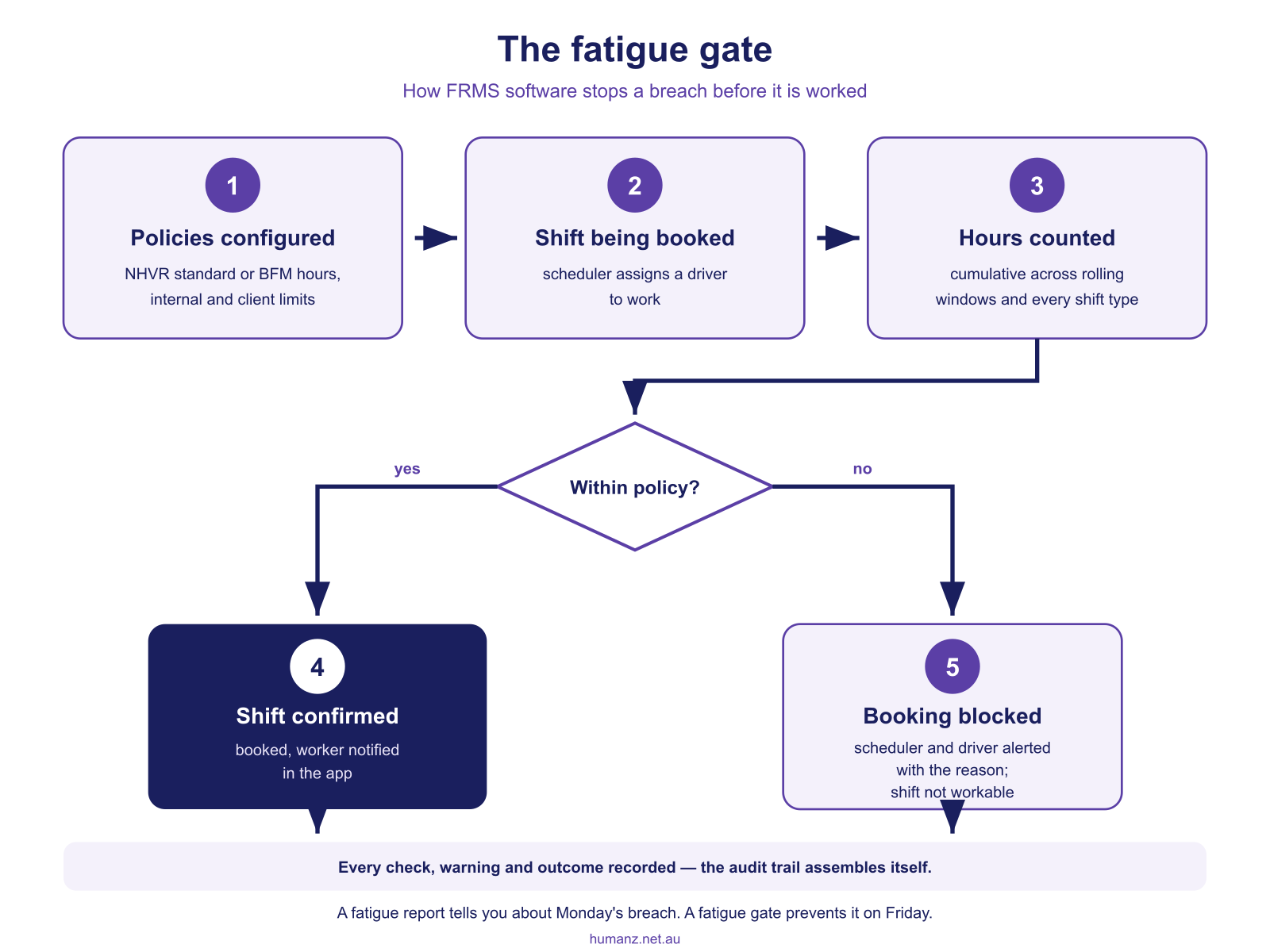
1. Encode your fatigue rules as rostering policies
Standard hours, BFM limits, internal policies stricter than the law, client-specific site rules. Each becomes a policy in the system, covering maximum daily and weekly hours, minimum breaks between shifts, night-shift caps and cumulative counting windows. Humanz supports layered fatigue policies, with a business-wide default overridden per client or site where contracts demand tighter limits.
2. Gate the roster, not report on it later
The defining FRMS feature is the gate. When a scheduler tries to book a driver whose accumulated hours would breach the policy, the platform flags or blocks the booking at that moment. The difference between a fatigue report and a fatigue gate is the difference between discovering a breach on Monday and preventing it on Friday. That gate logic is built into Humanz’s fatigue management at the point of scheduling.
3. Count hours the way the rules count them
Transport fatigue rules use rolling windows and cumulative counting. Think 24-hour periods, 7-day and 14-day windows, long and night hour distinctions. Software has to count the same way, across all work the person does. The depot shift on Saturday counts against the driving shift on Monday, and travel time on remote jobs compresses rest windows. Whole-of-roster counting is what spreadsheets get wrong first. The free fatigue hours checker is a quick way to test a shift pattern against rolling-window limits before it goes anywhere near the roster.
4. Show fatigue status live, not at month-end
Coordinators need to see, per worker, how much headroom remains. Who’s near a threshold this week, and who can legally take the extra shift. Live status turns fatigue from a compliance afterthought into an input the daily rostering decision uses. It also answers the 5am backfill question safely. Of the available drivers, who has hours left? The same check has to run when two drivers arrange a shift swap between themselves, which is exactly where informal group-chat swaps come unstuck.
5. Keep the evidence trail
Accreditation audits, chain-of-responsibility investigations and client reviews all ask the same question. Show us how the schedule managed fatigue. An FRMS platform holds the answer as data. Policies in force, checks run at booking, warnings raised, actions taken, actual hours worked. That record is your defence, and it assembles itself as a by-product of rostering. Pair it with digital time capture and planned-versus-actual hours reconcile automatically.
Beyond line-haul: who this applies to
Linehaul fleets aren’t the only operations that need this. The same machinery serves logistics depots and last-mile runs, mining services crews on FIFO swings, civil fleets on night works, and any operation mixing driving with site work. Our broader guides cover fatigue management software in Australia generally and workforce management for logistics and transport specifically.

How Humanz handles fatigue risk management
Humanz builds FRMS into the scheduling core rather than bolting it alongside:
- Layered fatigue policies, with business defaults tightened per client or site
- Booking-time gates that flag or block non-compliant shifts before confirmation
- Cumulative counting across all shift types, sites and clients in the roster
- Live fatigue status per worker, visible to schedulers as they fill shifts
- Mobile alerts so workers see warnings in the app before accepting extra work
- Audit-ready records of policies, checks, warnings and worked hours, exportable
See how Humanz manages fatigue in a transport roster →
Frequently asked questions
What is fatigue risk management software? Software that turns fatigue rules (regulatory hours, internal policies, client requirements) into live rostering controls. Bookings are checked against accumulated hours with alerts as thresholds approach, and the records proving fatigue was managed build automatically.
What’s the difference between a fatigue report and a fatigue gate? A report tells you about a breach after the shift was worked. A gate checks the rule when the shift is being booked and stops the breach happening. Regulators and courts are considerably more interested in the second.
Does Humanz enforce NHVR work and rest hours? Humanz enforces the fatigue policies you configure, including daily, weekly and rolling-window limits, minimum rest between shifts and night-hour caps. Operators encode their standard, BFM or internal limits as policies and the roster gates against them. Accreditation obligations themselves remain with the operator.
Who holds fatigue duties under the chain of responsibility? More people than the driver. Under the HVNL’s chain of responsibility provisions, schedulers, consignors and managers hold duties alongside drivers to ensure work demands don’t induce fatigue breaches. A roster that pressures drivers into non-compliant hours implicates the business that built it, and subcontracted owner-drivers sit inside the chain too.
Can it handle drivers who also do depot or site work? Yes. Hours count cumulatively across every shift type in the roster, which is exactly where manual systems fail. The Saturday depot shift quietly breaks Monday’s driving limits.
Do depot and workshop crews need fatigue management too? Yes. Workers outside the HVNL’s prescriptive hours, like depot crews, loaders and mechanics on irregular hours, still sit under the model WHS duty to manage fatigue as a foreseeable risk. Their hours also interact with driving limits when the same people do both, which is exactly the combination manual tracking misses.
How do drivers see their fatigue status? Through the app. They get warnings when they’re approaching limits, and can see rest requirements alongside their roster, so the conversation happens before shift acceptance rather than roadside.
We run a mixed fleet across two states. Can policies differ? Yes. Policies layer by business, client and site, so a WA mining contract’s tighter limits can sit alongside standard rules for east-coast work, each enforced automatically for the relevant shifts.
Related articles
Ready to see Humanz on your own roster?
Free 30-minute walkthrough, we'll use your real crews, sites and shift patterns.