
 Login
Login 

Timesheets & Payroll
Xero Rostering and Timesheets: Getting Approved Hours Into Payroll
By Heather · 14 August 2026 · Updated 3 September 2026

Xero is where a lot of Australian field businesses keep their books. The company’s FY26 results put its Australian customer base at 2.10 million at 31 March 2026, up 9% for the year with 165,000 net additions, out of 4.92 million customers worldwide. It handles the accounting, the payroll calculation, the superannuation and the reporting to the ATO. What it does not do is tell you who is on the Karratha job on Tuesday, whether that person’s confined space ticket is still current, or how many hours the night crew actually worked once the shutdown ran long.
That gap is normal. Xero was never meant to be a rostering engine. The problem is what happens in the gap: hours get written on paper, typed into a spreadsheet, retyped into payroll, and somewhere in that chain a 10-hour shift becomes a 9-hour shift and someone loses a Friday afternoon working out why.
This guide covers how roster and timesheet data should reach Xero, why “we export to Xero” and “we integrate with Xero” are very different claims, and the questions worth asking before you believe either one.
What Xero does, and where it stops
Xero Payroll handles the part that has to be exactly right for legal reasons. Gross to net, PAYG withholding, superannuation, payslips, leave balances and Single Touch Payroll reporting to the ATO each pay run. That is a genuinely hard problem and Xero solves it well.
It stops at the edge of the yard. Xero does not know that:
- Tuesday’s crew changed at 4pm because a client pulled a shutdown forward
- The apprentice hit a fatigue limit on his fourth consecutive night
- Two of the six people on that job are subcontractors who invoice rather than get paid
- The site allowance applies to three of them and not the other three
- One worker’s high risk work licence expired on Sunday
None of that is a criticism. It is a description of where the boundary sits. Workforce management software lives upstream of payroll and produces the inputs; payroll takes those inputs and calculates money. We have written up that division of labour in more detail in workforce management versus HR and payroll software, because buying the wrong side of the boundary is an expensive mistake to unwind.
The practical question is not whether you need both. Most field businesses do. The question is how the hours travel between them.
Xero timesheets: what they are and what fills them
Inside Xero Payroll, a timesheet is a smaller and more specific thing than the word suggests. It belongs to one employee, covers one pay period on their payroll calendar, and holds lines that each carry a date, a number of hours and the earnings rate those hours belong to. Ordinary time on one line, overtime on another. It starts as a draft, and once approved its hours are what the pay run picks up. That is the whole object. It holds no start and finish times, and it knows nothing about the job or the site unless a tracking category is attached. Nothing in it remembers the roster that produced the shift.
Three things can fill one. A payroll admin can type the hours straight into Xero. The worker can enter and submit them from the Xero Me app. Or a connected system can write the whole timesheet, lines and rates included, through Xero’s payroll API. The first two paths share a quiet cost. Whoever is typing is re-creating, from paper or from memory, numbers the roster already holds. Every fortnight, for every employee, someone rebuilds a record that existed upstream all along.
Approval inside Xero is worth understanding precisely, because it isn’t the approval that matters most. Clicking approve changes the timesheet’s status so the pay run can collect the hours, and a correction after that means reverting the timesheet to draft, fixing the line and approving it again. Useful payroll controls, both. But the person approving in Xero is reading numbers on a screen, days later and a long way from the job. That step confirms the timesheet is ready to pay. Whether the hours are true was decided earlier, by whoever checked them against what happened on site, which is why the approval that counts needs to happen before the hours reach Xero at all.
Three ways hours get from a site to Xero
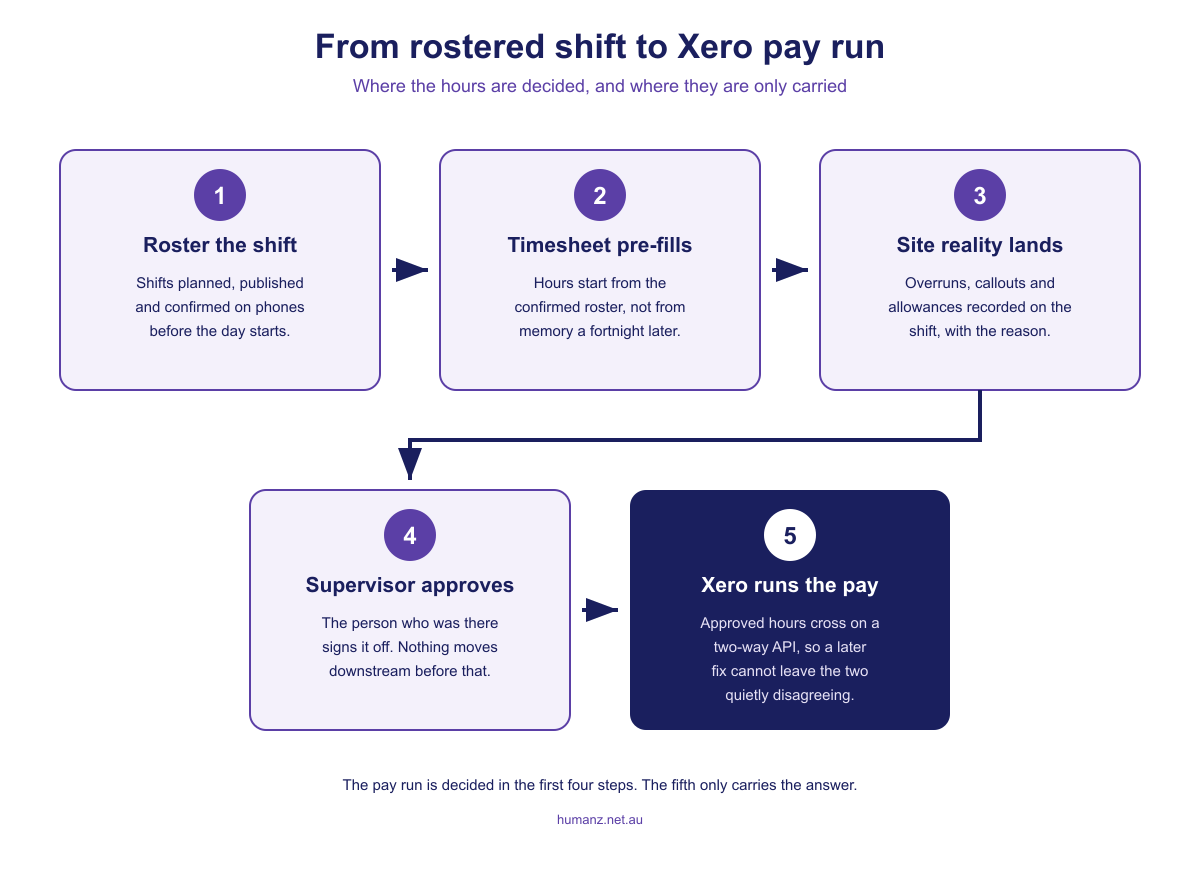
There are really only three patterns, and they differ enormously in how much of your week they consume.
Re-keying by hand. Someone reads hours off a paper timesheet, a text message or a spreadsheet, and types them into Xero. Cheap to start, and it works fine at five people. At fifty it is a part-time job with a permanent error rate, because every keystroke is a fresh opportunity to transpose 7.5 into 5.7.
File export. Your rostering or timesheet system produces a CSV or ABA file that you upload into Xero. Much better than typing. It is also a photograph: it captures what the hours were at the moment you pressed export, and it knows nothing about what happens afterwards.
Two-way API integration. The two systems talk directly. Approved hours move across without a file in the middle, and because the connection runs in both directions, the two systems stay in step rather than drifting apart between pay runs.
| Re-key by hand | File export | Two-way API | |
|---|---|---|---|
| Admin time per pay run | Hours | Minutes | Minimal |
| Error surface | Every keystroke | Mapping and stale files | Mostly configuration, set once |
| A corrected hour after transfer | Fix twice, remember to | Fix twice, or the two disagree | Stays in step |
| Audit trail | Whatever you kept | The file, if you saved it | Recorded on both sides |
| Breaks when | Someone is on leave | The format or a pay item changes | Credentials or mapping change |
Why an export and an integration are not the same word
This is the distinction most buying decisions get wrong, because both are described as “Xero integration” on a features page.
Picture a Thursday. You export the fortnight’s hours into Xero. On Friday morning a supervisor realises Wednesday’s crew stayed back three hours to finish a pour, and updates the timesheet. Your workforce system now says 84 hours. Xero says 81. Nothing in either system is aware of the disagreement. It surfaces either when the worker checks their payslip, or when someone reconciles by hand, or not at all.
A one-way file makes that scenario a certainty rather than a risk, because the only mechanism for keeping the two in agreement is a person remembering. A two-way connection removes the remembering. That matters most in exactly the businesses that are hardest to run: multiple sites, changing crews, work that overruns, corrections that arrive after the fact.
None of this makes exports worthless. If you run a small, stable crew and your hours rarely change after approval, a clean export is perfectly serviceable and much better than typing. The failure mode is buying an export while believing you bought an integration, then discovering the difference during your first messy fortnight.
The integration is only as good as the hours you feed it
An immaculate connection to Xero that carries wrong numbers just delivers wrong numbers faster. Almost all of the value sits upstream, in whether the hours were right before they moved.
Three things decide that.
Timesheets should start from the roster, not from a blank page. If a worker has to reconstruct last fortnight from memory, you are collecting recollections, not records. Pre-filling from the confirmed roster turns the task into confirming or correcting a known plan, which people do accurately and quickly. Our guide to pre-filled digital timesheets covers what that changes in practice, and reducing timesheet errors at the source covers the rest of the front line.
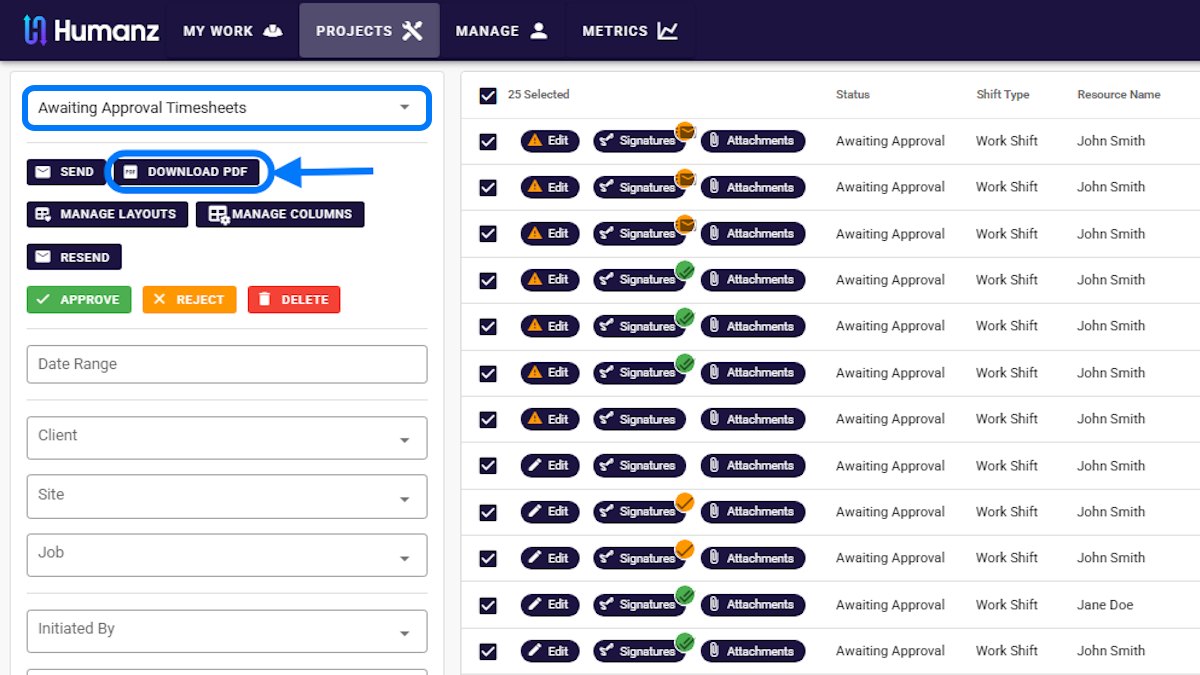
Nothing should move without an approval. The supervisor who was there is the only person who can say whether the extra three hours happened. A structured timesheet approval workflow puts that judgment before the transfer instead of after the payslip.
Variance should be captured, not smoothed over. When worked hours differ from planned hours, the reason is worth recording at the time. Six weeks later, “why was that job 40 hours over” is unanswerable without it. Reason codes are unglamorous and they are what makes job costing believable.
If you want to know what the current process is costing before you change anything, the free timesheet processing cost calculator and the payroll leakage calculator will give you a number from your own inputs in about a minute. Most people are surprised by the second one.
Where the money actually leaks
In field businesses the leaks are rarely in the base hours. They are in everything attached to the hours, which is precisely the detail a hand-keyed or exported summary tends to flatten.
- Penalty and loading conditions. Penalty rates depend on when the work happened, not just how long it took. A shift recorded as “10 hours” with no start and finish time cannot be interpreted correctly by any payroll system, Xero included.
- Allowances tied to conditions. Site, travel, height, confined space, remote. These attach to the circumstances of the shift, and they are the first thing lost when hours are summarised.
- Travel and mobilisation time. Whether it is paid, at what rate, and from which point, varies by agreement and is easy to record inconsistently across crews.
- The employee and subcontractor split. The same job can produce hours that become a pay run and hours that become an invoice. Both need the same underlying record. If your subbies live in a different system, or in no system, you are reconciling two versions of one week. Keeping subcontractors on the same platform as employees is what makes that one job instead of two.
Fair Work’s record-keeping requirements set the floor here, and they are more specific than most people expect about what has to be kept and for how long. The ceiling is worth knowing too. On the Fair Work Ombudsman’s current penalty figures, an underpayment contravention by a company with 15 or more employees carries a civil penalty of up to the greater of $546,000 or 3 times the underpayment, per contravention, and flat-total hours that misprice penalties and allowances are how a business backs into that territory. Meeting the record-keeping rules properly and feeding payroll accurately turn out to be the same task.
Single Touch Payroll raises the stakes
Under Single Touch Payroll you report to the ATO every time you run payroll, rather than once at the end of the year. Xero handles the reporting itself. What STP changes for you is the cost of a bad input.
Errors no longer sit quietly until an annual reconciliation. They are reported, and correcting them means an amended submission rather than a quiet fix. That puts a premium on three things that all live upstream of Xero: hours that were right the first time, an approval that happened before the pay run rather than after it, and a trail showing how a figure was arrived at. The ATO’s Single Touch Payroll guidance sets out the obligations in full.
The enforcement climate is moving the same direction. The Fair Work Ombudsman’s 2024-25 annual report notes a record $23.7 million in court penalties secured in a single year, including a $15.3 million penalty in one action, its highest ever. Pay errors stopped being treated as paperwork some time ago.
The compliance angle and the operational angle point the same way, which is convenient. Clean time data makes your STP reporting defensible and your Friday shorter.
What to ask before you believe an integration exists
Vendor feature lists are not much help here, because “Xero integration” covers everything from a genuine API connection to a CSV template someone wrote once. These questions separate them.
- Is it an API connection or a file? Ask directly. If the answer involves downloading anything, it is a file.
- Which direction does data move? One way into Xero, or both ways? What happens to a correction made in Xero?
- What happens when an approved hour changes after transfer? This is the question that finds the truth fastest.
- How do hours map to pay items? Ordinary time, overtime, allowances and leave need to land in the right categories, not arrive as one flat total for payroll to unpick.
- Do subcontractors and employees both come through cleanly? Different destinations, same source record.
- What does the audit trail look like on both sides? Who recorded a figure, who approved it, what changed.
- What happens when it breaks? Expired credentials and changed pay items are normal. How will you find out, and who fixes it?
Ask the same seven questions of your current process. It is a fast way to find out whether the problem is your software or your workflow, and occasionally the honest answer is the second one.
How Humanz feeds Xero
Humanz is workforce management software built in Australia for field operations: construction, mechanical contracting, mining services, drilling, civil and trades. It is deliberately not a payroll engine. It does not calculate gross to net, tax or super, and it has no ambition to.
What it does is the upstream half. Rosters are built once and published to workers’ phones. Timesheets arrive pre-filled from the confirmed roster and get checked against what actually happened on site. Nothing moves until the right supervisor has approved it, and every entry carries a record of who entered it, who approved it and what changed along the way. Around that sit the things that keep the hours legitimate in the first place: fatigue policies that stop a non-compliant shift being booked, credential expiry alerts, prestarts and site forms.
For businesses on Xero, the handover is a two-way API integration rather than a file drop, so approved hours flow through and the two systems stay in step in both directions rather than drifting between pay runs. Connecting takes a few minutes through the Integrations panel, and our Xero integration support page walks through the authorisation, exactly what Humanz can access, and how to disconnect; the broader integrations overview covers what else the platform connects to. How your particular pay items and allowance structure should map is a conversation worth having against your actual setup rather than a generic answer, and it is one of the first things we walk through in a demo.
Where a business runs something other than Xero, Humanz still does the same upstream job and hands over accurate, approved time data. It just does not pretend to be the system that calculates and pays.
One practical note for whoever in your business owns the software stack: Humanz supports Microsoft single sign-on across both the web app and the mobile app, so crews sign in with the credentials they already have and access is managed centrally. That tends to matter to the same person who asks about the Xero connection. We have covered it separately in Microsoft single sign-on for workforce software.
To see how the handover would work against your own pay categories, walk through it with our team.
Frequently asked questions
Does Xero have built-in rostering?
No. Xero Payroll calculates gross to net, superannuation and leave balances and reports to the ATO each pay run, but it doesn’t plan shifts, know who is on which site or check whether a ticket is current. Rostering happens upstream in workforce management software, which then hands Xero the approved hours.
What is the difference between a Xero export and a Xero integration?
An export produces a file that you upload, capturing the hours at the moment you generated it. A two-way API integration connects the systems directly and keeps them in step in both directions, so a correction after the transfer does not leave the two quietly disagreeing until someone reconciles by hand.
Does Humanz replace Xero Payroll?
No. Humanz produces accurate, approved time data and hands it to payroll. Xero Payroll does the calculation, the superannuation, the payslips and the Single Touch Payroll reporting to the ATO. The two do different jobs and most field businesses need both.
How do hours get into a Xero timesheet?
Three ways. A payroll admin can type them straight in, the worker can enter and submit them through the Xero Me app, or a connected system can write the whole timesheet through Xero’s payroll API, lines and rates included. The first two paths mean someone is re-creating numbers the roster already holds, and every keystroke is a fresh chance to transpose a figure.
Why do start and finish times matter if I already record total hours?
Because penalty rates, overtime thresholds and many allowances depend on when work happened, not only how much of it there was. A shift recorded as a flat total cannot be interpreted correctly by any payroll system, so the award gets applied to the wrong inputs and the pay comes out wrong.
Does Single Touch Payroll change what I need from a timesheet?
It raises the cost of getting it wrong. You report to the ATO every pay run, so errors surface immediately and corrections mean an amended submission. Accurate hours, an approval before the pay run and a clear audit trail are what make each report defensible.
Can rostering software handle subcontractors as well as employees?
Yes, and it should. The same job often produces employee hours that become a pay run and subcontractor hours that become an invoice. Keeping both on one platform means one approved record of who worked, with two different destinations downstream, rather than two systems to reconcile.
Related articles
Ready to see Humanz on your own roster?
Free 30-minute walkthrough, we'll use your real crews, sites and shift patterns.