
 Login
Login 

Timesheet software for Australian field & shift crews
Humanz prefills every timesheet from the roster, so the crew confirms hours on the phone instead of remembering them on Friday. Supervisors approve with signatures and attachments on record, and approved hours go to Xero or your payroll system. A timesheet app and time and attendance system built in Australia for the way field businesses work.

Hours that arrive approved, not reconstructed
Field timesheets fail in the gap between the shift and the pay run. Humanz closes it: the roster writes the timesheet, the worker confirms it, the supervisor approves it, and payroll receives it.
Timesheets that start full
Every shift on the roster becomes a timesheet with the job, site, start, finish and planned hours already in it. The worker checks it, adds a note or a photo, and submits. Nobody writes Thursday's hours from memory on Sunday night.
Approval with the evidence attached
Supervisors see a live queue of submitted timesheets by client, site and job, with signatures and attachments against each one, and approve or reject in bulk. Planned and actual hours sit side by side, so the variance is the first thing you see.
A clean handover to payroll
Approved hours go to Xero on a two-way integration, or out to any payroll system as a report, with the approval history kept against the record. Humanz does not calculate pay; it hands payroll hours that have already been checked.
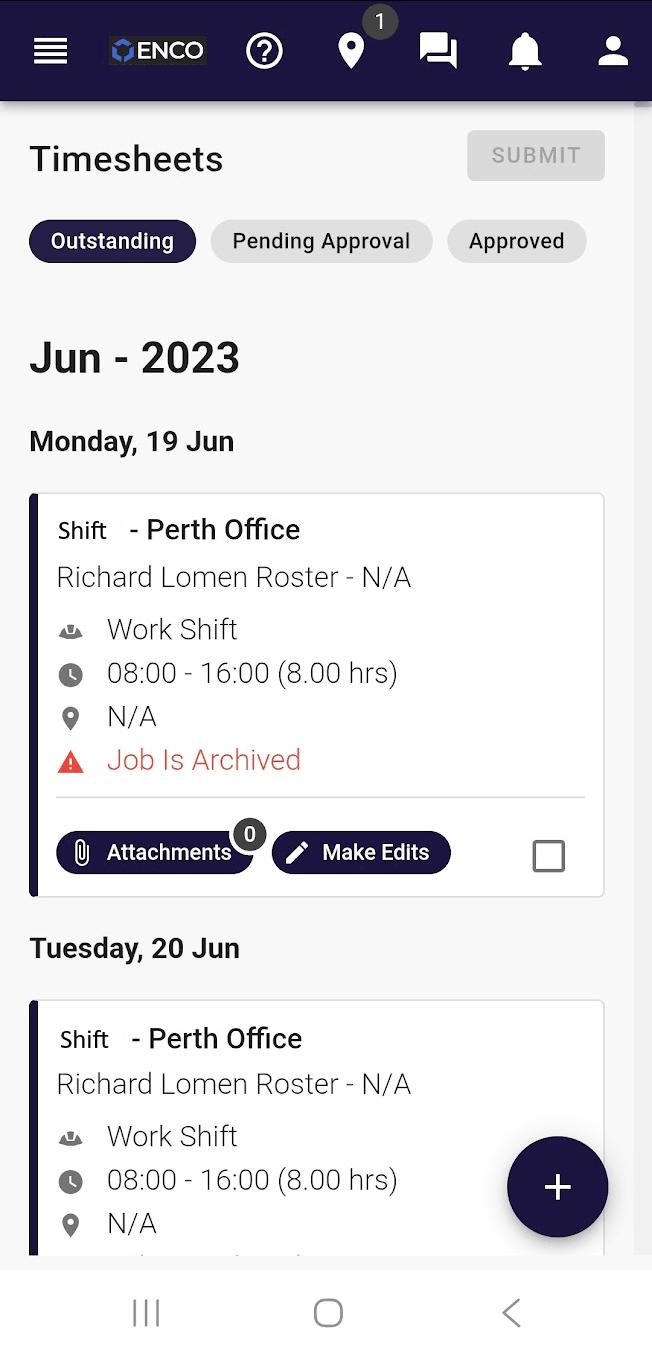
Roster-prefilled timesheets on the worker's phone
The roster already knows the job, the site and the planned hours, so the timesheet opens with them filled in. The worker edits the actuals, adds a note, a photo or a docket, and submits from wherever the shift ended.
- Job, site, start, finish and planned hours already filled
- Edit the actuals, add notes, attach a photo or a docket
- Outstanding, pending approval and approved in three tabs
- One list for employees, labour hire and subcontractors
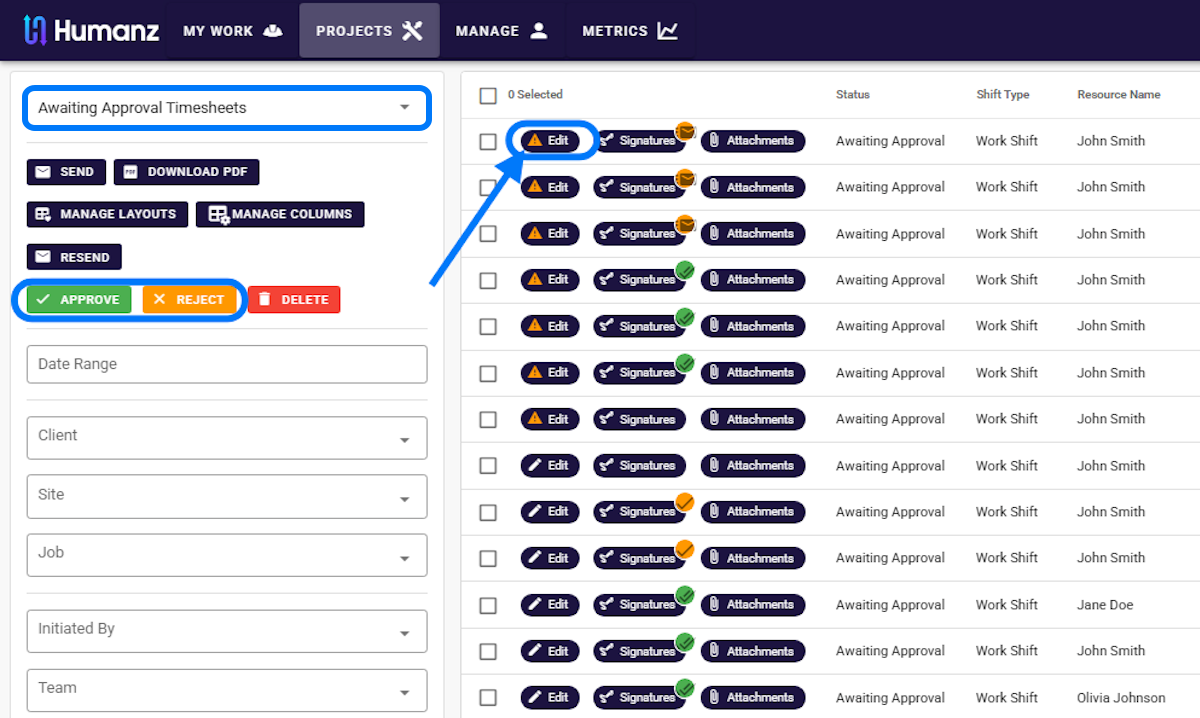
Approve, reject or send back, with signatures on each line
Approvers work from a live queue rather than an inbox. Each timesheet shows its signature and attachment status, the client, site and job it belongs to, and the planned hours beside the actuals, so the one that needs a question stands out from the twenty that do not.
- Queues for awaiting approval, team outstanding and historic timesheets
- Filter by date range, client, site, job, initiator or team
- Signature and attachment status visible per shift
- Approve, reject or send back for correction
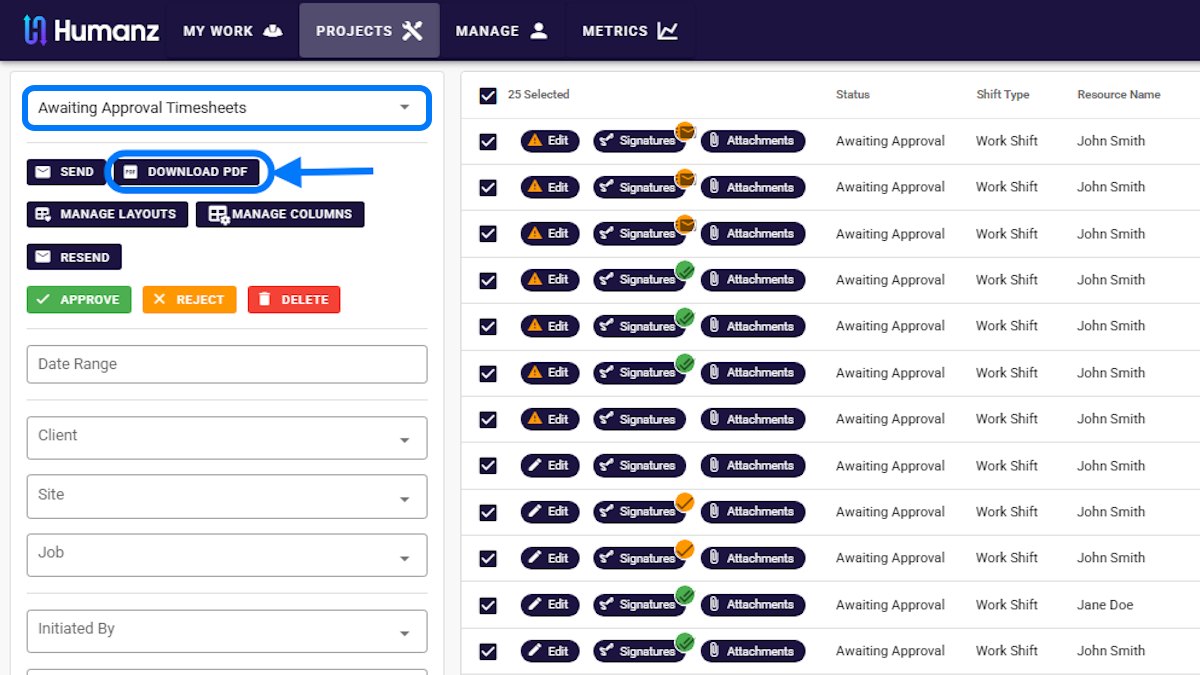
Bulk actions and a PDF for the client
Select a page of timesheets and approve them in one action, download a PDF pack for a client or a job, or resend a timesheet to the worker who left the break off. Layouts and columns are saved per approver, so the view fits the job.
- Select and approve a page of timesheets at once
- Download a PDF pack for a client or a job
- Resend a timesheet to a worker for correction
- Saved layouts and columns per approver
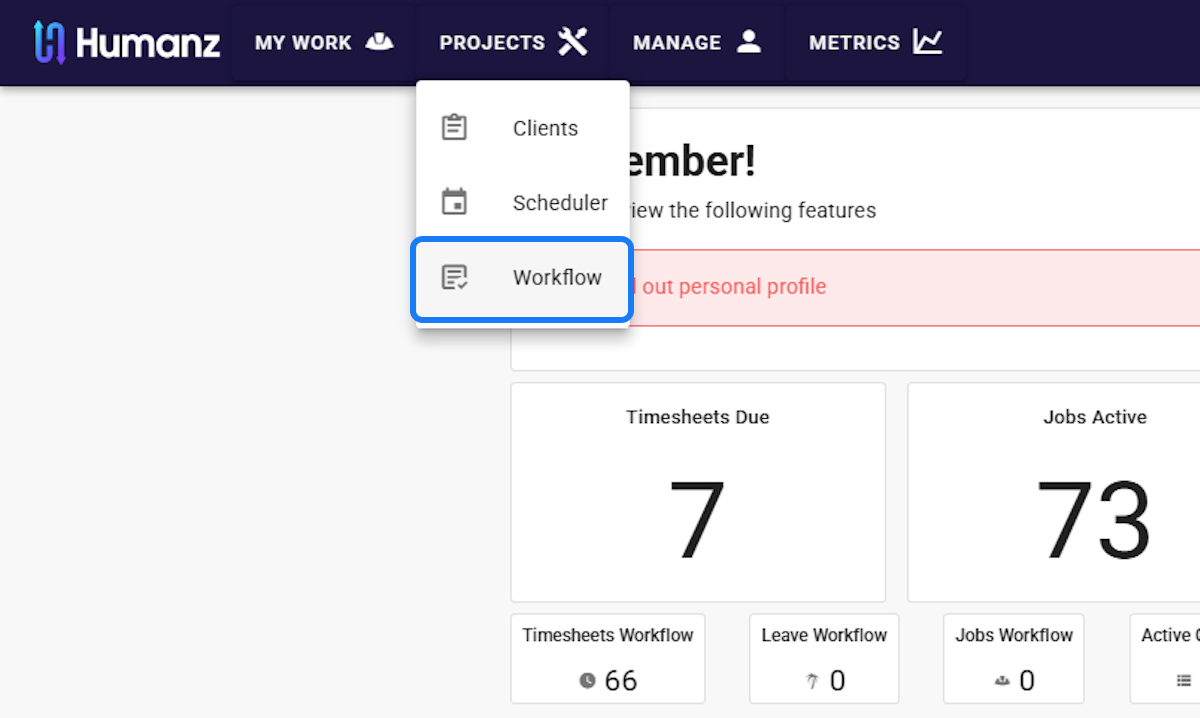
See what is due before payroll asks
The workflow dashboard shows timesheets due, timesheets in the queue, and the leave and job workflows beside them, so the chase has a name on Thursday rather than a number on Monday. Approvers who only approve get a supervisor portal and nothing else.
- Timesheets due and in workflow on one dashboard
- Leave and job workflows on the same screen
- A supervisor portal for approvers who only approve
- Outstanding timesheets by team
Approved hours to Xero, or to any payroll as a report
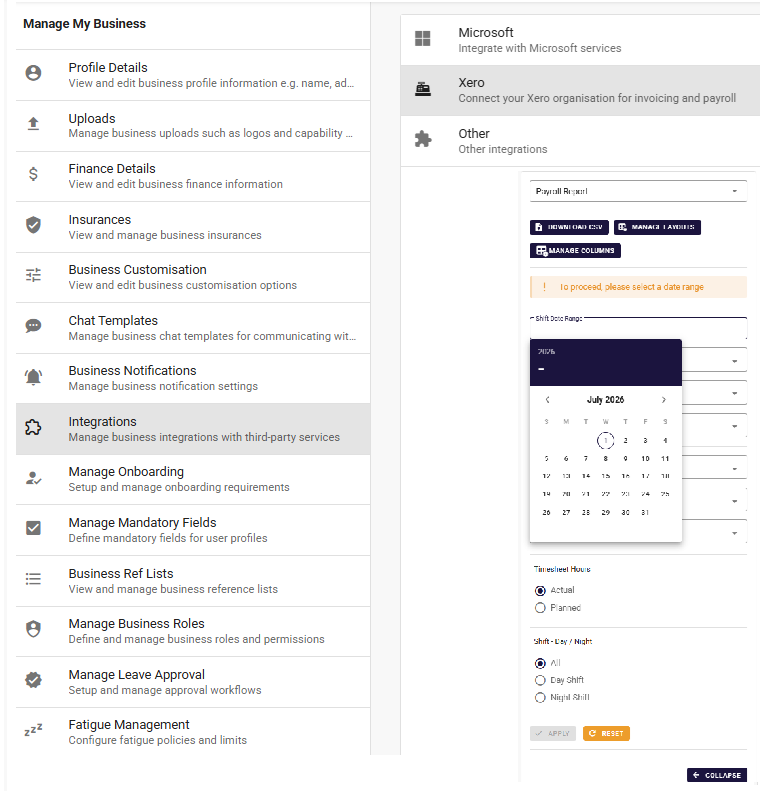
On Xero, approved hours flow across a two-way connection managed from your business profile. On anything else, the payroll report runs by date range with actual or planned hours and a day and night split, and downloads as a CSV your payroll system already imports.
- Two-way Xero connection from your business profile
- Payroll report by date range, actual or planned hours
- Day and night shift split, downloadable as CSV
- Approval history kept against every timesheet
Built for the records Fair Work expects
Timesheets are evidence. Humanz keeps them as the record, with the history attached, and leaves pay interpretation where the expertise is.
Time and wages records
Fair Work requires employee records to be accurate, accessible and kept for seven years. An approved timesheet with its edit and approval history is that record, not a reconstruction from a diary.
Award interpretation stays with payroll
Humanz records and approves hours. Rates, penalties and loadings are calculated in your payroll system from clean hours, which keeps the responsibility where the award knowledge is.
An audit trail on every timesheet
Who submitted, who edited, who approved and when, kept against the timesheet itself and visible when a client, an auditor or a worker asks.
Trusted by hundreds of Australian field & trades businesses






























.png)


























































Getting started is simple
We support each step and move at your pace, see our approach for the full rollout picture.
Connect the roster
Timesheets are generated from the shifts you already roster, so there is nothing to set up twice and nothing to key in.
Set the approvers
Choose who approves for each client, site or team, and whether signatures and attachments are required before a timesheet can be submitted.
Run the first pay cycle
Approve the first week in the workflow view, send it to Xero or export the payroll report, and compare the time it took with the old process.
Works with what you already run
A timesheet is only finished when payroll has it. Humanz connects outward so approved hours keep moving.
Xero
Approved hours flow to Xero on a two-way API, so a correction on either side is reflected on the other rather than reconciled by hand on a Friday.
How the Xero connection works →Microsoft single sign-on
Crews and approvers sign in with the Microsoft accounts they already hold, on the web app and the mobile app. One account to disable when someone leaves.
What your IT manager will ask →Your payroll system
Not on Xero? The payroll report hands over approved hours by date range in a CSV your system already imports, rather than pretending to be payroll.
The payroll handover in detail →Frequently asked questions
What is timesheet software?
Timesheet software records the hours a worker actually worked, routes them to someone who approves them, and hands the approved hours to payroll. In Humanz the timesheet is generated from the roster, confirmed by the worker on the mobile app, approved by a supervisor with signatures and attachments on record, and sent to Xero or exported as a payroll report.
Is there a timesheet app for workers?
Yes. Workers use the Humanz mobile app on Android and iOS to see their timesheets in three tabs (outstanding, pending approval and approved), edit the actual hours, add notes and attachments, and submit. The same app carries their roster, shift confirmations, leave requests and forms.
Does Humanz calculate pay or interpret awards?
No. Humanz records and approves hours and hands them to payroll. Rates, penalties, allowances and loadings are calculated in your payroll system, which is where the award knowledge sits. That split keeps the timesheet honest and the responsibility clear.
Does it clock workers in, or track their location?
No. Humanz has no clock-in, kiosk, geofence or GPS time tracking. Timesheets are prefilled from the roster and confirmed by the worker, then checked by a supervisor who knows the job. For field crews that model matches how work is actually done; a fixed-site clock-in tool is a different product.
How do approved hours get into Xero?
Through a two-way Xero connection set up from your business profile. Approved timesheets flow to Xero for the pay run, and corrections on either side are reflected on the other rather than reconciled by hand. Businesses not on Xero use the payroll report, a CSV by date range that any payroll system imports.
Can subcontractors and labour hire workers submit timesheets?
Yes. Subcontractors and labour hire workers use the same app and land in the same approval queue as employees, with the same signature and attachment rules. The approver sees who employs each person, and the records stay with the job whoever supplied the worker.
How long are timesheet records kept?
Timesheets and their approval history stay in Humanz for as long as your account is active, and can be exported at any time. Fair Work requires employee time and wages records to be kept for seven years, so the records are retained rather than overwritten by edits.
Something else on your mind? Browse every question we've answered →
Who it's for, and who it isn't
Timesheet software earns its keep where hours vary by job and site. Here is the honest split.
Built for
- Field, trades, civil and mining services crews whose hours change with the job, the site and the weather
- Businesses rostering employees, labour hire and subcontractors together and approving all three in one queue
- Operators on Xero who want approved hours flowing both ways rather than a monthly export
- Supervisors approving for several sites who need a queue with the evidence attached, not an inbox
Honestly, not for
- Retail and hospitality teams clocking in at a fixed counter. A kiosk or clock-in tool suits that; Humanz has no clock-in, kiosk or GPS time tracking.
- Businesses wanting pay calculated inside the timesheet tool. Humanz records hours; your payroll interprets the award.
- Agencies and studios tracking billable minutes against software projects. Different problem, different tool.
Guides & further reading
See a week of your timesheets run through Humanz
Book a free demo and bring last week's timesheets. We'll show the same week prefilled from a roster, approved in the workflow and ready for payroll.