
 Login
Login 

Timesheets & Payroll
The timesheet approval workflow: from site to payroll without the Friday chase
By Heather · 22 July 2026 · Updated 6 October 2026

A timesheet approval workflow is the path a submitted timesheet takes from the worker to payroll: a queue of what is waiting, a supervisor check against the roster, bulk approve or reject with an audit trail, a chase list for what was never submitted, and a clean handoff to the pay run.
Most businesses that move off paper timesheets fix the collection problem and keep the approval problem. The hours now arrive digitally, but they still land in an inbox. Someone still cross-checks them against the roster line by line, and every second Friday still ends with phone calls to the three people who haven’t submitted.
Collection is half the job. The other half is that timesheet approval workflow, run properly. This article walks through what that looks like in practice, using the workflow built into Humanz workforce management software. (Want the dollar figure first? The free timesheet cost calculator prices your current pipeline in four inputs.)
Why approvals break long before payday
When approval lives in email or on paper, four things go wrong on repeat:
- No single queue. Timesheets sit in inboxes, folders and photo rolls. Nobody can say how many are outstanding without going looking.
- Approval means “glanced at”. Without the roster beside the timesheet, the approver can’t easily see that 11.5 claimed hours were rostered as 10, or that an ordinary-looking Tuesday was a worked rostered day off, so variances slip through to payroll, where they’re expensive to unwind. And there is no flat number to wave through. ABS working arrangements data has 22% of Australian employees, 2.7 million people, with earnings that vary from one pay period to the next before overtime even enters it. Approvals only get quick when the timesheet arrives prefilled from the rostering software that scheduled the shift.
- The chase is manual. Someone spends Friday afternoon ringing crews for missing sheets, every single pay cycle.
- No trail. When a pay query lands weeks later, reconstructing who approved what, and what changed between submission and approval, takes hours. That trail is exactly what the Fair Work Ombudsman expects employers to be able to produce for time and wages records, and the gap gets fined at volume. The FWO’s 2024-25 annual report shows 743 infringement notices issued for record-keeping or pay slip breaches that year, with $838,000 paid.
If your team is still weaning itself off paper, start with our guide to digital timesheets for tradies. The rest of this article assumes the hours are already arriving digitally.
One queue, filtered to what you own
The heart of the workflow is a set of purpose-built views. In Humanz, the Workflow area gives an approver a live queue for each state a timesheet can be in:
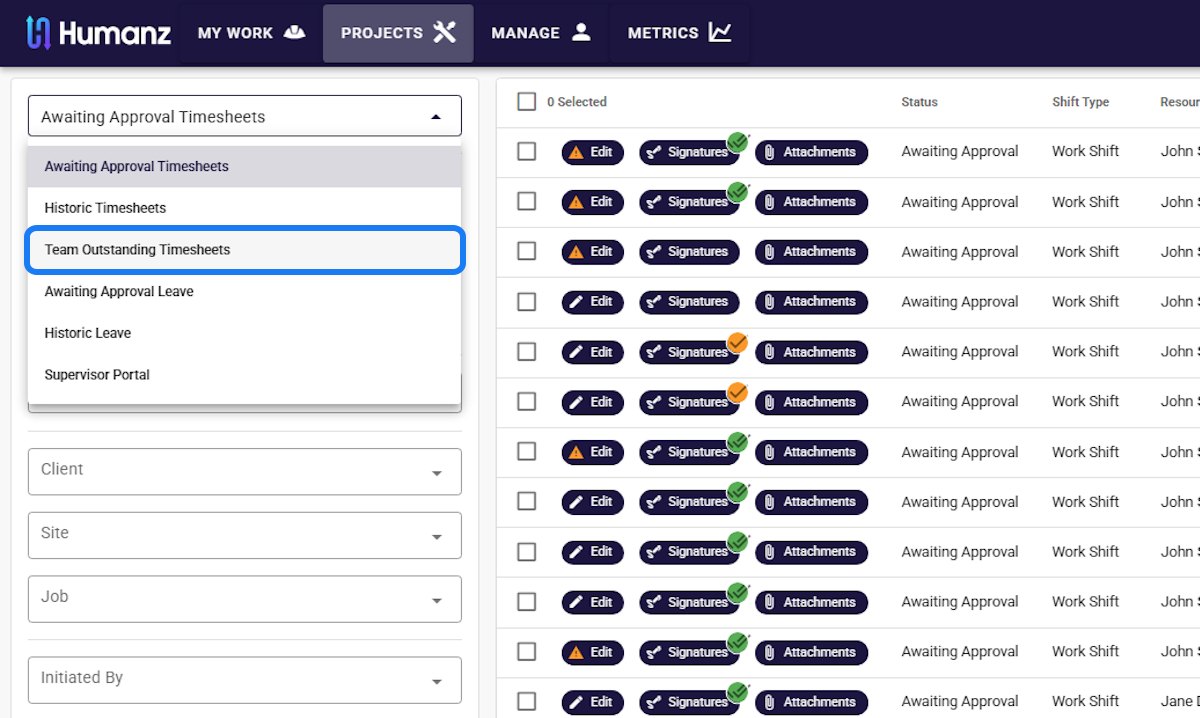
- Awaiting approval. Everything submitted and not yet actioned, filterable by client, site, job, team or who initiated it
- Team outstanding. Shifts that have been worked but whose timesheets haven’t been submitted. Your chase list, generated for you
- Historic. The archive of everything approved, for audits and pay queries
- Leave workflows. Leave requests running through the same approve/reject pattern, which matters because leave and hours end up in the same pay run (more on that in what to look for in leave management software). Overtime banked as time off in lieu (TOIL) is the clearest case: it starts as approved overtime on a timesheet and ends as approved time off on the roster
The filters matter more than they look. “Show me awaiting-approval timesheets for Client A’s shutdown job” is a ten-second question, and a supervisor only sees the crews they manage, which keeps each queue short enough to clear.
Working the queue: bulk actions with an audit trail
Opening every timesheet individually doesn’t scale past a dozen workers. A real approval hub lets you:
- Select and approve in bulk once you’ve scanned for exceptions, with reject and delete sitting beside it for the ones that need to go back
- See exceptions at a glance. Because timesheets in Humanz prefill from the roster, the ones matching plan need seconds, and edited entries carry a visible warning marker so attention goes where the variance is. Prefill is the single biggest error-killer. We covered the wider list in how to reduce timesheet errors
- Check signatures and attachments inline. Client sign-offs, dockets and photos travel with the timesheet instead of a separate email thread
- Resend for signature when a docket needs a client’s counter-signature before it can be billed
- Download to PDF when a client or auditor wants the pack, without re-keying anything
Every action is stamped to a user and time, so “who approved this and when” is a lookup, not an investigation.
The chase list that builds itself
The quiet hero of a good workflow is the outstanding view. Every worked shift with no submitted timesheet sits in one list with the worker’s name against it. Instead of discovering the gaps at payroll cut-off, a coordinator checks the list mid-week, nudges the stragglers through the app’s messaging, and arrives at Friday with nothing missing. Workers submit from the phone already in their pocket, in the same app they confirm shifts in, so “I’ll do it when I’m back at the office” stops being a reason.

A weekly rhythm that kills the Friday scramble
Tools aside, the businesses that make approvals painless run a simple cadence:
- Daily, two minutes. Workers submit as they finish the shift, not “at the end of the week from memory”. Prefilled timesheets make this a tap, and same-day hours are accurate hours.
- Mid-week, 10 minutes. The coordinator opens the outstanding view and nudges anyone behind. Two days out from cut-off, a reminder is a favour. On cut-off day, it’s a crisis.
- Approval day, 30 minutes. Supervisors clear their awaiting-approval queues. Bulk-approve the clean ones, action the flagged ones, resend anything needing a client signature.
- After cut-off, zero minutes. Payroll takes the approved data as-is. If this step still involves a spreadsheet, one of the steps above is leaking.
Since payday super arrived, this cadence carries a legislated edge as well. Under the ATO’s payment deadline rules, super has to be received by each worker’s fund within 7 business days of payday, and a late landing triggers a charge that stacks daily-compounding interest with an administrative uplift starting at 60% of the shortfall and interest. Every day a timesheet sits unapproved is a day off that window. The Friday chase used to cost goodwill. Now it can cost a percentage. We’ve covered the shift in full in payday super and your timesheet deadline.
The rhythm matters more than the feature list. An approval workflow only pays off when the queue gets cleared on schedule, and short, predictable sessions are what keep supervisors doing it.
The payroll handoff
Approval is the last gate before money moves, and it’s where the loop should close. Approved hours flow to payroll as structured data, not a spreadsheet someone re-keys, with the roster, the worked time and the paid time all reconciling. That reconciliation is what protects margin on cost-plus work, keeps Single Touch Payroll reporting to the ATO clean, and turns pay queries from archaeology into a filter. We’ve written up the integration patterns in connecting workforce management to payroll.
The benefit compounds, too. Once approvals run through one system, the same data answers planning questions (planned versus worked hours by job, by site, by client), which is the foundation of the workforce analytics most field businesses wish they had. Approved hours also feed safety reporting: they are the denominator in the lost time injury frequency rate a tender asks for.
Frequently asked questions
What is a timesheet approval workflow? It’s the structured path a timesheet follows from submission to payroll. The timesheet lands in an approval queue, an authorised approver reviews it against the roster and approves or rejects it with an audit trail, and approved hours flow to payroll. The workflow also surfaces what hasn’t been submitted, so chasing happens early instead of in a payday scramble.
Who should approve timesheets, the office or supervisors? The person who knows whether the hours are real, which is usually the site supervisor or coordinator who managed the shift. A supervisor-scoped portal means each approver only sees their own crews, and payroll receives hours that have already passed the person closest to the work.
What should a supervisor check before approving a timesheet? The variance from the roster, not every line. When timesheets prefill from the roster, entries that match plan need only a scan, and attention goes to edited entries, which carry a warning marker, and to any missing signatures or attachments. Approving against the roster is what catches the 11.5 claimed hours that were rostered as 10.
Can timesheets be approved in bulk? Yes, and they should be. When timesheets prefill from the roster, the majority match plan and can be selected and approved together, leaving individual attention for the entries flagged as edited or unusual.
How do you handle timesheets that were never submitted? A team outstanding view lists every worked shift with no timesheet against the responsible worker. Coordinators chase from that list during the week, by in-app message rather than phone calls, so the pay run isn’t held hostage by two missing sheets on Friday afternoon.
What records do we need to keep for approved timesheets in Australia? Employers must keep time and wages records for seven years under the Fair Work system. A digital approval workflow satisfies this naturally: submission, edits, approver, approval time and any signatures are stored against each timesheet and can be produced on request.
Can clients sign off on timesheets before invoicing? Yes. Client sign-offs, dockets and photos travel with the timesheet itself rather than in a separate email thread, and a timesheet can be resent when a counter-signature is missing. When the client or an auditor wants the pack, it downloads to PDF without anything being re-keyed.
Does this work for subcontractors as well as employees? Yes. Subcontractor hours can run through the same submission and approval queues, which is how you avoid the “two systems, two chases” problem.
Related articles
Ready to see Humanz on your own roster?
Free 30-minute walkthrough, we'll use your real crews, sites and shift patterns.