
 Login
Login 

Rostering & Scheduling
Humanforce, Employment Hero and Dayforce Alternatives for Field Teams
By Duane Butler · 8 August 2026 · Updated 3 September 2026

Search for alternatives to Humanforce, Employment Hero or Dayforce and you’ll mostly find listicles written by people who have never stood on a site. This guide takes a different approach. All three are established, capable platforms with real strengths, and plenty of Australian businesses run them happily. The useful question is narrower. Do those strengths line up with the way field, trades and resources businesses actually operate? And if they don’t, what should the alternative do that your current tool can’t?
We build a workforce management platform for exactly those businesses, so we have a position here and won’t pretend otherwise. What we can promise is a fair frame: where each platform’s origins give it an edge, where field operators tend to hit friction, and what a switch really involves.
Origins shape fit
Software keeps the accent of the problem it was born to solve. That’s not criticism. It’s the single most useful lens for choosing between platforms.
Humanforce grew up in Australian shift-based workforces. Venues, hospitality groups, healthcare and aged care providers with rostered staff at fixed locations. It’s a mature product with deep award-interpretation heritage, and in recent years it has broadened into a wider suite covering HR and payroll alongside workforce management.
Employment Hero approaches from the employment side. It made its name as an Australian HR, payroll and employee-management platform, and rostering sits within that HR-led suite. For businesses whose biggest pain is employment admin (contracts, onboarding paperwork, payroll and benefits), that orientation is a genuine strength.
Dayforce is a global enterprise HCM platform. Payroll, HR and workforce management in one system of record, built for large organisations with the appetite and resources for an enterprise implementation. For a multinational standardising thousands of employees onto one stack, that scale is the point.
None of that is a weakness in the abstract. The friction starts when the operating model on the ground looks nothing like the model the software grew up serving.
| Platform | Grew up serving | Strongest when |
|---|---|---|
| Humanforce | Australian shift workforces at fixed locations | Venues, hospitality groups, healthcare and aged care rosters |
| Employment Hero | HR, payroll and employment admin | The main pain is contracts, payroll and people admin |
| Dayforce | Global enterprise HCM | Large organisations standardising on one worldwide system |
| Humanz | Australian field, trades and mining operations | Blended crews, swings, site compliance and remote work |
A table like this is a starting point, not a verdict. Every one of these products has grown well beyond its origins. But when a demo feels like the software is politely translating your world into someone else’s, the origin story is usually why.
Where field businesses hit the limits
The pattern in the businesses that come to us is consistent. The tool wasn’t bad. It was built for a different shape of work. Five gaps come up again and again.
Subcontractors on the same roster as employees. HR-led and employee-centric platforms are organised around the employment relationship. Subbies and labour hire, who might be a third of your crew on any given day, end up in spreadsheets beside the system rather than inside it. Field operations need one roster across the whole blended crew, with per-type compliance profiles.
Swings, not weeks. An 8/6 or 2/1 pattern, panels offset so a site never goes quiet, travel days that belong to the shift. Weekly-pattern schedulers, which serve retail, hospitality and event rosters well, can usually be bent into shape, but every bend is a workaround a planner maintains by hand. Our guide to FIFO rostering software covers what native swing support looks like.
Compliance gates at the point of booking. In construction, mining services and drilling, the licence check has to stop the wrong booking before it happens, not report it afterwards. That means tickets, site inductions and fatigue limits evaluated as the shift is placed, which is a different architecture from running a compliance report on Friday.
Site logistics attached to the roster. Flights, camp rooms, vehicles and plant. If the roster doesn’t know about them, someone reconciles booking spreadsheets after every change. Generalist platforms rarely treat travel and assets as roster items, because in the industries they grew up serving there’s nothing to attach.
An implementation sized for your business. Enterprise HCM platforms are powerful and priced and paced accordingly. The published Australian rates, and the minimums and add-ons behind them, are in how much workforce management software costs. A 60-person mining services contractor doesn’t have a six-month implementation team, and doesn’t want to discover mid-project that field-specific requirements sit in the customisation budget. Leaner operations face the mirror image of the same question, which our guide to workforce management for startups and small businesses works through.
If two or more of those describe your operation, you’re not shopping for a better version of the same tool. You’re shopping for a different category, and the best workforce management software comparison walks through how to weigh the categories side by side.
What to score an alternative against
Skip the generic feature matrix and score candidates against your operating model. The checklist we’d use:
- Crew mix. Employees, labour hire and subcontractors on one roster, each carrying their own compliance profile
- Roster patterns. Swings, panels, DIDO and travel days as native objects, not weekly grids bent out of shape
- Compliance model. Licences, inductions and fatigue checked at booking time, with the audit trail written automatically
- Field reality. A mobile app crews actually use, working on patchy coverage, with shift confirmation tracking so you know who has seen what
- Logistics. Flights, rooms, vehicles and plant schedulable beside people
- Australian fit. Built around Fair Work record-keeping, local awards vocabulary and Australian-hours support
- Reporting. Fill rates, planned versus worked hours and utilisation without exports and pivot tables
Two free tools help put numbers on the decision. The cost calculator prices what manual workarounds and no-shows currently cost, and the ROI calculator turns that into a payback case you can put in front of whoever signs.
What switching actually involves
The fear that keeps businesses on the wrong platform is the switch itself, and payroll continuity is the legitimate part of that fear. The answer is a migration process rather than a leap of faith.
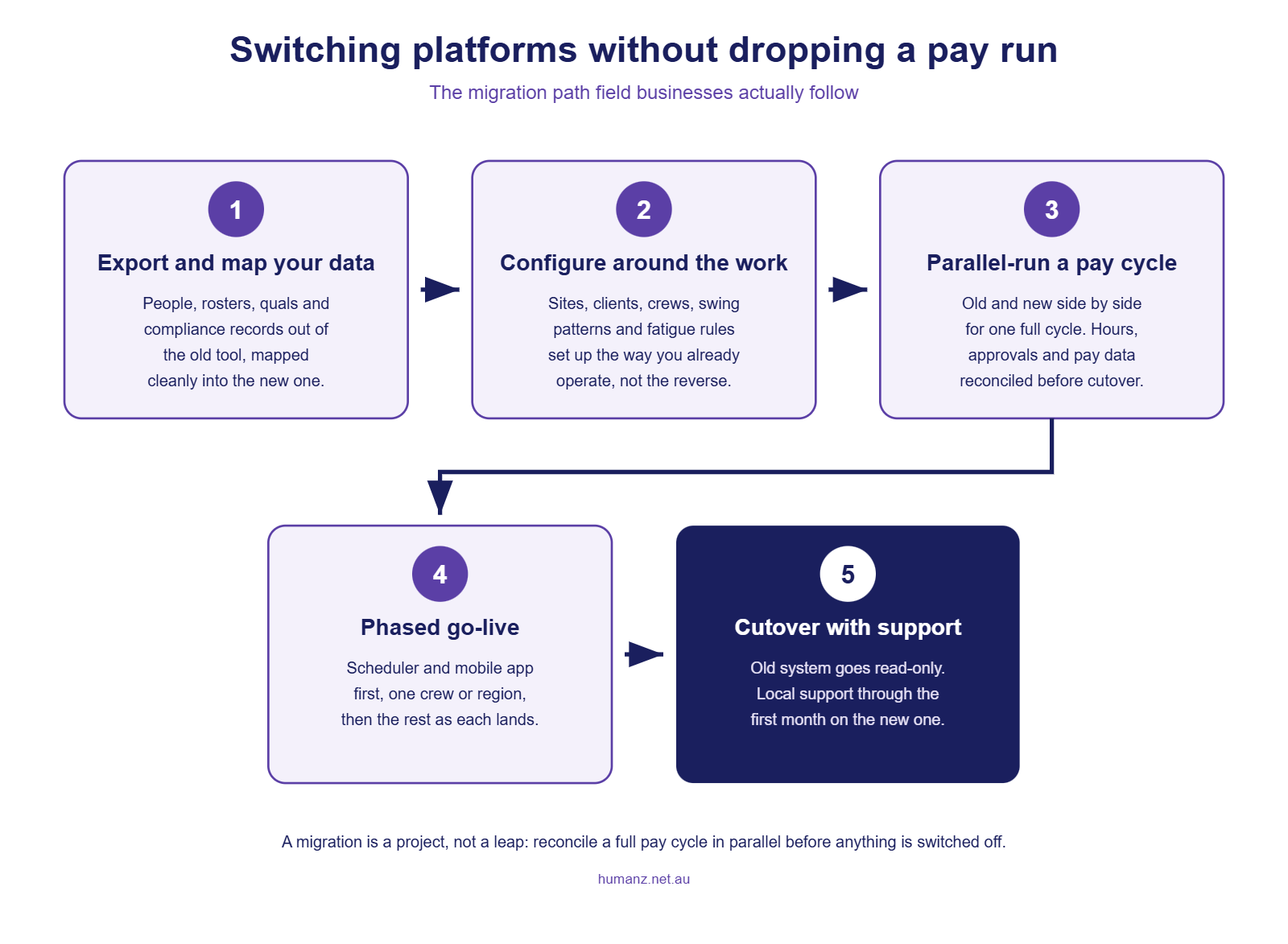
Export and map your data. People, roster history, qualifications and compliance records come out of the old system and get mapped into the new one. Ask any vendor to show you this process before you sign, not after.
Configure around the work. Sites, clients, crews, swing patterns and fatigue rules set up the way you already operate. If the implementation conversation keeps steering you toward changing how you work to suit the software, that’s a signal worth heeding.
Parallel-run a full pay cycle. Old and new side by side for at least one cycle, with hours, approvals and pay data reconciled between them. This is the step that protects the pay run, and it’s non-negotiable. The Fair Work Ombudsman expects time and wages records to stay accurate and complete through any system change, and Single Touch Payroll reporting to the ATO doesn’t pause because you’re migrating. The downside of a broken pay run is measured every year. In 2024-25 alone the Fair Work Ombudsman recovered $358 million for more than 249,000 underpaid workers, taking recoveries over the last five years past $2 billion.
Phase the go-live. Scheduler and mobile app first, usually with one crew or region, then timesheets, then forms. Each step lands when the team is ready, which is the same phased approach we use for every rollout.
Cut over with support. The old system goes read-only for reference, and local support carries the first month on the new one. Australian-hours support matters most right here, when the 5am questions are real.
Most businesses find the crew-facing side lands faster than expected, because for workers the change is simply a better app. The office side carries the real work, and the parallel pay cycle is where that work concentrates.
Sometimes the answer is two systems, not one
One honest wrinkle the listicles skip: switching isn’t always a straight replacement. Some businesses are best served running an HR-led platform for what it does well (employment contracts, leave balances, payroll administration) beside a field-built platform for what it does well (rostering, compliance gates, site logistics, timesheets from the field).
That architecture works when the two systems have a clean handoff. In practice the seam is payroll: the field platform owns the roster, captures worked hours and runs approvals, then hands approved, structured time data across to whatever runs the pay. Scale is no protection at that seam. About 60% of what the Fair Work Ombudsman recovered in 2024-25 came from large corporate employers, almost $213 million back-paid to nearly 118,000 employees, so a big-name system and a big implementation budget don’t immunise a pay run on their own. Our guide to payroll integration for workforce management covers what a clean handoff looks like and the questions to ask about it.
The trap to avoid is the reverse arrangement, where an HR suite’s rostering module is pressed into field service because it came bundled. Bundled and fit-for-purpose are different properties. If coordinators keep a spreadsheet beside the bundled module to run the real roster, the bundle is costing more than it saved.
Where Humanz sits in this
Humanz is the field-built option in this comparison. Founded in Perth in 2019, used by mining services, construction, drilling and trades businesses, and built around the five gaps above: blended crews on one roster, native swing patterns, compliance gates at booking time, travel and assets as roster items, and a mobile app crews keep using after week one.
We’re the right fit when field operations are the centre of your problem. We’re honest about the reverse, too. If your pain is white-collar HR admin, benefits and performance reviews, an HR-led platform genuinely serves you better, and our piece on workforce management versus HR software explains where that line runs. And if you’re comparing against the hospitality-heritage tools instead, the same fair-frame treatment is in our Deputy and Tanda comparison.
Frequently asked questions
What is the best alternative to Humanforce for rostering and scheduling?
It depends on the shape of your workforce. For fixed-location shift businesses, several established platforms compete well. For field operations with blended crews, swing rosters and site-specific compliance, a field-built platform like Humanz is the stronger fit because those requirements are native rather than configured workarounds.
Is Employment Hero suitable for rostering field crews?
Employment Hero is an HR-led platform, and its strength is employment administration: contracts, onboarding paperwork and payroll. Businesses whose main challenge is operational rostering across sites, subcontractors and swing patterns usually find they need a workforce-management-first tool, sometimes running alongside an HR system.
Is Dayforce suited to small and mid-sized field businesses?
Usually not, and that is about sizing rather than quality. Dayforce is a global enterprise HCM platform built for large organisations standardising thousands of employees onto one stack, with implementations priced and paced accordingly. A 60-person mining services contractor rarely has a six-month implementation team, and field-specific requirements can land in the customisation budget.
Can we keep our HR platform and run a field rostering platform beside it?
Yes, and for some businesses that is the right architecture. The HR-led platform keeps doing contracts, leave balances and payroll administration, while the field-built platform owns the roster, compliance gates, site logistics and timesheets. The seam that matters is payroll: the field platform hands approved, structured time data across to whatever runs the pay. The trap is the reverse arrangement, where a bundled rostering module gets pressed into field service because it came with the suite.
How long does it take to switch workforce management platforms?
For a field business of 20 to 200 workers, a phased migration typically runs a few weeks from data export to full cutover, with at least one full pay cycle run in parallel on both systems. The crew-facing app usually lands within days. The office-side reconciliation is where the calendar time goes.
Will switching platforms put our pay run at risk?
Not if the migration includes a parallel pay cycle. Running old and new systems side by side for a full cycle, and reconciling hours and pay between them before cutover, is the standard protection. Treat any migration plan without that step as incomplete.
Do we lose our roster history and compliance records when we switch?
You shouldn’t. Worker records, qualifications and compliance documents should be exported and mapped into the new platform, and the old system can be kept read-only for reference. Time and wages records must be retained for seven years regardless of which system holds them, and the obligation is enforced. Fair Work inspectors issued 743 infringement notices for record-keeping or pay slip breaches in 2024-25, with $838,000 in penalties paid, so the records need to arrive in the new system intact.
Related articles
Ready to see Humanz on your own roster?
Free 30-minute walkthrough, we'll use your real crews, sites and shift patterns.