
 Login
Login 

Guides
How Much Does Workforce Management Software Cost in Australia?
By Richard Lomen · 2 September 2026 · Updated 6 October 2026

Between about $6 and $15 per user per month, if the vendor publishes a price at all. “Depends on your business” if they don’t. Both answers are real, and the split between them tells you more about this market than any single number does.
First, a disclosure. Search this question and every result you’ll get is a software vendor, us included. There’s no independent price survey for this category in Australia, so every article on page one is a vendor grading its own homework. The best we can do is show our working. Published prices with a capture date, the conditions attached to them, and a straight explanation of why the vendors at the heavy end won’t name a figure until they’ve met you.
Every price here was checked in early September 2026 against the vendor’s own pricing page. Prices drift, plans get renamed, minimums appear. Confirm current pricing on each vendor’s site before you commit to anything.
If you’re still working out what sits inside the category, start with what workforce management software actually covers. This piece is only about the money.
The two pricing models you’ll meet
Australian vendors split into two camps, and the split isn’t random.
The rate-card camp publishes per-user prices. Deputy, RosterElf and foundU all do, Tanda publishes one bundle price, and Employment Hero lists prices with conditions. The products at this end mostly serve rostering that looks the same everywhere it’s sold. A café roster in Perth needs what a café roster in Cairns needs, so one public price fits every buyer.
The quote camp doesn’t. Workforce.com shows four plans and every one of them says “Request Pricing”. Humanz carries no public rate card either. The products at this end run field workforces with compliance loads, and the cost of standing one up varies too much per business for a sticker to be honest. Whether that’s a fair excuse is a question we’ll come back to.
Here’s the published end of the market as it stood in early September 2026.
| Vendor | Published price (AUD per user per month unless noted) | The fine print |
|---|---|---|
| Deputy | Lite $6.75, Core $8.75, Pro $13, excluding tax | $30 minimum monthly spend on monthly plans. Payroll, HR, messaging and analytics are paid add-ons |
| Tanda | $12.80 plus GST for the HR, Payroll and Workforce Management bundle | The individual modules show no published price, just a “Request pricing” button |
| RosterElf | Core $6 plus GST per employee on annual billing, or $8 billed monthly. Full Suite $7 annual or $10 monthly | Minimum 10 seats on annual billing, 3 staff on monthly. 250+ employees is contact-only |
| foundU | Essential $12, Everyday $15 per active user, excluding GST | Under 25 employees the minimum charge is $400 a month. The top Performance tier is quote-only |
| Employment Hero | HR Essentials listed at $10 per employee. Rostering and time and attendance add-on $4 | Minimum 10 users. Add-on minimum $40 a month. Billed on the higher of contracted or active users |
| Connecteam | Operations hub $29, $49 or $99 a month in US dollars, covering the first 30 users | Each hub is priced separately. Extra users cost per head. Free plan for up to 10 users |
| Workforce.com | No published prices | All four plans say “Request Pricing”. Cost depends on modules, headcount and implementation |
| Humanz | No published prices | Quoted per business on workforce size, with all 14 modules included and rollout scoped into the quote |
Treat the table as a snapshot, not a promise. Four of those rows deserve a closer look before you build a comparison spreadsheet around them.
Deputy’s Australian pricing is the cleanest rate card in the market, and also the most modular. The $8.75 Core plan, the one Deputy marks as most popular, covers the scheduling basics. Payroll is a $5 add-on per user per month, HR another $3.50, Messaging+ $2.75 and Analytics+ $2. Take all four and the add-ons total $13.25 per user per month on top of the base plan, which lands a fully loaded Deputy well past its own Pro sticker. SMS costs about 5 cents AUD per 160 characters, and Deputy’s own page notes that many messages run longer than that, so one wordy roster update counts as more than one SMS. Small, but it’s metered, and it scales with how chatty your rostering is.
Connecteam’s pricing is in US dollars, which its page states plainly, so an Australian buyer has to add currency conversion and card fees before comparing anything. The model is also different in kind. Instead of per-user pricing there are flat tiers per hub, $29, $49 or $99 a month for the Operations hub, each covering the first 30 users with extra users charged per head, and each hub priced separately. There’s a free Small Business Plan for up to 10 users, covering all hubs, with the “all features” claim qualified by a footnote. For a crew of 12 on one hub the maths can be very cheap. Stack hubs and tiers and the flat fees compound.
foundU’s pricing bills per active user at $12 for Essential or $15 for Everyday, excluding GST, with the Performance tier quote-only. The catch for small operators sits in the floor. Under 25 employees the charge defaults to $400 a month, so a 20-person crew pays the minimum rather than 20 times $12. foundU also tiers its implementation, self-managed on Essential and assisted on Everyday, which is more useful information than most pricing pages volunteer.
Employment Hero’s Australian pricing page lists HR Essentials at $10 per employee per month with a 10-user minimum, and its rostering and time and attendance add-on at $4 with a $40 monthly floor. The page never states the currency or the GST treatment, which is worth confirming before you compare it against the ex-GST rows above. One condition matters more than the rest. Billing runs on the higher of your contracted user count or your active user count, so a quiet month doesn’t shrink the invoice.
Why the compliance-heavy end won’t name a price
A shift-swap app is the same product for every café that buys it. Load the staff, set the trading hours, publish the roster. The vendor can price it like a phone plan because the work of standing it up is nearly identical everywhere.
A platform for field crews isn’t like that. Before the first roster goes out, someone has to load every worker’s tickets, licences and inductions and decide which of them should block a booking. Subcontractor businesses arrive with their own entities, insurances and expiry dates. Pay rules have to reconcile with whatever the payroll system already believes. Crews need the mobile app working before Monday on sites where phone coverage is a rumour. Two businesses with identical headcounts can be weeks apart in setup effort, and an honest price has to know which one you are.
That’s the real reason the quote camp exists. Workforce.com’s own pricing FAQ says its cost depends on which modules you want, how many staff you have and your implementation requirements. That isn’t evasion, it’s an admission that the product is a project.
Notice the pattern in the table, though. The published end of the market is desk-and-counter rostering. The quote end is field work and compliance. When a vendor with a simple product hides its price anyway, that’s a different signal, and you’re allowed to read it as one.
The costs that never make the pricing page
The per-user sticker is the start of the bill, not the bill. Six things to price before you compare anything.
Minimum spends. Deputy applies a $30 monthly minimum per invoice on its monthly Lite, Core and Pro plans. RosterElf wants at least 10 seats on annual billing or 3 staff on monthly. foundU’s floor for small headcounts is $400 a month. Employment Hero’s rostering add-on carries a $40 monthly floor of its own. None of this is scandalous, but every line changes the maths for a small crew. To show how much, we priced the same 10-person crew against every published AUD rate card in the table above (Connecteam sits out, since its US-dollar hubs price by tier rather than per user). The monthly bill runs from roughly $60 on RosterElf Core (annual billing, ex GST) to foundU’s $400 floor, with Deputy Core at $87.50, Tanda at $128 and Employment Hero at about $140 once the rostering add-on is included. A spread of more than six times for an identical crew, and almost none of it is features. It’s minimums.
The definition of a billable user. foundU bills per active user. Employment Hero bills on the higher of contracted or active users. If your workforce swells for shutdowns and shrinks afterwards, the definition decides whether you pay for the peak all year.
Add-ons and modules. Deputy’s four add-ons together cost more than its Pro base plan. Tanda’s individual modules have no public price at all. Connecteam charges per hub. The demo you watched almost certainly showed the full stack, and the tier you budgeted for almost certainly wasn’t it.
Metered extras. SMS is metered on both Deputy and foundU at about 5 cents, per message on foundU and per 160 characters on Deputy, where a longer message counts as more than one. Trivial per send, real at volume.
Currency. Connecteam bills in US dollars, so your bank adds a conversion margin and the effective AUD price moves with the exchange rate.
Implementation and your own hours. foundU tiers implementation by plan, and most quote-only vendors scope it into the quote. What no pricing page prices is your side of the ledger. Migrating worker records, loading credentials and expiry dates, configuring pay rules, training supervisors. That cost is real, it varies more than the subscription does, and the only way to pin it down is to ask each vendor exactly what your team will have to do.
How to compare costs without fooling yourself
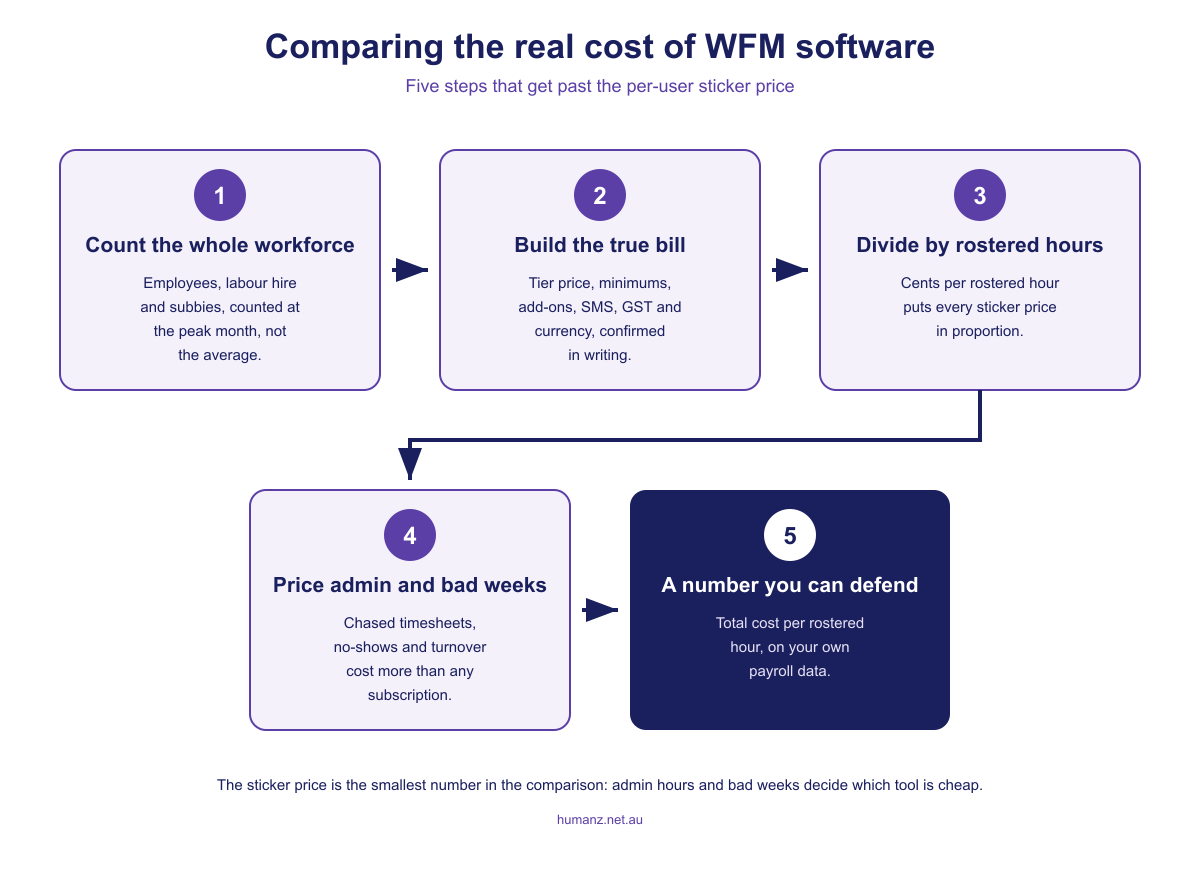
Per-user prices invite lazy comparison. Software at $8 looks like half the price of software at $16, and that framing has sold plenty of cheap tools to businesses that then paid the difference in admin wages. A better sequence looks like this.
- Count everyone the system has to cover. Employees, labour hire and subcontractors, at the peak month rather than the average. A tool that only holds employees leaves part of your roster, and its risk, in a spreadsheet.
- Build the real monthly figure for each shortlisted tool. Tier price, minimums, the add-ons you’d genuinely use, SMS, GST treatment and currency. Use the vendor’s page, then get it confirmed in writing.
- Divide by rostered hours, not heads. A crew working 45-hour weeks makes almost any subscription cost cents per rostered hour. Differences between tools are real but small at this level, which is exactly why the next two steps matter more.
- Price the admin hours. Hours spent building rosters, chasing timesheets and retyping into payroll are the biggest cost in this whole equation for most field businesses. Put your own numbers through the admin cost calculator rather than trusting anyone’s brochure, ours included.
- Price a bad week. A no-show on a client site, a worker turned around at the gate over an expired ticket, a good operator resigning after one roster stuff-up too many. The turnover cost calculator puts a defensible number on that last one. These events are where cheap tools get expensive.
You’ll notice there’s no ROI percentage anywhere in this article. That’s deliberate. Vendor ROI figures, including the ones commissioned from consulting firms, aren’t something you can audit, and your own payroll data run through your own assumptions beats all of them. If you want the feature-by-feature view to sit beside the cost view, our guide to the best workforce management software in Australia covers the same market from the other side.
When a quote is fair, and what to ask for
Quote-only pricing is reasonable when setup varies per business, and once compliance is involved it usually does. It’s less reasonable as a way of dodging comparison on a simple product. The test is whether the vendor can tell you, specifically, what about your business moves the price. “It depends” followed by detail is scoping. “It depends” followed by a discovery call and no numbers is theatre.
Humanz sits in the quote camp, so here’s the same transparency we’d ask of anyone else. The quote is built per business on the size of the workforce you’re rostering. Every business gets the full platform, all 14 modules, so there’s no tier ladder where the feature you need next year costs extra, and rollout support is scoped into the quote up front rather than surfacing later as professional services. The platform is built for the compliance-heavy end this article keeps pointing at. Credentials and inductions gate the roster, subcontractors sit beside employees with their own entities and insurances, timesheets prefill from rosters, and payroll flows both ways with Xero. The detail lives on the workforce management platform page.
Whoever you’re talking to, get these five answers in writing before you sign.
- The total first-year cost on your real headcount, implementation and training included
- What’s inside the quoted price and what becomes an add-on later
- The definition of a billable user, and what the invoice does in your quietest month
- Minimums, contract term, and what happens to the price at renewal
- Which setup tasks land on your staff, and roughly how many hours they’ll take
A vendor who answers those in writing has told you the price. A vendor who won’t has told you something too, mostly about what support will feel like after you’ve paid.
Frequently asked questions
How much does workforce management software cost per user in Australia?
Published Australian prices mostly sit between $6 and $15 per user per month as at early September 2026, depending on vendor and tier. Minimum monthly spends, paid add-ons, GST treatment and how the vendor defines a billable user all move the real figure. The compliance-heavy end of the market doesn’t publish prices at all and quotes per business instead.
What hidden costs should I check before signing up?
Check for minimum monthly spends, paid add-on modules, per-message SMS charges and whether prices are in Australian dollars, since at least one major vendor bills in US dollars. Ask how a billable user is defined, because active-user billing and higher-of-contracted-or-active billing can hold the invoice at peak levels. Then ask what implementation involves and how many of your own admin hours it will consume.
Why does workforce management software cost more per head for a small crew?
Minimum monthly spends set a floor under the per-user price. Deputy applies a $30 monthly minimum, RosterElf wants at least 10 seats on annual billing, and foundU charges $400 a month for anything under 25 employees, so a 20-person crew pays the minimum rather than 20 times the sticker. Always work out your actual invoice at your actual headcount before comparing anything.
Why do some workforce management vendors only offer quotes?
Setup effort varies widely between businesses once compliance is involved. Pay rules, credential and induction loads, subcontractor arrangements and payroll integration all differ, so vendors at that end scope the work before naming a figure. A quote is fair when the vendor can explain what about your business changes the price, and a warning sign when they can’t.
Is quote-based pricing a red flag?
Not on its own. Field and compliance platforms carry setup work that differs so much between businesses that one honest public number is hard to print. It becomes a red flag when the product is simple or the vendor can’t say what specifically drives your price. Always get the total first-year cost in writing on your real headcount.
Is there free workforce management software for small teams?
Yes, at the very small end. Connecteam publishes a free Small Business Plan covering up to 10 users, with its all-features claim qualified by a footnote, and it was the only genuinely free tier among the vendors we checked in September 2026. Free plans suit simple rostering for a handful of staff, but once compliance tracking, subcontractors or payroll integration matter, you’re into paid territory.
What’s the best way to compare a cheap rostering app with a full platform?
Compare total monthly cost per rostered hour rather than the per-user sticker, then weigh the admin hours each tool removes and the operational failures it prevents. For field businesses, chased timesheets, no-shows and workers turned away over expired credentials usually cost more than any subscription. The cheaper tool wins on the price tag and often loses on that maths.
Related articles
Ready to see Humanz on your own roster?
Free 30-minute walkthrough, we'll use your real crews, sites and shift patterns.