
 Login
Login 

Industries
Labour Hire Software: Managing a Compliant On-Hire Workforce in Australia
By Nanci · 20 July 2026 · Updated 6 October 2026

Labour hire software runs an on-hire workforce from one system: every worker’s licences, inductions and availability, the rosters that place them on host client sites, and the timesheets that pay the worker and bill the client.
Labour hire is a uniquely demanding workforce problem. You’re rostering people you employ onto sites you don’t control, under compliance obligations that vary by state, client and role. And the business that fills the order fastest usually wins it. A spreadsheet can limp along at 20 workers. At 100, across a dozen host clients, admin becomes the bottleneck that caps your growth.
That is the bottleneck the software removes. One system holds every worker’s compliance profile, availability and history, connected to the rosters that place them on client sites and the timesheets that get everyone paid and billed. This guide covers what that system needs to do, and the regulatory backdrop that makes it non-optional in Australia.
The regulatory reality for Australian labour hire
Labour hire is one of the most heavily regulated corners of Australian employment, and it’s tightening:
- Licensing schemes. Victoria, Queensland, South Australia and the ACT operate mandatory labour hire licensing, with the Victorian Labour Hire Authority and Queensland’s Labour Hire Licensing Scheme both requiring providers to demonstrate compliance with workplace, tax and superannuation obligations to hold a licence. Operating without one is priced accordingly. The Labour Hire Authority lists maximum penalties of $167,280 for an individual and $669,120 for a corporation providing labour hire services without a licence. South Australia’s scheme expanded to every industry in 2026. Hosts using unlicensed providers commit an offence of their own, and our state-by-state guide to the host employer’s obligations covers the registers, penalties and record-keeping from their side of the fence.
- Same job, same pay. Under the Fair Work Act’s Closing Loopholes reforms, regulated labour hire arrangement orders can require on-hire workers to be paid no less than employees of the host performing the same work. The Fair Work Commission’s regulated labour hire guidance covers how these orders operate.
- WHS shared duties. Both provider and host employer hold overlapping duties of care. The provider must verify the worker is inducted, licensed and fit for the specific site, every placement, every time. Safe Work Australia’s guidance on labour hire duties is explicit that “the host will look after it” is not a defence.
None of this is theoretical enforcement, either. In December 2023 the Supreme Court of Victoria handed A L Star Express Pty Ltd a total penalty of $617,916 for supplying workers to four horticulture businesses without a licence, which the Labour Hire Authority describes as the highest in Australian history for breaches of labour hire law.
Every one of those obligations is, in practice, a data problem. Who is qualified for what, where are they placed, what were they paid, and can you prove it. That’s exactly the problem labour hire software exists to solve, as one part of the wider workforce management platform.
What labour hire software needs to do
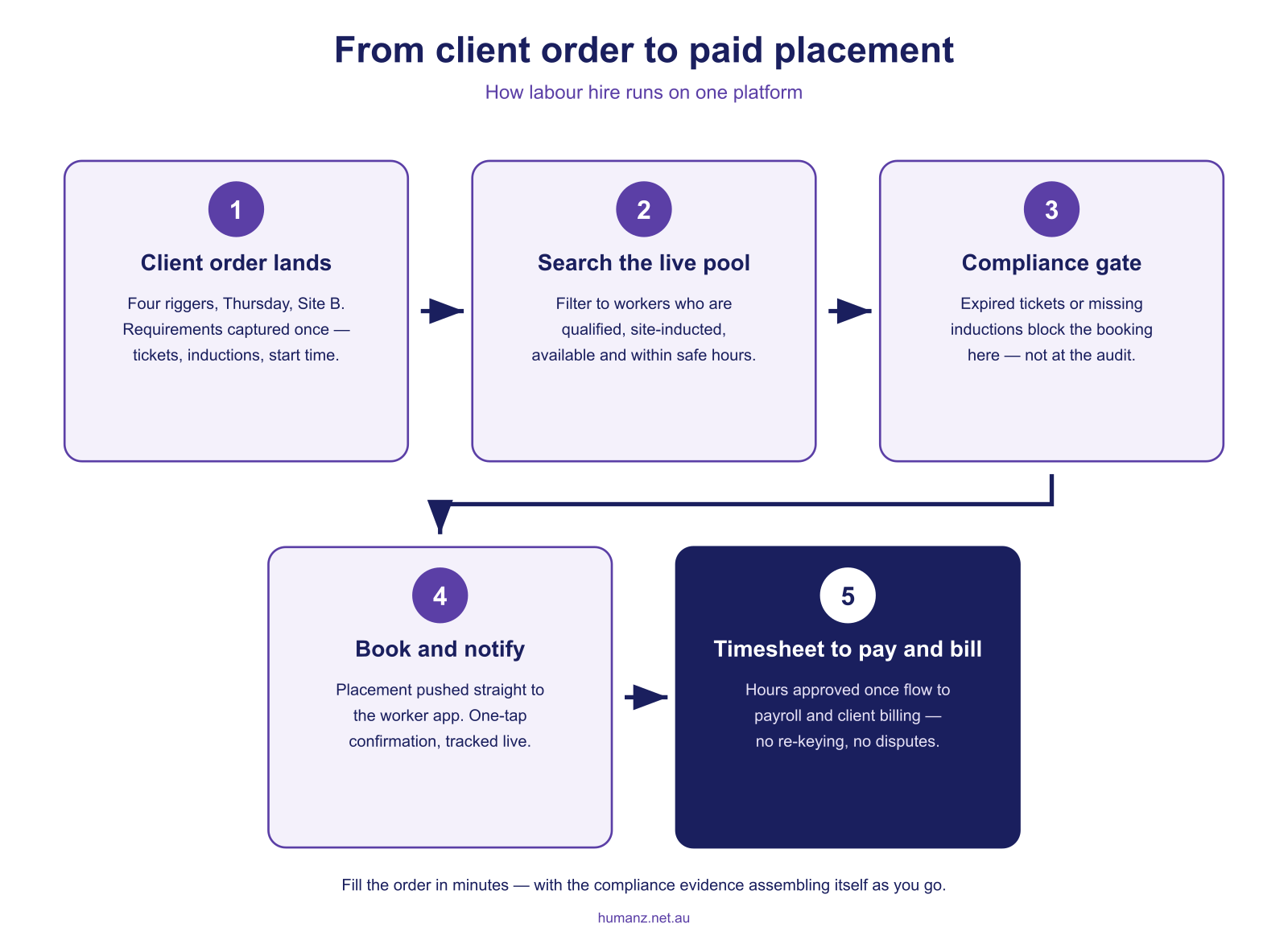
1. Hold a compliance profile per worker, and gate placements on it
Tickets, licences, inductions, medicals, visa status and right-to-work checks belong on the worker’s profile with expiry dates, not in a filing cabinet. The critical feature is the gate. A worker whose White Card has lapsed or whose site induction is missing can’t be rostered to that placement until it’s fixed. Our guide to qualification, induction and credential tracking covers how expiry alerts keep profiles current without anyone chasing spreadsheets.
2. Fill client orders from live availability
The core daily motion of labour hire is a client ringing for four riggers on Thursday. Good software answers in seconds (who’s qualified, inducted for that site, inside fatigue and safe-hours limits, not already placed) and books them with instant app notifications. That’s the difference between filling the order in 10 minutes and losing it in two hours of phone calls. It’s the same real-time rostering capability field businesses use internally, applied across client sites.
3. Confirm attendance before the client notices a gap
A no-show on a client site doesn’t just cost a shift. It costs the relationship. Seen/unseen and confirmation tracking on every placement means unconfirmed workers surface the day before, while there’s still time to backfill. Shift confirmation tracking is arguably worth more per incident in labour hire than in any other industry.
4. Capture time once for payroll and billing
Labour hire timesheets do double duty. They drive what workers are paid and what hosts are billed. Digital timesheets submitted from the worker’s phone, approved against the roster and flowing straight to payroll remove the double-keying that produces margin-eating errors. Timesheets done this way also create the audit trail your licence obligations assume you have.
5. Handle mixed engagement types
Most providers run a blend of casuals, permanents and ABN subcontractors for specialist trades, and an ABN worker carries a different profile again: insurances and licences rather than an employment record, as our buyer’s guide to contractor management software sets out. The platform should roster and track all of them in one view, with the right compliance profile per engagement type. If subbies are a big part of your book, see subcontractor management software for how that side works.
6. Report per client, per site, per worker
Fill rates by client, hours by site, compliance status across the pool, margin per placement. Workforce analytics turn the operational data you already generate into the reporting that licensing audits and client reviews ask for. Worker churn belongs in that reporting too. The free turnover cost calculator puts a number on what losing and replacing a worker from your pool costs.
Where generic rostering tools fall short
Hospitality-style rostering products assume one employer, one workplace and one award. Labour hire breaks all three assumptions: multiple client sites with separate induction regimes, workers moving between hosts week to week, and compliance evidence that has to survive a licensing audit. Bolting spreadsheets onto a café roster tool recreates the exact admin burden you were trying to remove. Our comparison of workforce rostering software in Australia explains the platform categories in more depth.

How Humanz handles labour hire
Humanz is an Australian-built platform used by labour hire and recruitment businesses supplying mining services, construction and industrial clients. If mining is your main market, our mining workforce management guide covers the site-credential and shutdown-crew side in depth. What the platform handles:
- Worker compliance profiles with tickets, inductions, medicals and expiry alerts
- Placement gates that flag non-compliant workers before they’re booked, not after
- Live availability search across the whole pool, filtered by qualification and site induction
- Multi-client scheduling with every host, site and placement in one real-time view
- Seen/unseen and confirmation tracking on every placement, with app notifications
- Digital timesheets approved against the roster and exported for payroll and billing
- Employees and subcontractors together, each with the right compliance profile
See how Humanz works for your labour hire business →
Frequently asked questions
What is labour hire software? Software that manages an on-hire workforce end to end, covering worker compliance profiles, availability, placement rostering across client sites, attendance confirmation, and timesheets that feed both payroll and client billing.
Does labour hire software help with licensing compliance? It maintains the evidence licensing schemes ask for: right-to-work checks, qualification records, placement history, hours and pay records, all timestamped and exportable. The licence obligations remain yours. The software makes them provable.
Does it handle client billing as well as payroll? It produces the approved hours both sides need rather than raising the invoices itself. Each timesheet is approved against the placement, so the same record drives what the worker is paid and what the host is billed, exported per client and site. Your accounting system still generates the actual invoice.
Can it manage ABN subcontractors alongside employed casuals? Yes. Employees, casuals and ABN subcontractors sit on the same roster, each with the compliance profile their engagement type needs. A subbie’s record tracks insurances and licences rather than employment details, and placement gates apply to all of them equally.
Does it replace our recruitment/ATS system? No, it takes over after the hire. Candidate sourcing stays in your ATS. Humanz manages the placed workforce across compliance, rostering, confirmation, time capture and reporting.
Can it handle workers placed with multiple hosts in the same week? Yes. Placements are scheduled per client and site, and safe-hours and fatigue checks run across the worker’s whole week rather than per host, so combined hours stay compliant.
How do workers see their placements? Through the mobile app. They see the site address, start time, host details and any placement notes, with push notifications when something changes and one-tap confirmation.
Can host clients see anything? Reporting can be shared per client (fill rates, hours and compliance status for their sites) without exposing the rest of your pool.
Related articles
Ready to see Humanz on your own roster?
Free 30-minute walkthrough, we'll use your real crews, sites and shift patterns.