



Connect your own systems with the Humanz API
Humanz has a public REST API that lets your other systems create and update people, projects, jobs, tasks, assets, positions and leave, and read shifts, timesheets and form submissions. Access uses a client ID and secret limited to your own IP addresses, with tokens that expire every 15 minutes.
What the API covers
| Area | What your systems can do |
|---|---|
| People | Create one person or many at once, read and list, update, deactivate |
| Invitations | Send, resend, list and cancel app invitations |
| Positions | Create, read, update and delete |
| Projects, tasks and jobs | Create, read and update |
| Assets | Create, read and update |
| Leave | Create and read |
| Shifts | Read, filtered by department, project, task, job, shift type, team, person or asset |
| Timesheets | Read, with the same filters |
| Form submissions | Read a report of submitted forms |
| Roster patterns and departments | Read |
Shifts and timesheets are read through the API rather than written: the roster and the approval of hours stay in Humanz, where the fatigue rules, compliance checks and approvals run.
What businesses use it for
- New starters from an HR or recruitment system. Create the person, give them a position and send the app invitation as soon as they are hired, without anyone keying them in twice.
- Hours into reporting or a payroll Humanz has no connector for. Pull timesheets by project, department or person into a data warehouse, BI tool or your own payroll import.
- Work from a job or project system. Create the projects, tasks and jobs your crews will be rostered to as they are won in the system where they start.
- Leavers. Deactivate a person when your HR system records their last day.
How access works
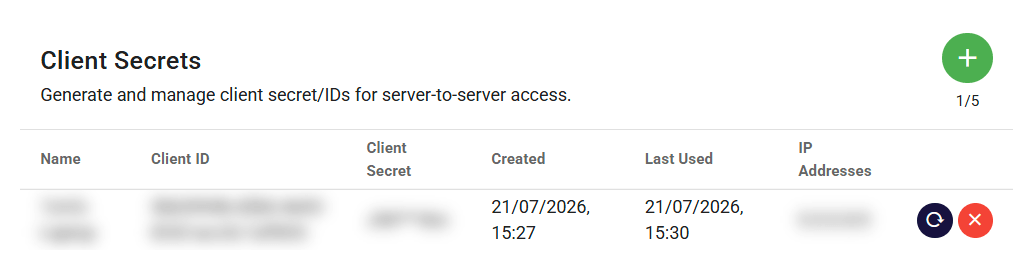
- API access is switched on for your business by Humanz. Then an administrator opens Business Profile → Integrations → API and creates a client ID and secret.
- Every secret must name the IP address range (a CIDR block) it can be used from, normally your office or your server's static address. Requests from anywhere else are refused.
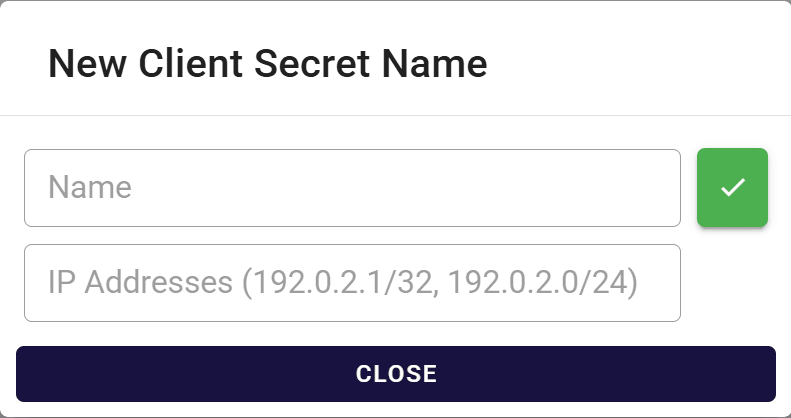
A new secret takes a name and the IP addresses it may be used from. - The secret is shown once. Keep it in a secrets manager; it can be rotated or deleted at any time from the same page, which also shows when each secret was last used.
- Your system exchanges the ID and secret for an access token, which lasts 15 minutes, and sends that token with each request.
The full interactive reference, with every field and a way to try requests, is available to customers with API access. The API is request and response: your system asks, Humanz answers.
When the API is not the answer
If you use Xero, the Xero integration already moves payroll timesheets and invoices without any code. For sign-in, there is Microsoft single sign-on. And if you would rather someone else built and maintained the connection, we can build it as a custom integration. To ask about API access, get in touch.
Frequently asked questions
Does Humanz have an API?
Yes. Humanz has a public REST API that lets your systems create and update people, projects, tasks, jobs, assets, positions and leave, and read shifts, timesheets, form submissions, roster patterns and departments. API access is switched on per business by Humanz.
How does the Humanz API authenticate?
An administrator creates a client ID and secret in Humanz, and each secret only works from the IP address range set for it. Your system exchanges the ID and secret for an access token that lasts 15 minutes and sends that token with each request.
Can I get timesheets out of Humanz through the API?
Yes. Timesheets can be read through the API and filtered by department, project, task, job, shift type, team, person or asset, which suits reporting tools and payroll systems that Humanz does not have a built-in connector for.
Can the API create shifts or approve timesheets?
No. Shifts and timesheets are read through the API, and rostering and timesheet approval stay in Humanz, where the fatigue rules, compliance checks and approvals apply.
Can new starters be created in Humanz from an HR system?
Yes. The API can create one person or many at once, assign a position and send the Humanz app invitation, and it can deactivate a person when they leave.
Ready to see Humanz on your own roster?
Free 30-minute walkthrough, we'll use your real crews, sites and shift patterns.