
 Login
Login 

Custom integrations, built the way we build our own
Xero and Microsoft come connected out of the box. For everything else your operation runs on, here's how an integration gets scoped, quoted, built and kept working.
One home for every piece of data
An integration done right means every type of data has exactly one home. Hours get captured once, at the face or the gate, and flow through to payroll without anyone retyping them. Worker records live where the rostering happens, so a ticket that expires shows up before the roster is built, not after the crew is standing at the gate.
That's how the platform already works. Our two-way Xero integration moves approved timesheets, contacts and invoices in both directions, and Microsoft single sign-on puts crew logins under the IT accounts your business already controls. Both are covered on the integrations page. This page is about everything else.
What custom work can cover
No two stacks look the same, and we won't pretend to have a connector for everything on day one. What we can tell you is where the requests usually land.
- Payroll and accounting systems beyond Xero
- ERP and project controls platforms
- Site access and gatehouse systems
- Induction and LMS providers
- Client reporting feeds, where the principal wants your data in their format
Those are categories, not a list of finished connectors. If your system doesn't fit one, that doesn't rule it out. If it has an API, it's a conversation worth having.
How a custom build runs
Every build follows the same five steps. You'll know what's moving, which direction it moves and who owns it before anyone writes a line of code.
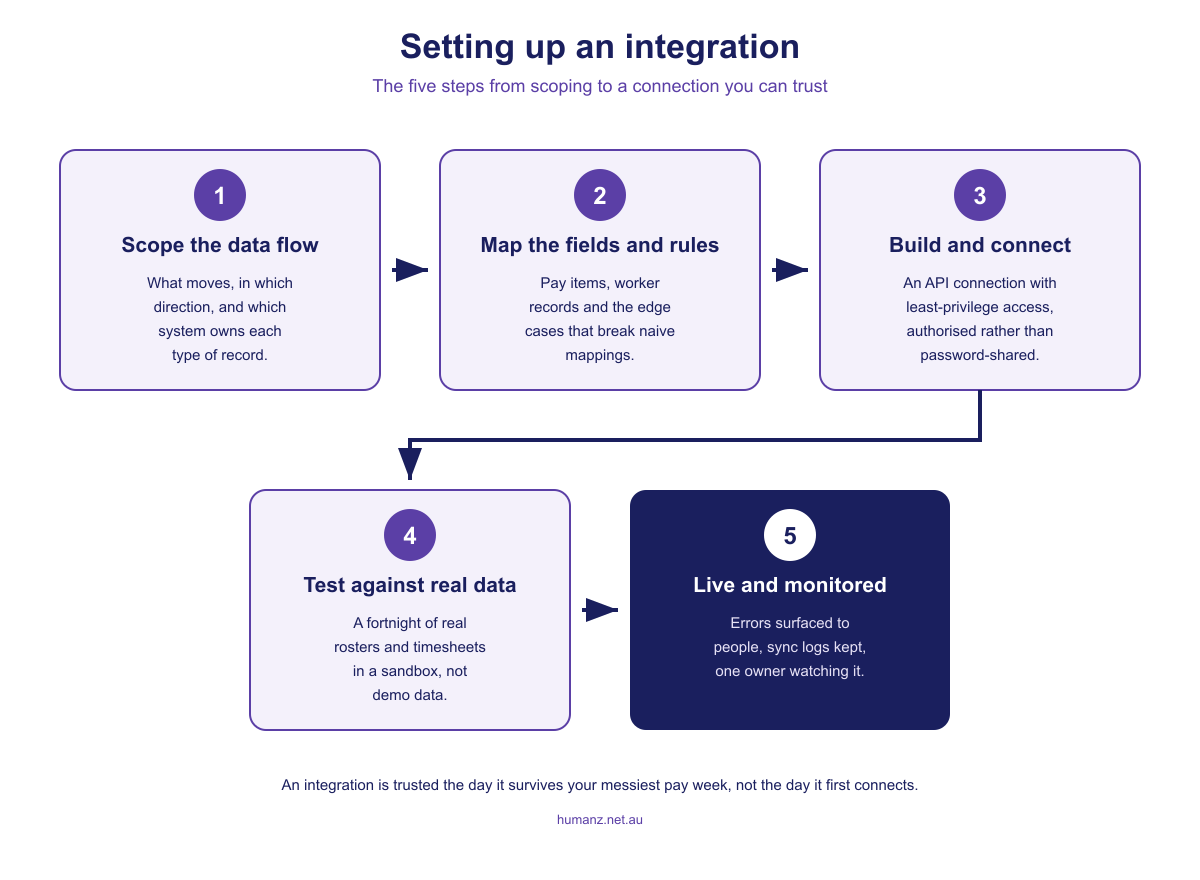
- Scope the data flow. Work out what moves between the systems, which direction it travels, and which system owns each type of data. Most integration grief traces back to skipping this step.
- Map the fields and rules. Pay items, worker records, allowances, and the edge cases that only show up on a wet weekend. The mapping is agreed on paper before it exists in code.
- Build and connect. The connection is built by the Humanz team using each system's own authentication, with access limited to the data the integration actually needs.
- Test against real data. A sandbox run on a fortnight of your real rosters and timesheets, not tidy demo data. If it survives your messiest pay week, it'll survive anything.
- Go live and monitor. The integration goes live with sync logs, error visibility and a named owner. When something fails, the people using it can see it and know who fixes it.
What we hold every integration to
Whether an integration ships with the platform or gets built for one customer, the same rules apply. They're the difference between a connection you forget about because it works and one you babysit every pay run.
- Two-way beats export. A file export tells you what was true when someone last remembered to run it. A live connection keeps both systems current without anyone remembering anything.
- One owner per data type. Every other system reads from the owner. The moment two systems both think they own a record, you're reconciling instead of working.
- Errors surface where people work. A failed sync that lands in a log file gets found at pay run time. One that shows up on screen gets fixed the same day.
- Least-privilege access. Connections authenticate with OAuth and touch only the data they need. Our Xero integration can't see bank transactions, and that's by design.
- Test with your messiest pay week. Demo data always passes. A public holiday mid-swing, someone on two sites in one day, a backdated allowance. That's the test that counts.
- Parallel runs end. Keeping the old system going beside the new one makes sense for a pay cycle or two. Indefinitely, it means two systems of record and double the reconciliation.
On the roadmap, or built for you
Every Humanz integration, including the Xero connection, is built by the same team that builds the platform, and a custom build for you goes through the same door. It isn't a bolt-on from a third party that quietly breaks the next time the platform moves.
Where your request goes depends on where it sits. If the integration you need is already on our roadmap, it arrives as part of the platform and the conversation is about timing. If it isn't, we can scope and build it as a custom integration at your cost. The work is quoted up front, after a scoping conversation, so you make the call with the number in front of you.
Frequently asked questions
What counts as a custom integration?
Anything outside what ships with the platform. Xero and Microsoft single sign-on are standard, so connecting either is setup, not custom work. A custom integration is a connection scoped and built specifically for your stack, such as a feed into a client's reporting system or a link to the gatehouse platform on one of your sites.
What integrations come standard with Humanz?
The two-way Xero integration and Microsoft single sign-on ship with the platform, so connecting either is setup rather than custom work. Everything else is either on the roadmap, arriving as part of the platform, or scoped and quoted as a custom build for your stack.
Can Humanz integrate with a system it has no connector for?
That is exactly what custom integrations are for. If the other system exposes an API, there is usually a workable path, and the scoping conversation establishes what can move, in which direction and at what cost. The two-way Xero connection runs in production on the same foundation a custom build would use.
Who pays for a custom integration?
If the integration you need is already on the Humanz roadmap, it arrives as part of the platform and there's nothing extra to pay. If it isn't, we build it at your cost. We scope the work first and quote it up front, so you know the price before you commit to anything.
How long does a custom integration take?
It depends on the scope, and we won't pretend otherwise. A one-way feed into a reporting system is a much smaller job than a two-way payroll connection with complex pay rules. The scoping conversation is where you get an honest timeframe for your specific build.
Does every integration have to be two-way?
No. A one-way feed, like pushing your data into a client's reporting format, is a legitimate and smaller build. Where both systems hold the same data, though, a two-way connection keeps them current without anyone remembering to run an export, so that's the default we push for.
What happens if the system on the other end changes?
Systems update their APIs, and a good integration expects that. Ours are monitored, so a failed sync is visible rather than silent, and go-live always includes a named owner, so when something changes you know who picks it up.
Talk through your stack
Tell us what your operation runs on and you'll get a straight answer: already connected, on the roadmap, or a custom build we can scope with you.
Ready to see Humanz on your own roster?
Free 30-minute walkthrough, we'll use your real crews, sites and shift patterns.