


Sign in to Humanz with Microsoft
Humanz supports Microsoft single sign-on (Microsoft Entra ID) on both the web app and the mobile app. Staff on your company's email domains sign in with their Microsoft work account and no separate Humanz password, so when IT disables someone's Microsoft account, their route into Humanz closes too.
How it works
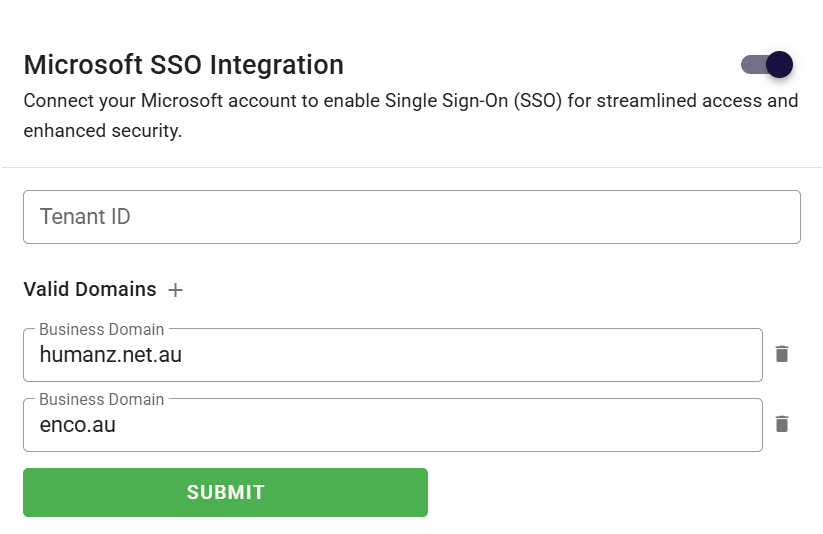
- An administrator turns on Microsoft sign-on from Integrations in Humanz and lists your business email domains, for example yourcompany.com.au. A business with several domains lists them all.
- Optionally, you add your Microsoft tenant ID. Humanz then accepts sign-ins from your organisation's Microsoft tenant only, not from any other organisation's.
- Staff choose to sign in with Microsoft on the web or in the mobile app, authenticate with Microsoft (including whatever multi-factor authentication your IT team requires), and land in Humanz.
The rules Humanz applies
- Your domains must use Microsoft. Once it is on, anyone whose email is on one of your listed domains cannot sign in with a Humanz password at all. There is no side door for IT to forget about.
- The person must already be in Humanz. Signing in with Microsoft does not create an account. The Microsoft account's email has to match a person your business has already set up, so the roster and the compliance records stay under your control.
- Everyone else keeps a password. Subcontractors, labour hire and short-term crews on their own email domains sign in with a Humanz password, because they have no account in your Microsoft tenant and should not need one. Both groups work on the same roster.

Why it matters for field crews
Many workforce apps offer single sign-on on the web app and not the mobile app, which leaves the field crew, most of the people who use it, on separate passwords. In Humanz it covers both. That means no password reset call at 5am in a car park, and one place to switch off access when someone leaves. Our guide to Microsoft SSO for workforce software covers what single sign-on solves, what it does not, and the questions to ask any vendor.
Setting it up
Single sign-on is switched on per business. If your IT team wants it, get in touch and we will turn it on, then your administrator adds the domains and tenant ID from the Integrations panel. For the other systems Humanz connects to, see all integrations.
Frequently asked questions
Does Humanz support Microsoft single sign-on?
Yes. Humanz supports Microsoft single sign-on (Microsoft Entra ID) on both the web app and the mobile app. Staff whose email is on one of the business's listed domains sign in with their Microsoft work account instead of a Humanz password.
Does Microsoft sign-on work in the Humanz mobile app?
Yes. Microsoft single sign-on covers the Humanz mobile app as well as the web app, so field crews sign in the same way as office staff and do not keep a separate password for Humanz.
Can subcontractors still sign in if we use Microsoft sign-on?
Yes. Only people whose email is on one of your listed business domains must use Microsoft. Subcontractors, labour hire and others on their own email domains sign in with a Humanz password and work on the same roster.
Can Humanz restrict sign-in to our own Microsoft tenant?
Yes. When an administrator adds the organisation's Microsoft tenant ID, Humanz accepts Microsoft sign-ins from that tenant only. Without it, Humanz still checks that the person's email matches someone already set up in the business and is on one of the business's listed domains.
What happens to Humanz access when someone's Microsoft account is disabled?
They can no longer sign in to Humanz. People on your listed domains cannot use a Humanz password, so access depends on their Microsoft account, and disabling that account closes the route into Humanz as well.
Ready to see Humanz on your own roster?
Free 30-minute walkthrough, we'll use your real crews, sites and shift patterns.