
 Login
Login 

Guides
In-app messaging for field teams: why phone calls aren't enough
By Richard Lomen · 8 June 2026 · Updated 3 September 2026

If you’re managing a field team in Australia, your communication setup probably looks something like this: phone calls, text messages, a WhatsApp group that’s half-useful and half-chaos, and the occasional email nobody reads until it’s too late.
It works until it doesn’t. A missed call about a site change sends workers to the wrong location. A safety update gets buried under 40 replies about Friday’s roster. Someone passes on a roster change verbally and two workers never get the memo.
For construction and trades businesses running crews across multiple sites, informal channels carry real operational risk. Messaging is one piece of the wider construction workforce management problem, and it’s the piece most businesses leave to whoever happens to have the group chat open. This article covers why purpose-built in-app messaging for field teams is a better fit, and what it should do.
The problem with WhatsApp and phone calls for field team management
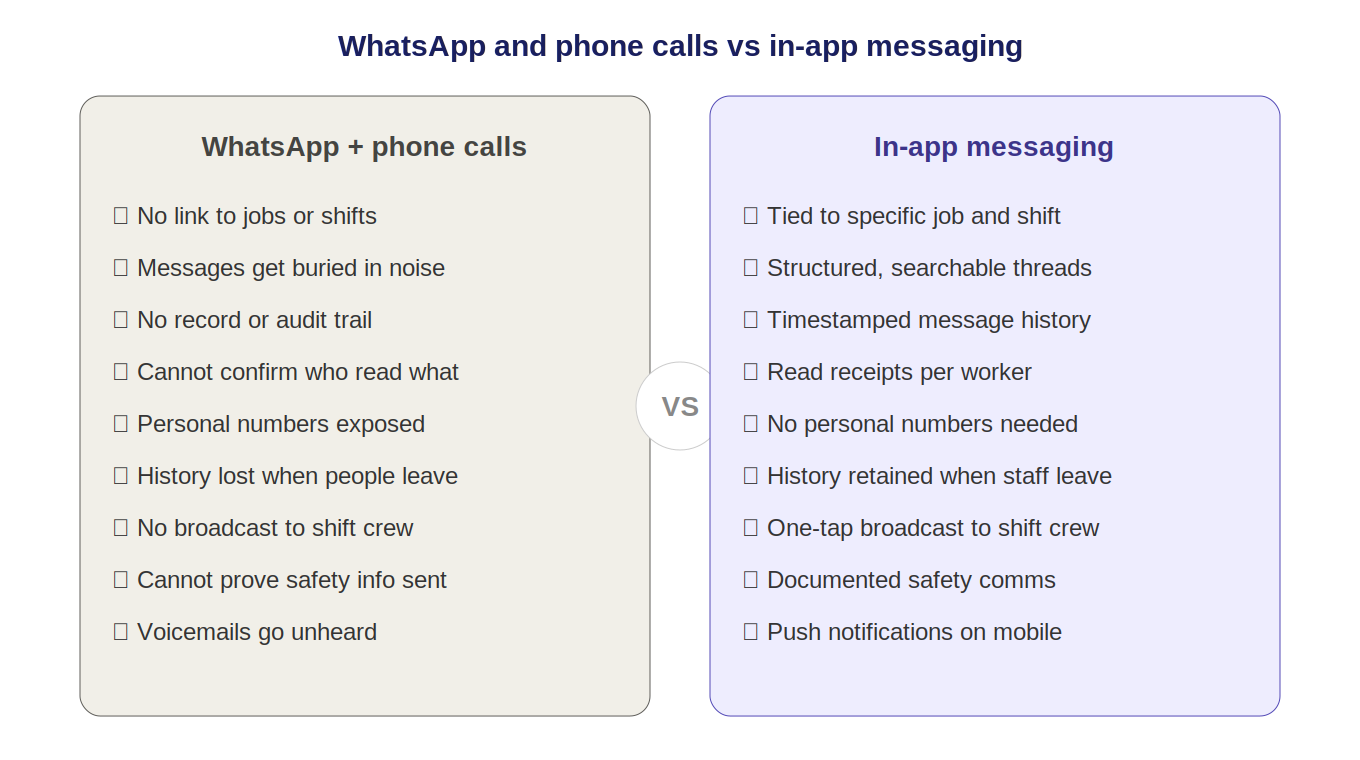
WhatsApp and phone calls aren’t bad tools. They were never designed for workforce management, though. Here’s where they break down.
No connection to jobs or rosters
A WhatsApp group is a flat list of messages. There’s no link between a message and a specific job, shift or worker. When you send a site update, there’s no way to know whether the right people saw it, let alone understood it.
No record or audit trail
Verbal communications and WhatsApp messages aren’t stored in a way that’s useful for a business. If a dispute ever arises about what was communicated (a safety instruction, a roster change, a site condition) you’re relying on screenshots and memory.
Group chat chaos at scale
A WhatsApp group with 15 workers generates noise. Important messages get lost, workers mute notifications, and banter sits in the same thread as work instructions. It’s also where workers quietly arrange to cover for each other, which is why swapping shifts through the roster rather than the thread keeps the qualification and fatigue checks switched on. Sooner or later the group stops being reliable as a primary channel.
No confirmation of receipt
A phone call that goes to voicemail might as well not have happened. A WhatsApp message has a read receipt, but you can’t confirm understanding or action. Critical safety or operational information needs more than a blue tick.
Personal phone numbers exposed
Using WhatsApp for work means sharing personal mobile numbers across the whole team, including subcontractors. As the business grows and workers turn over, that becomes a privacy and data management problem. If you run subcontractors as well, our page on subcontractor management software Australia covers keeping contractor communications structured and separate from your direct workforce.
What good in-app messaging looks like for field teams
Purpose-built messaging for workforce management isn’t just a chat tool. It’s communication tied to the context of the job.
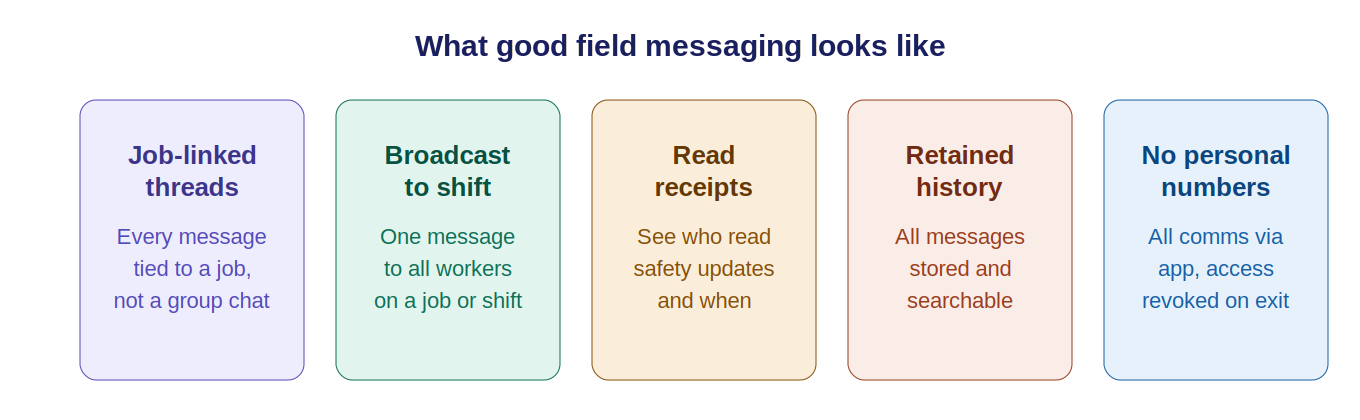
Job-linked messaging
Messages should attach to a specific job, shift or worker rather than floating in a general thread. When a supervisor flags a site condition, the note sits against the relevant job where anyone working that shift can see it, and it stays visible as new messages come in.
Broadcast notifications
For critical updates (a site closure, a safety alert, a roster change) supervisors need to reach every worker on a job or shift in one action. Not by ringing each person. One broadcast, confirmed receipt.
Read receipts and acknowledgements
Knowing a message was sent isn’t enough. For safety-critical communications, the system should confirm workers have read and acknowledged it, which gives you a documented record that the information went out.
Separation of work and personal communications
Workers and managers should be able to communicate through the workforce app without sharing personal phone numbers. When someone leaves the business, their access ends. Their personal number doesn’t sit in a shared group forever.
Retained message history
All messages should be stored and searchable. If a safety instruction went out, that record should still exist years later, not vanish when someone leaves the WhatsApp group.
The compliance angle
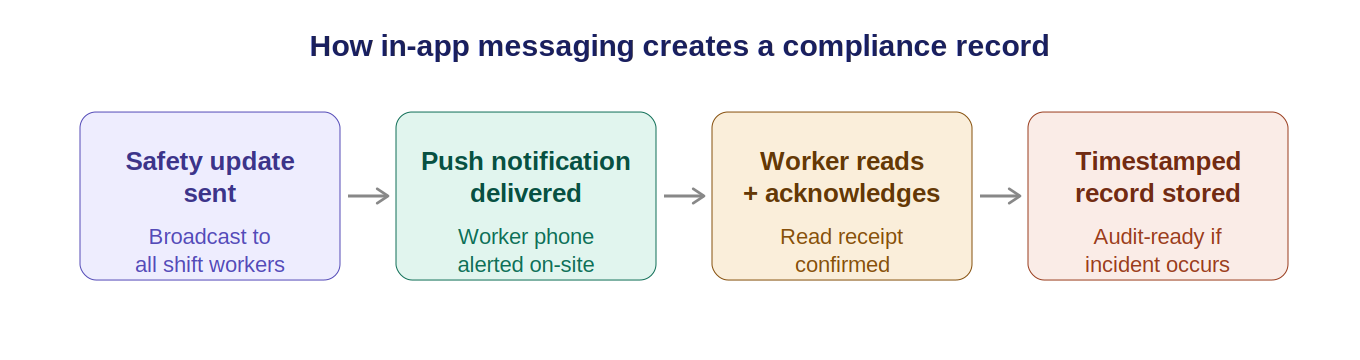
Safe Work Australia and the model WHS Act require that workers are informed about workplace hazards and safe work procedures. When safety communications happen via WhatsApp or phone calls, there’s no reliable way to demonstrate a worker was informed, which matters the day an incident investigation starts.
In-app messaging that retains a timestamped, searchable record of what was communicated, when, and to whom is a meaningful step toward demonstrable WHS compliance. It’s not a substitute for training and induction, but it fills the gap between formal documentation and day-to-day operational communication. For a full picture of what site compliance should cover, see our construction site compliance checklist.
No incident report ever says “the message didn’t get through”, but plenty of them start there. The quality of day-to-day crew communication is a safety issue as much as a productivity one, and for anyone working alone it is the safety system: our guide to lone worker check-ins sets out the procedure.
How Humanz messaging works for field teams
Humanz is a field team communication app inside a full workforce management platform. Messaging shares a system with rostering, timesheets and compliance, so every conversation stays connected to the job context.
Key messaging features in Humanz:
- Job-linked messages tied to specific jobs and shifts, not a general chat thread
- Broadcast notifications that send an update to every worker on a job or shift in one action
- Push notifications so workers get alerts even when the app is in the background
- Read receipts showing who has read a message and when
- No personal number sharing, because everything runs through the app rather than personal mobiles
- Retained history, with every message stored and accessible for reference or compliance
For businesses running on phone calls and WhatsApp groups today, the move to structured in-app messaging typically cuts the number of calls a supervisor makes each day. It also ends the familiar scene of workers turning up uninformed about a site change.
Messaging also connects to timesheets. When workers receive a shift update or roster change in-app, it flows through to the right timesheet period automatically. Our guide on digital timesheets for tradies explains how that connection works.
Frequently asked questions
Is in-app messaging secure?
Messages sent through a workforce management platform like Humanz are stored on secure servers, not on workers’ personal devices. Access is controlled by the platform. When a worker or contractor leaves the business, their access is revoked and they can no longer see job communications.
Can workers message supervisors directly, or only the other way around?
In Humanz, messaging is two-way. Workers can start conversations with supervisors, and supervisors can message individuals or broadcast to groups. The structure keeps job-related communication organised rather than siloed in one direction.
How do I move a crew off WhatsApp without a revolt?
Make the app the only place work information is authoritative, then stop duplicating it anywhere else. Rosters, site changes and safety alerts go through the app from a set date, supervisors stop answering the old group, and workers follow the information. Running both channels in parallel for months is what kills these transitions, because everyone keeps watching the old one.
Can in-app messages be used as evidence in a WHS investigation?
They can. A timestamped message with read receipts shows what was communicated, when, and who saw it, which is far stronger than anyone’s memory of a verbal briefing. Messaging records complement formal induction and training documentation rather than replacing it, but they cover the ground where most disputes actually start: the day-to-day instructions between formal documents.
What happens if a worker doesn’t have the app installed yet?
Most platforms, including Humanz, can send SMS notifications to workers who haven’t yet installed or logged into the app. This is useful during onboarding and for casual workers who haven’t been set up in the system yet.
Does this replace email?
For day-to-day field communications (site updates, shift changes, safety alerts) yes. In-app messaging beats email for field workers who are rarely at a desk. Formal documentation such as contracts and formal notices still warrants email or written correspondence.
How is this different from just using a walkie-talkie or two-way radio?
Two-way radios are useful for real-time voice on a single site. In-app messaging does a different job. It covers asynchronous communication across multiple sites, with a written record, read receipts and a link to job context. They’re complementary tools rather than alternatives.
Related articles
Ready to see Humanz on your own roster?
Free 30-minute walkthrough, we'll use your real crews, sites and shift patterns.